Page | 7 Ascento 37 Export St Lytton QLD PH: 1800 807 604 | VSRM Inverter Contant Pressure Pumps | V2016.12
3.9 Operating Instructions
3.9.1 Check before Operation
1. Check the electrical and plumbing installation comply with these instructions, and also complies with
applicable electrical and plumbing regulations; it is the installer’s responsibility to check compliance as we
have no control over the installation.
2. Check whether the pressure transducer is connected to the right port on the 5-Way Valve – see 3.7
3. Check whether the product is firmly fixed to a level base that cannot move.
4. Check that it is in a well-drained and well-ventilated area, and protected from the weather and from children
and pets.
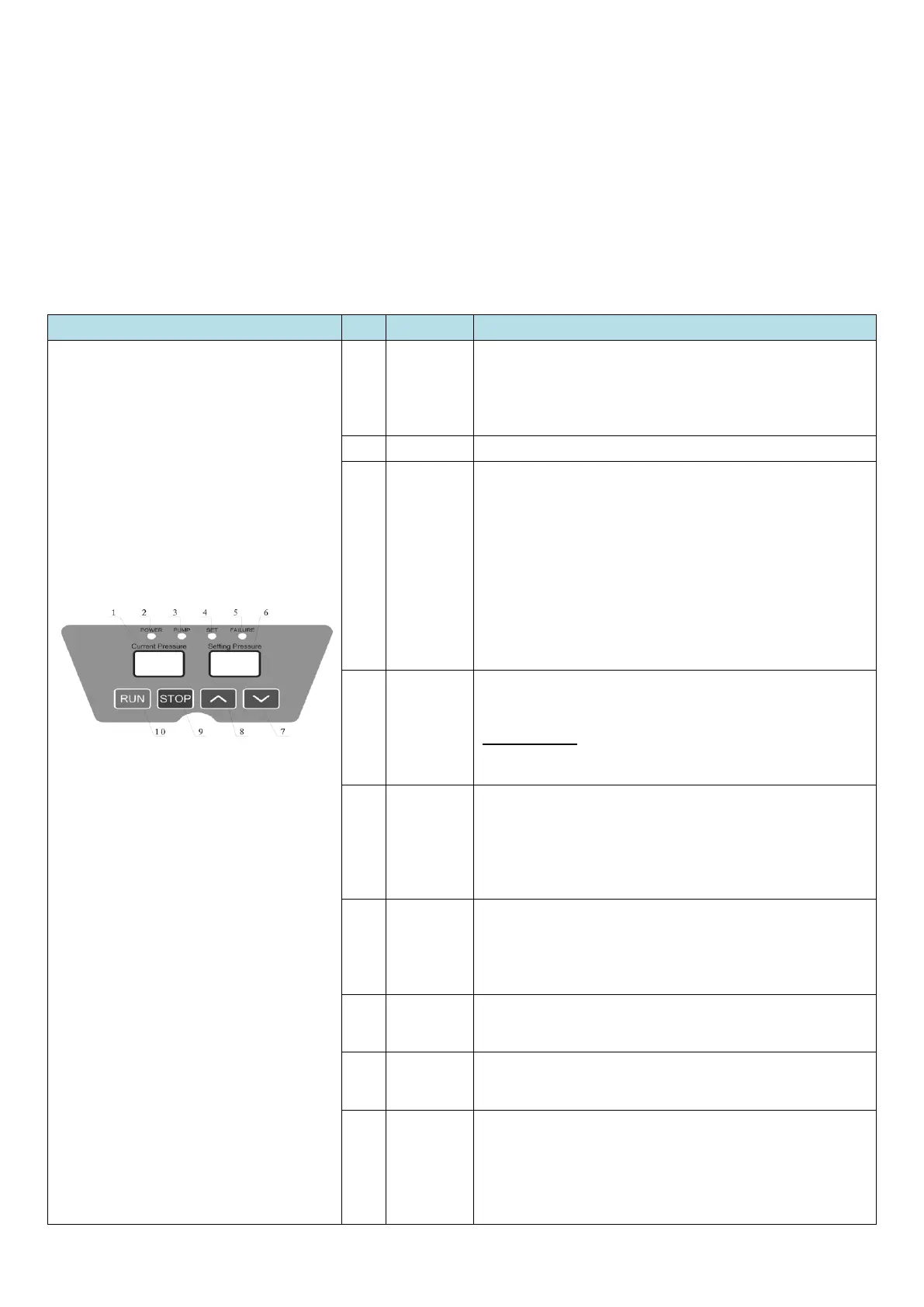
3.9.2 Button and Function Instruction
Displays the current pressure in the pumpset and discharge
pipework. This is not user-adjustable. The “Setting
Pressure” is adjusted by the user.
Unit: bar
Indicator lights up when the power is connected.
1) Light flashing quickly: the inverter is adjusting the speed
of the pump
2) Light flashing slowly: Pump is operating at constant speed
(constant pressure) or there is a water shortage,
3) Light constantly on: Pump has automatically stopped
4) Light off: Manual stop or power is disconnected.
NOTE!! – some models have Pump1 & Pump2 light – ignore
the Pump2 lights as these are not used.
The light flashes while setting the working pressure
IMPORTANT!!! If the pressure is set too high the pump will
run continuously which will cost you a lot of money in
wasted power, and void the warranty.
This light blinks when there is a water shortage, the pump
will attempt to restart automatically within a set period. The
interval times are: 8sec, 1min, 10min, 30min, 1hr, 2hr, then
2hourly ongoing. If the tank will be dry for days, turn the
pump power off.
Displays the pressure that the pump is set to operate at, this
display will change when the user/installer changes the
operating pressure – refer below.
Unit: bar.
Press once, the pressure decrease 0.1bar. Press and hold and
the pressure will decrease quickly.
Press once, the pressure increase 0.1bar. Press and hold and
the pressure will increase quickly.
Stops the pump manually, also resets the Inverter when it is
in the “Failure” mode, back to normal running.
However if there is a water shortage, it will revert to Failure
again.


 To Next Page
 Loading...