28
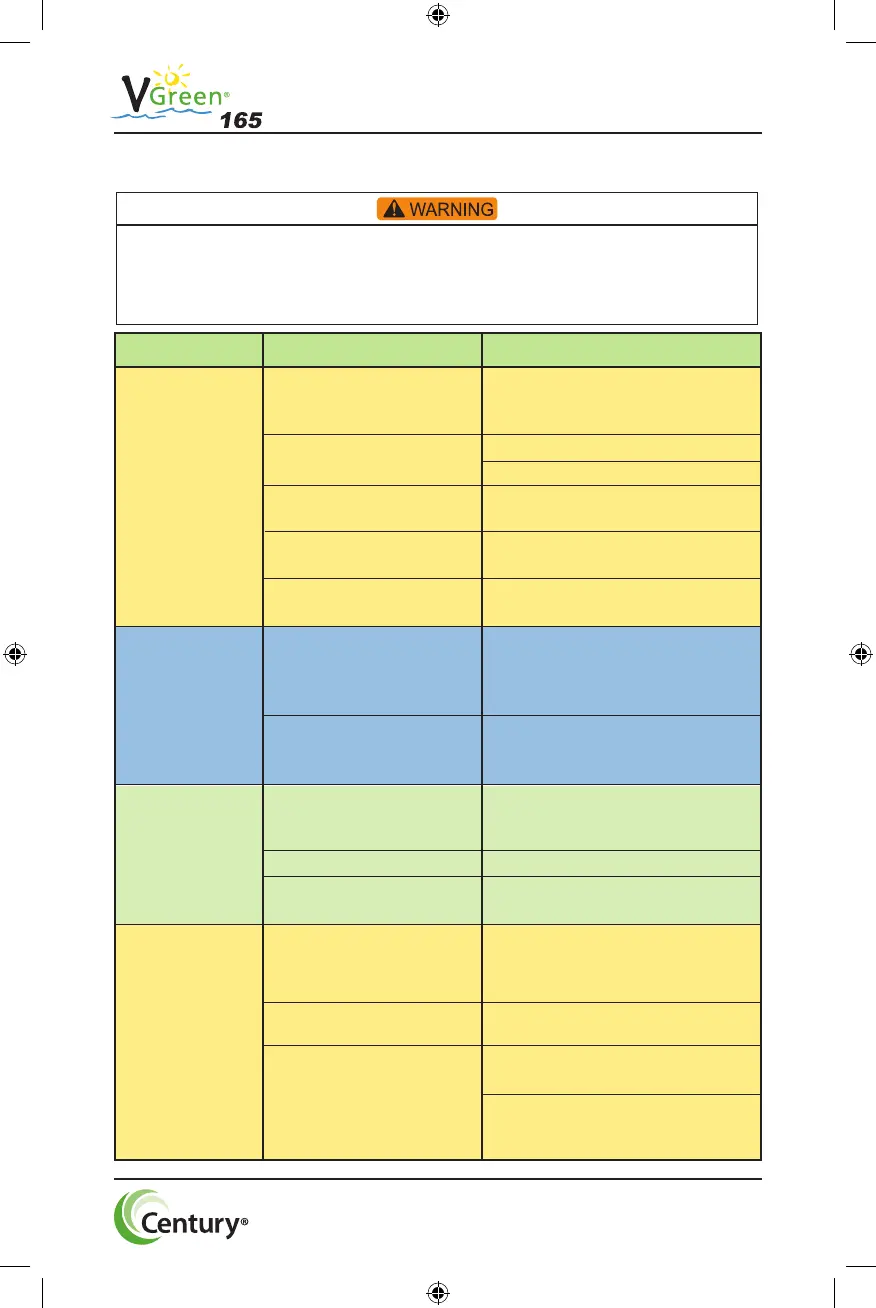
Verify that the DIP switches of SW100 un-
der the controller terminal box cover
are
in the correct position. Refer to section 10.
Check that back of VGreen 165 is free
from dirt and debris. Use compressed air
to clean.
Check that VGreen 165 is spinning by
looking at fan on back of VGreen165. If
so, check that pump impeller is correctly
installed.
Replace fuse, reset breaker/GFI.
Check connections at J201 connector.
Check that back of VGreen 165 is free
from dirt and debris. Use compressed air
to clean.
Clean strainer basket.
Check plumbing connections and verify
they are tight.
Check if the VGreen 165 can be rotated
by hand and remove any blockage.
Tighten mains wire connections.
Controller DIP switches not
congured properly
Debris in contact with fan
Impeller is loose
Mains Voltage is not present
Over temperature FAULT
Debris in strainer basket
Air leak
User Interface is not connected
Over current FAULT
Loose mounting
Clogged or restricted plumbing
VGreen 165 shaft is locked
VGreen 165 shaft is damaged
VGreen 165 will automatically restart after
one (1) minute.
Check that mounting bolts of VGreen 165
and pump are tight.
Check for blockage in strainer or suction
side piping.
Checked for blockage in discharge piping
including partially closed valve or dirty
pool lter.
Replace VGreen 165.
VGreen 165
FAILS
TO START
VGreen 165
RUNS
THEN
STOPS
VGreen 165
IS
NOISY
VGreen 165
RUNS,
BUT NO
FLOW
14 Troubleshooting Guide
Symptom Possible Causes Potential Solutions
Diagnosing certain symptoms may require close interaction with, or in close proximity to,
components that are energized with electricity. Contact with electricity can cause death,
personal injury, or property damage. When trouble shooting the VGreen 165, diagnostics
involving electricity should be cared for by a licensed professional.
10019878-001-001 _V-Green165 UM_7-30-19.indd 30 8/5/2019 4:27:00 PM



 To Next Page