6
3.2 Quick Start Guide (User-denedcustomschedule)
A VGreen 165 user can set the program DURATION and SPEED for
STEP 1, STEP 2, STEP 3 & OVERRIDE keys.
NOTE: VGreen 165 must be Stopped (Press STOP Key) for program-
ming DURATION and SPEED of the STEP 1, STEP 2, and STEP 3
keys. OVERRIDE DURATION and SPEED can be programmed when
the VGreen 165 is either stopped or running.
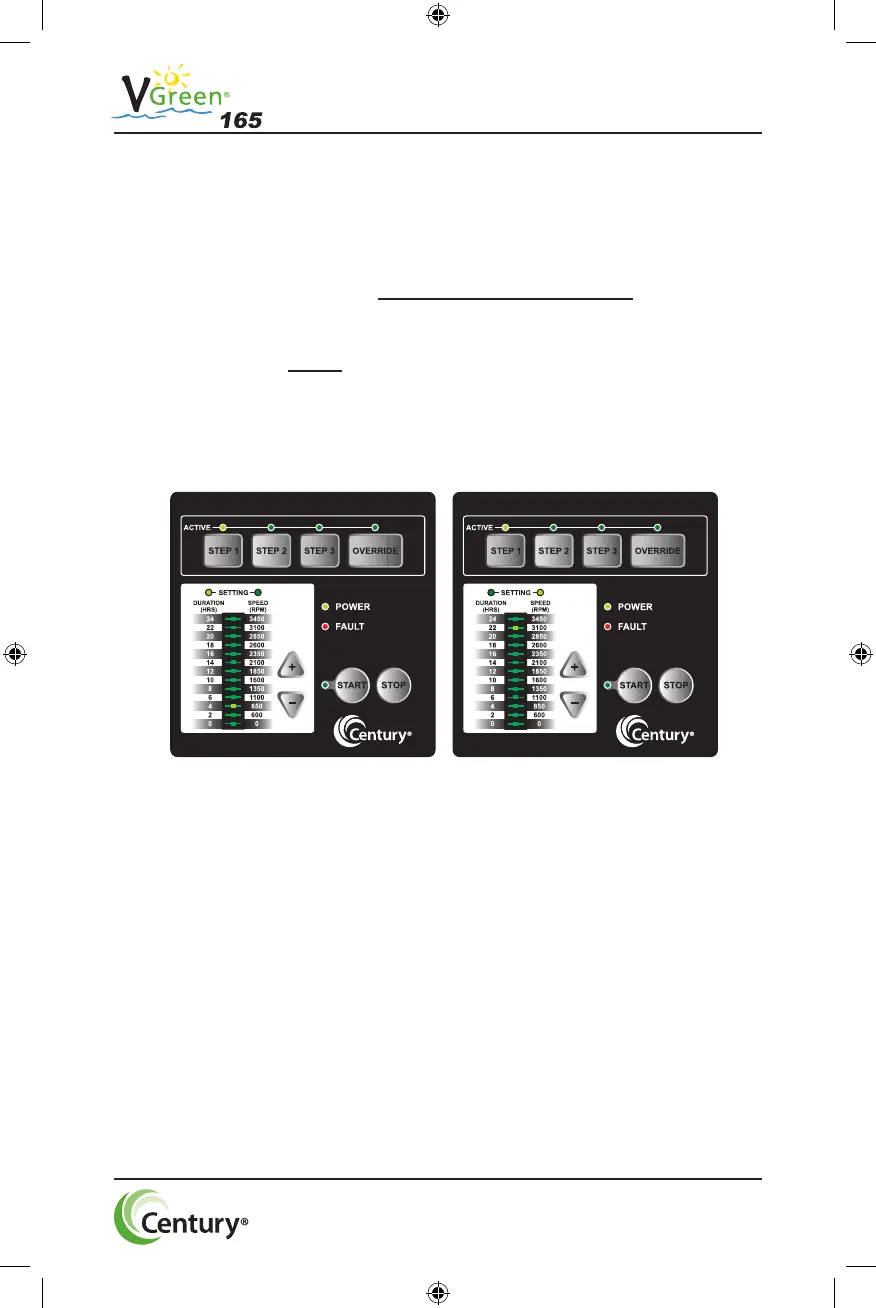
Press the STEP 1 key. The STEP 1 button and DURATION setting
LEDs will illuminate. The bar graph will show default DURATION for
STEP 1.
1. Press UP (+) or DOWN (-) arrows to change the DURATION
2. Press the STEP 1 key again to change the SPEED setting.
The SPEED setting LED will illuminate. The bar graph will
show default SPEED for STEP 1.
3. Press UP (+) or DOWN (-) arrows to change the SPEED.
4. Press any STEP or OVERRIDE key to save the DURATION
and SPEED settings for STEP 1. If the user decides not to
save the settings, pressing the STOP key will revert back to the
previously stored setting.
10019878-001-001 _V-Green165 UM_7-30-19.indd 8 8/5/2019 4:26:55 PM




 To Next Page