Area
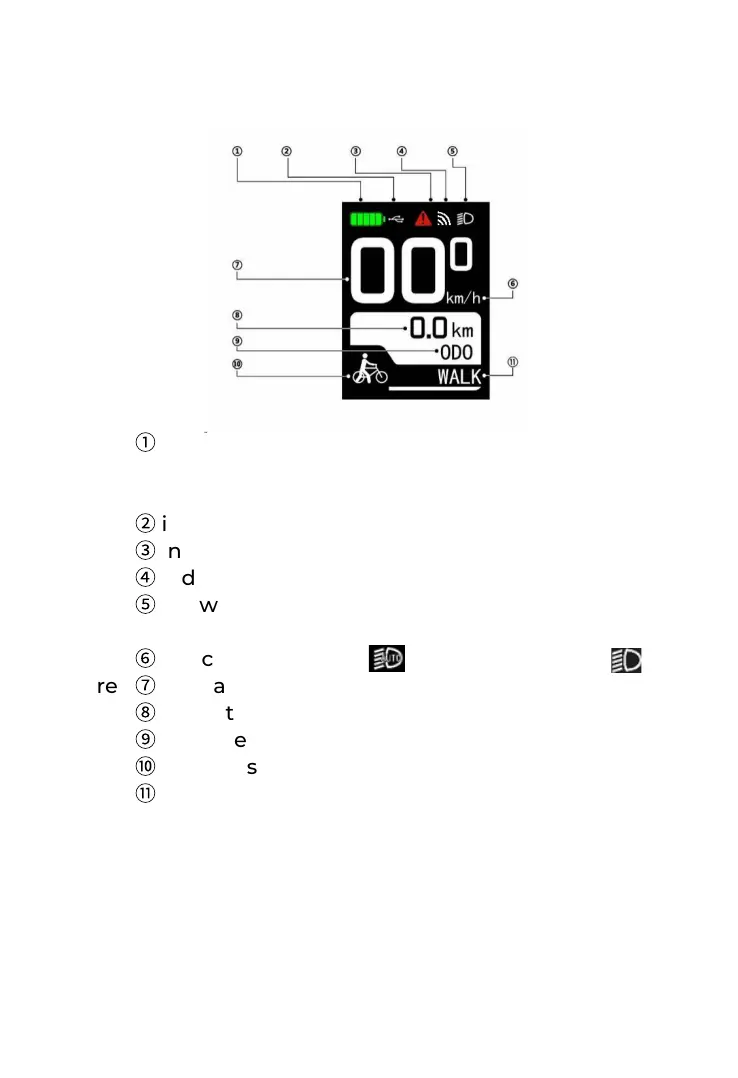
①
indicates the current remaining battery level.
It is the
mode of battery display grid in the figure.
Area
②
indicates USB charging.
Area
③
indicates the fault reminds.
Area
④
indicates WiFi.
Area
⑤
shows the headlight status indication,
including automatic mode and manual mode .
Area
⑥
indicates the speed unit.
Area
⑦
indicates the real time speed value.
Area
⑧
indicates the content of ODO mileage data.
Area
⑨
indicates the mode of ODO mileage.
Area
⑩
indicates the status of assist walk.
Area
⑪
indicates the current gear level.
5. Normal operation
5.1 Start/ stop
◆ The instrument has been turned on when the
battery has output. The battery will be closed by
keeping the battery button pressed and meanwhile,
the instrument will be shut off automatically and the
system will be turned off.
4. Normal display areas



 To Next Page