en
48
Installation Indications, functions and options MessagesCommissioningOperation and function
4 Operation and function
4.1 Buttons
1
3
2
backwards (-)
forwards (+)
Ⓢ (selection /
adjustment mode)
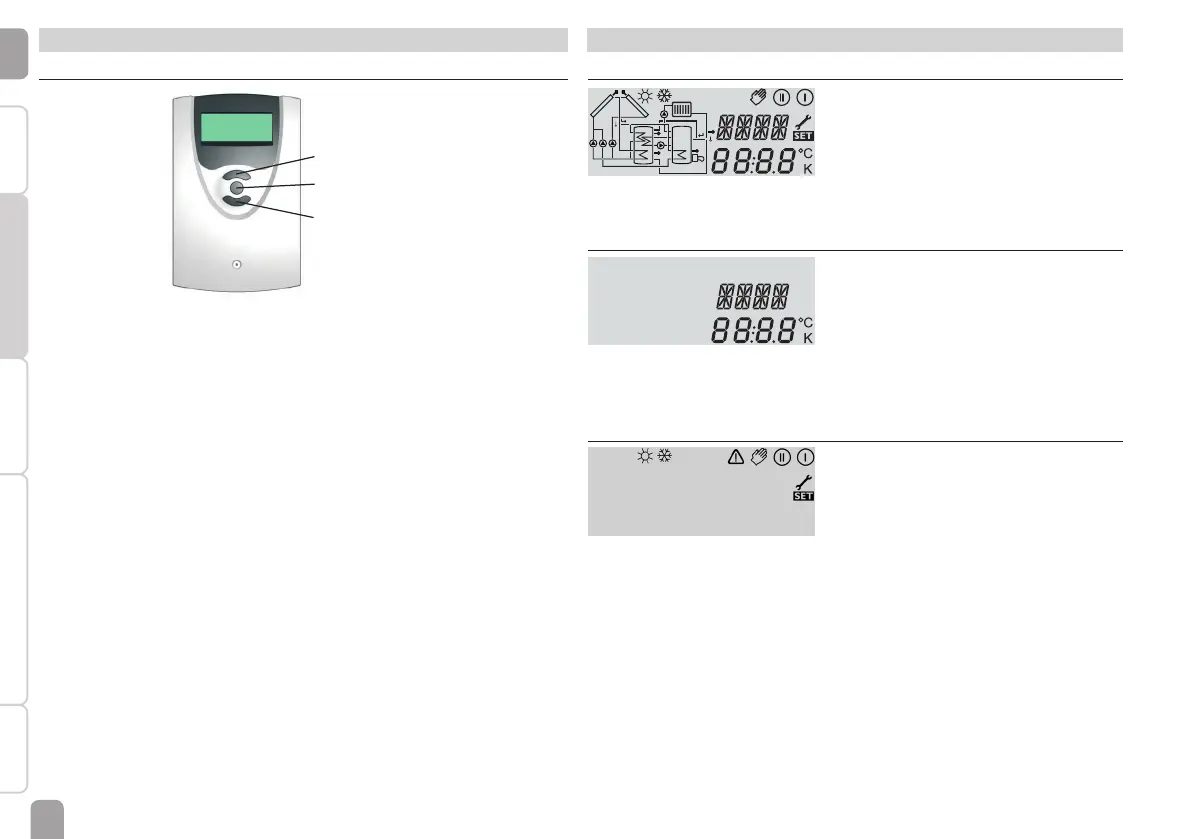
The controller is operated via the 3 push buttons below the display.
Button 1 (+) is used for scrolling forwards through the menu and increasing
adjustment values. Button 2 (-) is used for scrolling backwards through the menu
and reducing adjustment values. Button 3 (OK) is used for selecting channels and
conrming adjustments.
During normal operation, display channels will be displayed.
Î In order to scroll between display channels, press buttons 1 and 2.
Access to adjustment channels:
Î Use button 1 in order to scroll to the last display channel, then press and hold
down button 1 for approx. 2 s.
If an adjustment channel is shown on the screen, Ⓢ will be displayed on the
right-hand side next to the channel name.
Î Press button 3 in order to select an adjustment channel.
Ⓢ starts ashing.
Î Adjust the desired value with buttons 1 and 2.
Î Briey press button 3.
Ⓢ permanently appears, the adjusted value has been saved.
5 System-Monitoring-Display
System-Monitoring-Display
!
The System-Monitoring-Display consists of 3 blocks: channel display, tool bar and
system screen.
Channel display
The channel display consists of 2 lines. The upper display line is an alphanumeric
16-segment display. In this line, mainly channel names and menu items are displayed.
In the lower 16-segment display, values are displayed.
Tool bar
The additional symbols in the tool bar indicate the current system state.



 To Next Page