en
50
Installation Indications, functions and options MessagesCommissioningOperation and function
1. Language
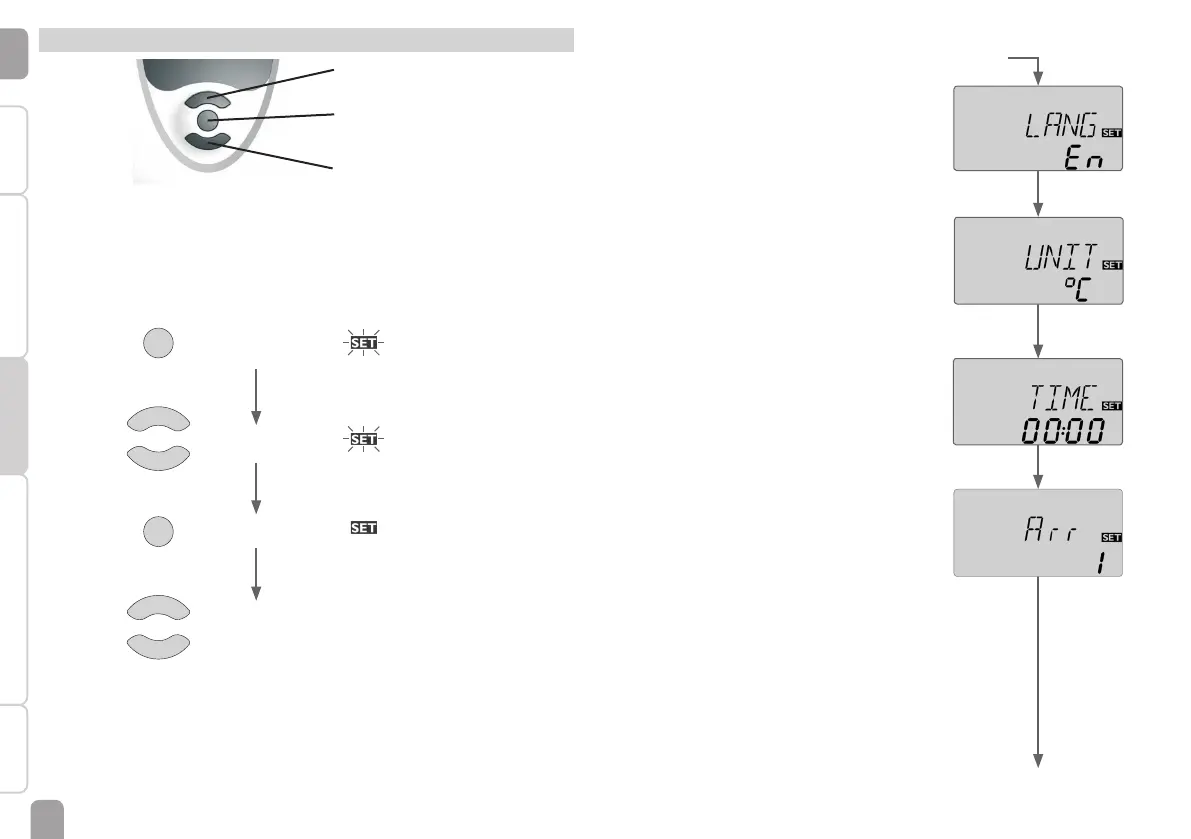
Î Adjust the desired menu language.
LANG
Language selection
Selection: dE, En, Fr, ES, It
Factory setting: dE
2. Temperature unit
Î Adjust the desired unit.
UNIT
Temperature unit
Selection: °F, °C
Factory setting: °C
3. Time
Î Adjust the clock time.
First of all adjust the hours, then the minutes.
TIME
Real time clock
4. Arrangement
Î Adjust the desired system.
For a detailed description of the systems to choose
from, see page 9.
Arr
System selection
Adjustment range: 1 … 10
Factory setting: 1
If the system selection is changed later on, any previ-
ous adjustments which have been made in the other
channels will be lost. Therefore, changing the system is
always followed by a security enquiry.
Commissioning
6 Commissioning
1
3
2
backwards (-)
forwards (+)
Ⓢ (selection /
adjustment mode)
Î Connect the device to the mains
The controller runs an initialisation phase.
When the controller is commissioned or when it is reset, it will run a commission-
ing menu. The commissioning menu leads the user through the most important
adjustment channels needed for operating the system.
Adjustment mode ashing
Operation
Changing a value ashing
Conrming a value not ashing
to the next
parameter
1
1
3
3
2
2


 To Next Page