1
QXBIUDB*T[G3DJH
AVANTIME D66 nu647-2
C:\Documentum\Checkout\nu647-2_eng_T1.WIN 3/4/2002 12:59
-page9
1.03
OPENING AND CLOSING THE DOORS
Locking and unlocking the
doors
Press the remote control for
approximately one second to lock
or unlock the doors. (Indicator
light 2 on the key will light up.)
The hazard warning lights flash
twice to indicate that the doors have
been locked. The hazard warning
lights flash once to indicate that the
doors have been unlocked.
Remote control operating range
This varies according to the
environment: therefore take care
when handling the remote control
that you do not inadvertently lock
or unlock the doors.
Indicator light to indicate the
engine immobiliser is operating
This indicator light will
light up on the instrument
panel.
- permanently if the vehicle was
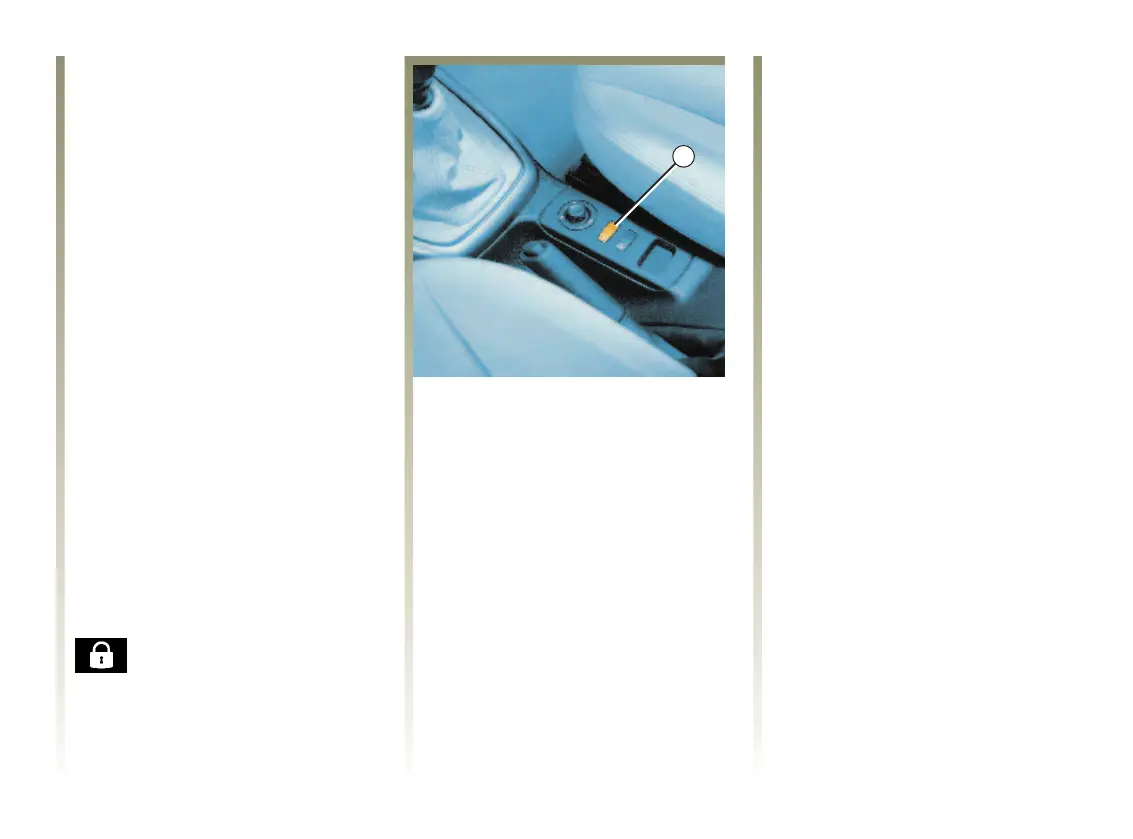
locked by the switch 1;
- for one minute if the vehicle was
locked using the remote control.
Electric central locking
This allows you to control the locks
for the doors, the tailgate and the
fuel filler flap from inside the
vehicle.
Lock the vehicle by pressing on the
red spot on switch 1 (padlock side).
Unlock the vehicle by pressing on
the switch 1 (side opposite the
padlock).
Opening a locked door from inside
the car automatically overrides
locking.
Locking, unlocking the doors
manually
Front doors:
Use the key to lock or unlock the
door.
Tailgate:
To lock, use the central locking
control 1 and lock the front door
with a key.
Check that a door is properly locked
after using the key.
Automatic relocking
If you unlock the vehicle
accidentally, the doors will relock
automatically after a few seconds if
the opening handle has not been
operated.


 To Next Page