R01QS0053EJ0100
10
6. e
2
studio might ask to change to Renesas Debug Perspective. Choose Yes.
7. After the code is downloaded to the board, choose Resume to run the code up to the first line of
the main function. Choose Resume again to run the rest of the code.
H. Monitoring MQTT messages in the cloud
You can use the MQTT client in the AWS IoT console to monitor the messages that your device
sends to the AWS Cloud.
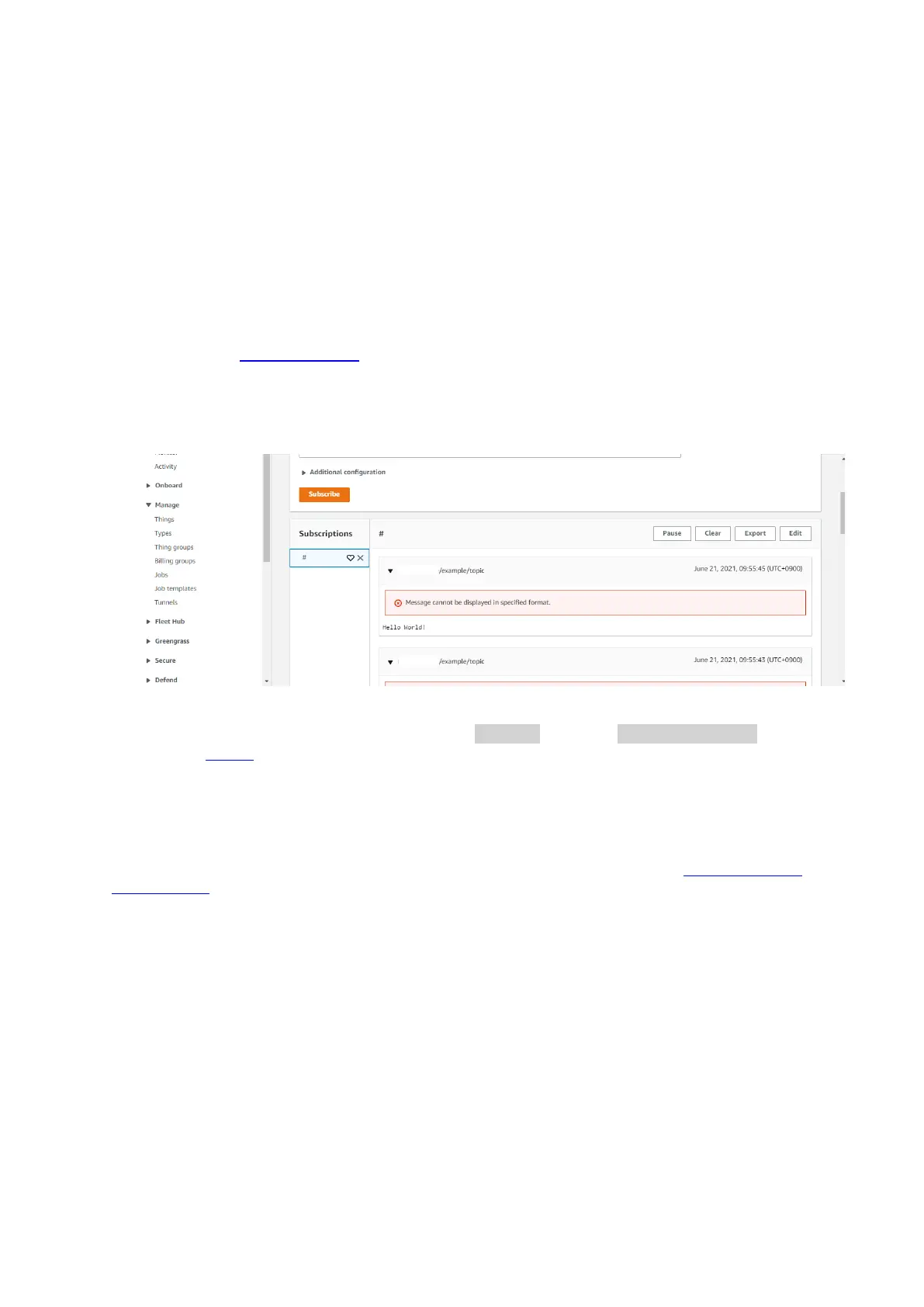
To subscribe to the MQTT topic with the AWS IoT MQTT client
1. Sign in to the AWS IoT console.
2. In the navigation pane, choose Test to open the MQTT test client.
3. In Subscription topic, enter #, and then choose Subscribe to topic.
4. Successful demo run looks like following the picture
For the latest projects released by Renesas, see the renesas fork of the amazon-freertos
repository on GitHub.
Troubleshooting
For general troubleshooting information about Getting Started with FreeRTOS, see Troubleshooting
getting started.
The following information is for debugging if any troubles.
1. Open e2studio to debug
Make sure that debug configuration is same as the following setting.



 To Next Page