• Pressing does not clear replay memory, so you can recall the last calculation even after
you press .
• Replaymemorycapacityis128bytesforstorageofbothexpressionsandresults.
• Replay memory is cleared by any of the following actions.
When you press the key
Whenyouinitializemodesandsettingsbypressing (Mode)
When you change from one calculation mode to another When you turn off the calculator.
Error locator
• Pressing or after an error occurs displays the calculation with the cursor positioned at
the location where the error occurred.
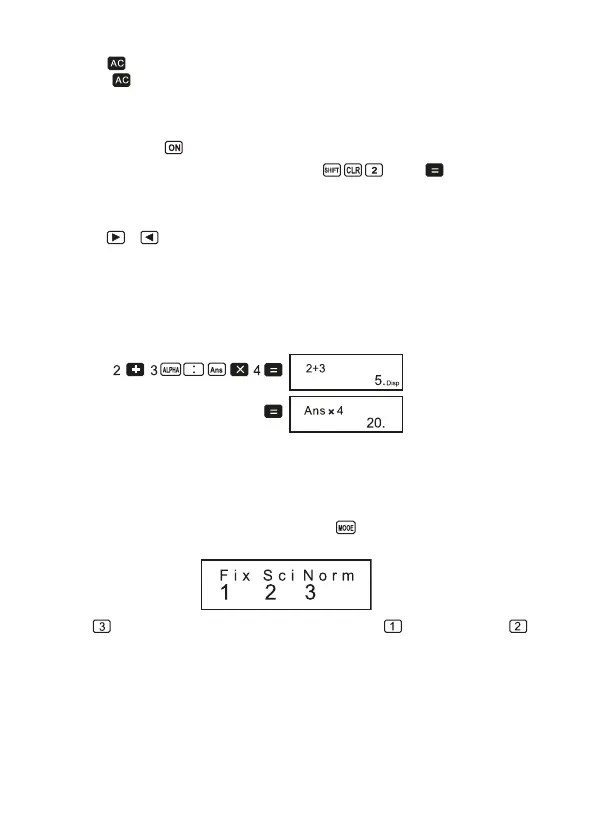
Multi-statements
Amulti-statementisanexpressionthatismadeupoftwoofmoresmallerexpressions,which
are joined using a colon (:).
• Example: To add 2 + 3 and then multiply the result by 4
Exponential display formats
This calculator can display up to 10 dig its.Larger values are automatically displayed using
exponentialnotation.ln thecase ofdecimal values,youcanselectbetween twoformats that
determineatwhatpointexponentialnotationisused.
• Tochangethe exponentialdisplayformat, pressthe key a number of times until you
reachtheexponentialdisplayformatsetupscreenshownbelow.
• Press . On the format selection screen that appears, press toselectNorm1or
forNorm2.
• Norm 1
With Norm 1, exponential notation is automatically used for integer values with more than
10 digits and decimal values with more than two decimal places.
9


 To Next Page