• Norm 2
With Norm 2, exponential notation is automatically used for integer values with more than
10 digits and decimal values with more than nine decimal places.
• AlloftheexamplesinthismanualshowcalculationresultsusingtheNorm1format.
Decimal point and separator symbols
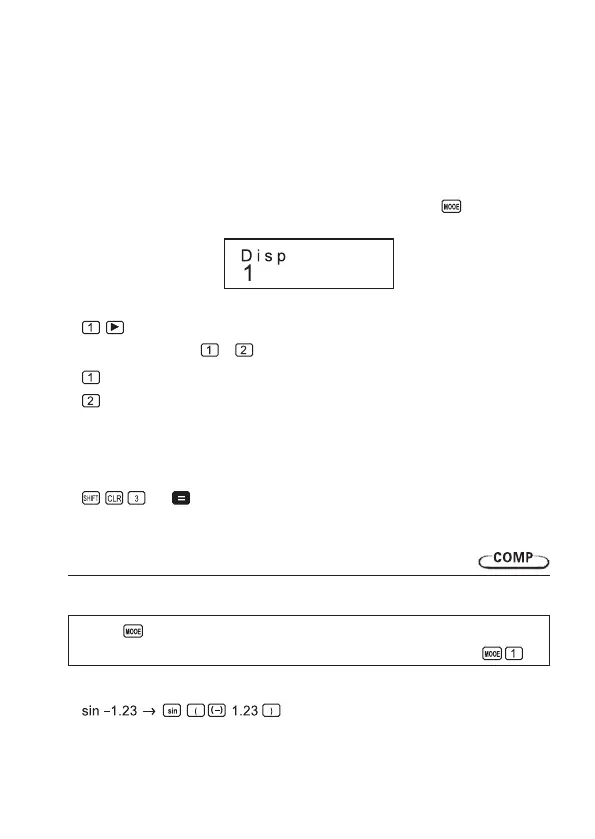
You can use the display setup (Disp) screen to specify the symbols you want for the decimal
point and 3-digit separator.
• To change the decimal point and separator symbol setting, press the key a number of
times until you reach the setup screen shown below.
• Display the selection screen.
• Press the number key ( or ) that corresponds to the setting you want to use.
(Dot):
Period decimal point, comma separator
(Comma):
Comma decimal point, period separator
Initializing the calculator
• Performthefollowingkeyoperationwhenyouwanttoinitializethecalculationmodeand
setup, and clear replay memory and variables.
(All)
7. Basic calculations
Arithmetic calculations
Usee the key to enter the COMP Mode when you want to perform basic calculations.
COMP ....................................................................................................................
• Negativevaluesinsideofcalculationsmustbeenclosedwithinparentheses.
10


 To Next Page