34
Select one of the following options to disconnect Bluetooth:
• Deactivate Bluetooth on your mobile device. The TV soundbar emits the acoustic message
“Disconnected”.
• Switch the soundbar to another audio source (e.g. AUX 1).
• Press and hold the ►II / PAIR button for approx. 3 seconds. The TV soundbar emits the acoustic message
“Pairing”.
Music playback via Bluetooth device
The TV soundbar supports the following proles in Bluetooth mode:
A2DP (Advanced Audio Distribution Prole) – audio playback
AVRCP (Audio Video Remote Control Prole) – music control via remote control of the TV soundbar and
audio playback
If your mobile device supports AVRCP, you may use the following buttons on the remote control for music
control:
►II / PAIR button – playback, pause
I ◄◄ / ►►I buttons – skip to previous/next song
g) NFC mode
NFC is the abbreviation for Near Field Communication. Please note that NFC only works if your mobile
device is equipped with NFC as well.
• Turn on the TV soundbar.
• Press the SOURCE button (2) repeatedly or the BT button (18)
to activate the Bluetooth mode.
• Activate NFC on your mobile device.
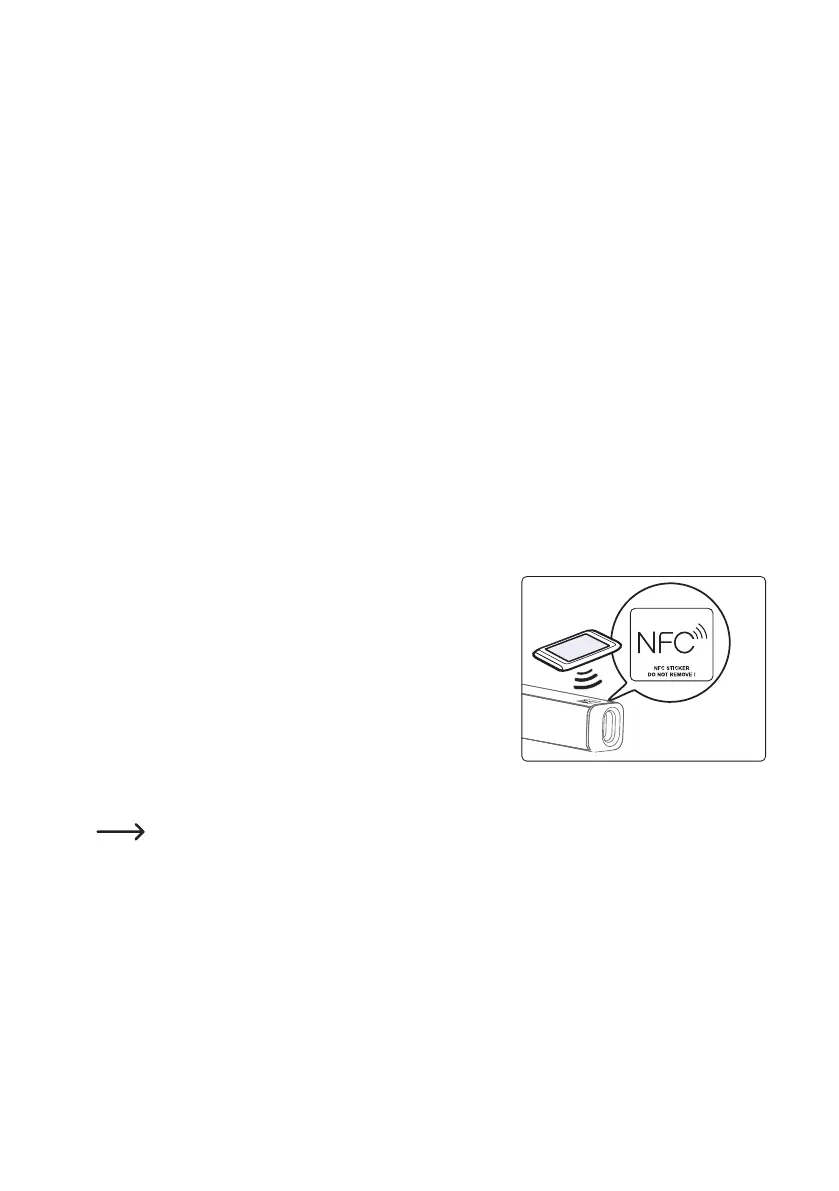
• Place the mobile device on the NFC sensor area; see
adjacent picture. Your mobile device will vibrate or show a
message in the display.
• Start audio playback on your mobile device.
• Remove the mobile device from the NFC sensor area in order
to deactivate NFC on your TV soundbar.
NFC sensor area
If necessary, remove the cover/protective housing from your mobile device during NFC
transmission, in order to ensure a sucient connection


 To Next Page