Need help?
Do you have a question about the Reolink RLC-511W and is the answer not in the manual?
Provides an overview of Reolink E1, E1 Pro, E1 Zoom indoor cameras, detailing their features and integration into home protection.
Details the Reolink E1 Outdoor camera, highlighting its smart technology, remote communication, and color night vision capabilities.
Describes the Reolink Lumus camera, emphasizing its motion-triggered spotlight, PIR sensor, and siren features for enhanced protection.
Introduces RLC-410W camera, noting its 2560x1440 high resolution for clearer home security monitoring.
Introduces RLC-523WA camera with motion-triggered spotlight, human/vehicle detection, siren, and pan/tilt features for comprehensive security.
Introduces Reolink Duo WiFi camera with dual lenses, 150° view, person/vehicle detection for accurate real-time alerts.
Explains the meaning of different status light indicators on Reolink cameras for operational feedback.
Guides through the initial setup process for WiFi cameras using the Reolink App, without requiring an Ethernet port.
Provides steps for initial setup of WiFi cameras using an Ethernet port via the Reolink App.
Details how to mount the E1, E1 Pro, and E1 Zoom cameras to a wall, including drilling and securing steps.
Provides instructions for mounting the E1 Outdoor camera to a wall, noting upside-down installation for better waterproofing.
Guides on how to mount the Reolink Lumus camera to a wall, covering bracket separation, attachment, and angle adjustment.
Details the installation process for bullet cameras, including drilling, mount base attachment, and angle adjustment for optimal viewing.
Provides instructions for mounting dome cameras to a ceiling, covering template use, cover removal, and camera attachment.
Explains how to access the live view of the camera through the Reolink App, detailing various control icons and their functions.
Describes how to select specific cameras to view from the device list within the Reolink App interface.
Details the camera's color modes (Color, Black & White, Auto) for adjusting image display based on lighting conditions.
Explains the Immersive Mode for a wider, less interfered viewing area, suitable for multiple cameras on one screen.
Guides on viewing multiple camera streams simultaneously on the same screen within the Reolink App.
Instructions on how to enter and exit the full-screen mode for an enhanced viewing experience of the camera feed.
Explains how to use the two-way audio feature to communicate with people or pets via the camera.
Details how to use the clip function to drag a rectangle and view a specific area of the camera feed.
Guides on using the PTZ (Pan, Tilt, Zoom) controls to adjust the camera's direction and focus.
Covers various display settings for the camera, including flip, quality, anti-flicker, and scene modes.
Explains how to adjust the video quality settings (Clear or Fluent mode) for optimal viewing experience.
Details the anti-flicker feature and its options (50Hz, 60Hz, Off) to reduce screen flickering from lights or TVs.
Instructions on how to adjust the image brightness by dragging a circle on the progress bar.
Explains how to set the position of the camera name displayed on the screen.
Details how to set the position of the date displayed on the camera's screen.
Instructions on how to enable or disable the watermark shown on the camera's screen.
Guides on setting up a privacy mask by drawing rectangles to block specific areas of the camera's view.
Information about infrared lights and how they function automatically in dim environments.
Instructions on how to turn off the status LED if it's not desired for others to see.
Details how the built-in spotlight automatically turns on during alarm events for full-color images and better illumination.
Explains the principle of motion detection in Reolink WiFi cameras and mentions advanced detection features for specific models.
Guides on creating a detection zone to exclude areas from receiving motion alerts.
Details how to adjust motion detection and smart detection sensitivity levels for accurate alerts.
Explains how to set minimum and maximum object sizes to trigger alarms for human/vehicle detection.
Details how to set up push notifications on your mobile phone when the camera detects motion.
Guides on setting up alarm emails to receive notifications with text or live images when motion is detected.
Instructions on how to set up the camera siren to sound an alert when motion is detected.
Details how to set up the spotlight to automatically turn on at night when motion is detected.
Guides on enabling motion recording to save clips to the SD card when motion is detected.
Explains how to set up the camera to record motion alarm events to the SD card.
Details how to enable continuous recording to the SD card by setting a timer schedule.
Instructions on enabling the record audio option to capture sound along with video recordings.
Guides on how to play back recorded footage from the SD card and download it to your device.
Introduces time-lapse photography and provides steps for setting up and capturing time-lapse videos with the camera.
Explains Reolink Cloud Recording, its benefits, supported models, and availability in different countries.
Guides on registering an account and the initial steps to set up cloud recording for your camera.
Details how to subscribe to a cloud plan and bind your camera to the cloud service for recording.
Instructions on how to manage cloud recording by turning it on/off or unbinding the camera from the cloud plan.
Explains how to change the resolution of uploaded videos to either Fluent or Clear.
Guides on how to upgrade an existing cloud recording plan to a new one.
Details how to play back and download cloud recordings using the Reolink App.
Instructions on how to share your Reolink camera with other users via QR code scanning.
Explains Scene Modes for customizing camera alarm settings based on different usage scenarios.
Guides on adding cameras to the Reolink App, including automatic detection and manual addition via LAN.
Details the process of adding a camera to the Reolink App by scanning its QR code.
Explains how to add a camera to the Reolink App by manually entering its UID.
Provides instructions on how to remove a camera from the Reolink App.
Guides on how to register a Reolink account for placing orders, checking history, and accessing cloud services.
Details how to adjust various app settings like device order, sound settings, and cache.
Explains how to check the camera's WiFi connection status, signal strength, and network information.
Guides on how to change the camera's WiFi connection to a different network.
Provides tips for improving WiFi signal strength for wireless cameras.
Details how to configure FTP settings to upload pictures or videos to an FTP server.
Specifies the requirements for compatible SD cards (capacity, speed, format) and how to install them.
Explains how to check the SD card's status, used space, and total storage capacity in the Reolink App.
Guides on how to check basic camera information such as model number, UID, and firmware version.
Details how to set up and change the camera's access password for security purposes.
Explains how to synchronize the camera's date and time with your smartphone.
Provides instructions on how to reboot the camera or restore its settings to default.
Guides on how to check for and perform firmware upgrades for the camera, both automatically and manually.
Details Reolink camera compatibility with smart home systems like Google Home and Amazon Alexa.
Provides step-by-step instructions for integrating Reolink cameras with Google Home.
Lists requirements and details for connecting Reolink cameras to Amazon Alexa, including supported countries.
Presents frequently asked questions regarding cloud service, SD card compatibility, sharing, NVR, third-party software, and power adapters.
Provides solutions for common issues like camera not powering on, QR code scanning failure, and WiFi connection problems.
 General
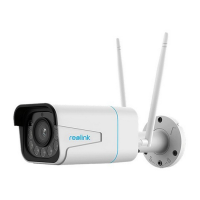
| Type | IP security camera |
|---|---|
| Antenna type | External |
| Day/night mode | Yes |
| Antennas quantity | 2 |
| Placement supported | Outdoor |
| Connectivity technology | Wired & Wireless |
| Form factor | Bullet |
| Mounting type | Ceiling/wall |
| Product color | White |
| Protection features | Waterproof |
| International Protection (IP) code | IP66 |
| Camera pan control | No |
| Camera shutter type | Electronic |
| Minimum illumination | 0 lx |
| Sensor type | CMOS |
| Number of sensors | 1 |
| Optical sensor size | 1/2.7 \ |
| Number of effective pixels (H x V) | 2560 x 1920 pixels |
| Optical zoom | 4 x |
| Number of lenses | - |
| Focal length range | 2.7 - 12 mm |
| Maximum aperture number | 1.6 |
| LED type | IR |
| Infra-red wavelength | 850 nm |
| Night vision distance | 30 m |
| Number of illumination LEDs | 24 |
| Total megapixels | 5 MP |
| Video compression formats | H.264 |
| Noise reduction technology | 3D noise reduction |
| Supported graphics resolutions | 640 x 480 (VGA), 2048 x 1536 (QXGA), 2304 x 1296, 2560 x 1440, 2560 x 1920 |
| Number of users | 20 user(s) |
| Wi-Fi standards | 802.11b, 802.11g, Wi-Fi 4 (802.11n) |
| Streaming method | Multicast |
| Ethernet interface type | Fast Ethernet |
| Supported network protocols | HTTPS, SSL, TCP/IP, UDP, UPNP, RTSP, SMTP, NTP, DHCP, DNS, DDNS, FTP, P2P |
| Compatible memory cards | MicroSD (TransFlash) |
| Alert notification type | E-mail, Snapshot alert message, Text alert message |
| DC output voltage | 12 |
| Power source type | DC, PoE |
| Power consumption (typical) | 10 W |
| Operating temperature (T-T) | -10 - 55 °C |
| Operating relative humidity (H-H) | 10 - 90 % |
| Mobile operating systems supported | Android, iOS |
| Cables included | LAN (RJ-45) |
 Weight and Dimensions
| Depth | 186 mm |
|---|---|
| Width | 67 mm |
| Weight | 750 g |


 To Next Page