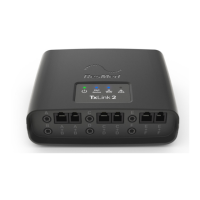
The ResMed TxLink 2 is a network device designed to provide connectivity between ResMed's EasyCare Tx 2 titration software and compatible ResMed therapy devices. It also retransmits real-time signals measured by the therapy device to a polysomnograph (PSG). The device is intended for use in a clinical environment.
Function Description:
The TxLink 2 acts as a bridge, enabling the EasyCare Tx 2 software to communicate with ResMed continuous positive airway pressure (CPAP), bilevel, or non-invasive ventilator devices that incorporate ResMed's proprietary communication protocol. It relays real-time signals from these therapy devices to a PSG, facilitating comprehensive sleep study data collection. The device features six analog DC outputs (A-F), which can be used to transmit real-time data streams to a PSG system. Each DC output is available at three connection points to support various PSG systems. Mono jack connectors provide a single channel, while modular connectors provide two channels.
Important Technical Specifications:
TxLink 2 Device:
- Dimensions (H x W x L): 45 mm x 125 mm x 147 mm (1.8 in x 4.9 in x 5.8 in)
- Weight: 0.77 ± 0.11 lb (350 ± 50 g)
- Typical Power Consumption: 3 W
- Maximum Power Consumption: 5 W
- Housing Construction: Flame retardant engineering thermoplastic
- Operating Temperature: +5°C to +35°C (+41°F to +95°F)
- Operating Humidity: 10% to 95% non-condensing
- Storage and Transport Temperature: -25°C to +70°C (-13°F to 158°F)
- Storage and Transport Humidity: 5% to 95% non-condensing
- Altitude of Functioning: Sea level to 3,010 m (9,870 ft)
- IEC 60601-1 Classification: Class II
- Expected Service Life: 5 years
- Intended Operator: Sleep technician or clinician
Analog Outputs (6 channels):
- All channels isolated from mains power: 3 kV
- All channels isolated from communication signals: 1.5 kV
- No isolation between channels: -
- Voltage Range: -1 V DC to +1 V DC
- Accuracy: ±5%
- Bandwidth: 25 Hz
- Output Impedance: 50 Ohm
Analog DC Output Configuration:
- Mask Pressure (A): 0 to 30 cm H₂O (0 to 1 V DC)
- Patient Flow (B): -120 to 120 L/min (-1 to 1 V DC)
- Leak (C): 0 to 60 L/min (0 to 1 V DC)
- Prescribed Inspiratory Pressure (D): 0 to 30 cm H₂O (0 to 1 V DC)
- Prescribed Expiratory Pressure (E): 0 to 30 cm H₂O (0 to 1 V DC)
- Minute Ventilation (F): 0 to 30 L/min (0 to 1 V DC)
90W AC Adapter:
- Dimensions (H x W x L): 32 mm x 65 mm x 132 mm (1.3 in x 2.6 in x 5.2 in)
- Weight: 0.55 lb (250 g)
- AC Input Range: 100-240 V, 50-60 Hz; 115 V, 400 Hz
- DC Output: 24 V
- Class of Equipment: Class II
- Typical Power Consumption (with ResMed therapy device attached): 77 W
- Maximum Power Consumption (with ResMed therapy device attached): 101.5 W
Usage Features:
The TxLink 2 is designed for straightforward setup. It connects to the therapy device via a PAP device cable (power/communications), to a power supply unit, and to a computer running EasyCare Tx 2 software via an Ethernet cable. A USB Type B port is available for installation and setup, but it should not be connected to a computer while a patient is connected to the therapy device.
Indicators: The device features four LEDs to indicate its operating state:
- Power (Green LED): Illuminates when TxLink 2 is powered on.
- PAP Device (Blue LED): Illuminates when connected to a therapy device and flashes to indicate communication. It is off when disconnected.
- Ethernet (Blue LED): Illuminates when connected to the network and flashes to indicate network traffic. It is off when disconnected.
- Device Error (White LED): Illuminates or flashes to indicate an internal error.
LEDs can be disabled during normal use to avoid patient disruption, but they will remain active during power-up or system error states. The Power indicator will also remain dimly lit when disabled.
Initial Configuration:
- IP Address: Automatically obtained via DHCP.
- LEDs: During therapy, PAP device and Ethernet LEDs are deactivated, and power consumption is reduced.
Maintenance Features:
The TxLink 2 is designed for reliable and safe operation without requiring user maintenance throughout its lifespan.
- Cleaning: The exterior of the device should be wiped with an alcohol-based cleaning and disinfecting wipe/solution (e.g., CaviWipes1™, Mikrozid™) until visually clean, following the manufacturer's cleaning instructions. The power cable must always be disconnected before cleaning and reconnected only when dry.
- Prohibitions: Users should not open or modify the device, as it contains no user-serviceable parts. Repairs and servicing must only be performed by ResMed authorized technicians. Harsh cleaning solutions such as bleach, chlorine, scented solutions, moisturizing or antibacterial soaps, or scented oils should not be used, as they can damage the module and reduce its lifespan.
- Troubleshooting: Basic troubleshooting steps are provided for common issues like the error LED being lit or the power LED not illuminating. If problems persist, the device should be disconnected and returned to a ResMed service center for investigation.
- Patient Isolation: The TxLink 2 must be placed outside the patient environment (beyond a 1.5 m radius of the patient's bed).
- Liquid Separation: Maintain a minimum distance of 0.5 m from humidifiers and liquids.
- Power Supply: Use only the supplied ResMed power cable.
- Discontinue Use: Stop using the device and contact the supplier or ResMed service center if it malfunctions, shows signs of damage/wear, or makes unusual sounds.
- Electrocution Hazard: Do not immerse the device in water, connect it while wet, or use it if liquids have spilled inside.
- RF Communications: Portable RF communications equipment should be used no closer than 10 cm (3.9 in) to any part of the device to prevent performance degradation.
- Cybersecurity: As a network device, an appropriate cybersecurity policy must be established and maintained to ensure reliable network operation, information security, and protection of connected equipment.
- User-Serviceable Parts: The TxLink 2 and its 24V DC power cable contain no user-serviceable parts.
- Placement: Avoid placing the device where it can be bumped, stepped on, or cause tripping.

 Need help?
 General






 To Next Page