
 Need help?
Do you have a question about the ReSound RT561-DRWC and is the answer not in the manual?
Details product matrix and information for the OMNIA platform.
Details product matrix and information for the ONE platform.
Comprehensive listing of all available parts and their part numbers.
Listing of Housing (HSG) parts for 61-DRW models with BAT 312.
Listing of Housing (HSG) parts for 62-DRW models with BAT 13.
Listing of Housing (HSG) parts for 61-DRWC RHI models.
Part numbers for SureFit 3 and 3B receiver tubes with 8-pin connectors.
Part numbers and descriptions for SureFit standard and power domes.
Listing of SureFit accessories including fitting kits and sport locks.
Step-by-step instructions for disassembling 312 and 13 DRW models.
Procedure for replacing the top housing assembly (HSG ASM) on 61-DRWC RHI models.
Instructions for removing and connecting a new receiver tube.
Step-by-step guide for replacing wax filters in receiver tubes.
Procedure for replacing the microphone filter in M&RIE receiver tubes.
Lists all necessary test equipment and their part numbers.
Details specific test equipment used with the DSA6000 system.
Procedure for conducting Hearing Instrument (HI) tests using the DSA6000.
Instructions for performing wireless range and connectivity tests.
This document serves as a technical manual for the ReSound GN OMNIA and ONE hearing aid platforms, specifically focusing on the RS CAMBRIDGE RIE (Receiver-In-Ear) models. It provides comprehensive information for both internal GN operations and general maintenance, covering various aspects of the devices, their components, and related tools.
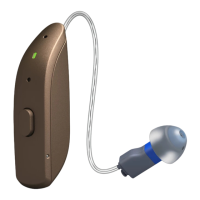
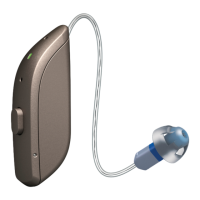
The hearing aids described are RIE (Receiver-In-Ear) models, available in different battery configurations: 312 zinc-air, 13 zinc-air, and integrated rechargeable batteries (DRWC models). These devices are designed for wireless programming and HI (Hearing Instrument) testing. The OMNIA and ONE platforms offer a range of models, including RU961-DRW, RU761-DRW, RU561-DRW, RU461-DRW, RU962-DRW, RU762-DRW, RU562-DRW, RU462-DRW for zinc-air battery types, and RU961-DRWC, RU761-DRWC, RU561-DRWC, RU461-DRWC for rechargeable models within the OMNIA platform. Similarly, the ONE platform includes RT961-DRW, RT761-DRW, RT561-DRW, RT461-DRW, RT962-DRW, RT762-DRW, RT562-DRW, RT462-DRW for zinc-air, and RT961-DRWC, RT761-DRWC, RT561-DRWC, RT461-DRWC for rechargeable models. The devices are available in a variety of colors, including Gold, Warm Grey, Espresso, Deep Black, Bronze, Champagne, Sparkling Silver, and Graphite.
A key feature of these hearing aids is their compatibility with SureFit 3, 8-pin receiver tubes and SureFit 3, 8-pin M&RIE (Microphone & Receiver-In-Ear) tubes. They offer four selectable receiver power levels: Low Power (LP), Medium Power (MP), High Power (HP), and Ultra Power (UP), allowing for customization based on individual hearing needs.
Maintenance features are extensively detailed, particularly for replacing components and ensuring proper functioning. The manual provides a detailed part list for various components, including pins, cleaning brushes, color markers, and specialized tools.
For disassembling the 312 and 13 DRW models, a specific procedure is outlined. This involves using a pin removal tool to push out the TOP HSG (Hearing Aid Shell Group) pin, followed by gently lifting off the TOP HSG. For the 61-DRW 312 model, the module pin in the sound outlet end is removed, while for the 62-DRW 13 model, the module pin in the battery end is targeted. After removing these pins, the module and battery door (BAT DR) can be gently lifted from the BOT HSG (Bottom Hearing Aid Shell Group). The BAT DR pin can also be removed using a pin removal tool and tweezers.
The manual emphasizes that for the 61-DRWC (RHI) models, only the TOP HSG ASM (Assembly) can be replaced. If the mic filters (mounted inside the TOP HSG) or the TOP HSG itself are damaged, users can choose to replace either the TOP HSG ASM or a FILTER REPL KIT. Due to the mechanical construction and internal sealing of the HI, the BOT HSG is not replaceable; a damaged BOT HSG necessitates returning the complete HI for repair or replacement. A black SERVICE PIN TOOL (p/n 21161685) is provided for fixing the TOP HSG. The process involves locating and pushing out the pin for the TOP HSG ASM, lifting off the old TOP HSG, and then attaching a new one by inserting a new pin using the tool.
Receiver tube replacement is another crucial maintenance aspect. The manual describes how to remove the existing receiver by sliding the receiver lock towards the battery end of the HI, which unlocks the receiver and allows it to pop out. A new receiver is then connected by sliding it into the HI and pressing it into place until a "click" is heard, ensuring it is correctly seated.
The manual also covers replacing the wax guard/filter in the receiver tube. If a dome is mounted, it must be removed first. A box of 8 wax filter tools is provided, each having a removal tip for collecting the used filter and a replacement tip with a new white filter. The removal tip is inserted into the used wax filter and pulled straight out. The other end of the tool, with the replacement filter, is then inserted into the sound outlet and gently pressed until the outer ring touches the sound outlet. Finally, the tool is pulled straight out, leaving the new wax filter in place.
For M&RIE Rec Tubes, the process of replacing the mic filter is detailed. The mic filter is located at the back of the rec tube. The filter removal end of the mic filter pin is used to remove the defective filter, ensuring the pin is pushed all the way in for a secure grip. The defective filter is then pulled back with the pin. The new filter, attached to the other end of the filter pin, is pushed into the hole/mic sound inlet and turned clockwise until released and correctly in place.
The document concludes with information for internal GN Operations, including a part list for test equipment and procedures for HI testing (DSA6000) and wireless testing. The HI test involves adding the correct battery pill, closing the battery door, attaching the test receiver to the test jig, and connecting it to the HI. The test receiver mic must be correctly placed on the jig. The 2cc coupler is mounted to the TM12 coupler mic, and the test receiver is attached to the 2cc coupler. The HI is then attached to the test jig/fixture, which is placed in the black test frame within the test chamber. Users are instructed to select the correct test program and follow on-screen instructions.
The wireless range test combines DSA6000 Noahlink/SAS Range Check using the SAS-3. The SAS-3's MAC address is entered into the DSA 6000 system configuration, and a Noahlink is mounted directly into a DSA 6000 unit's USB port. No fixture is required for this test. The process involves evaluating the streaming signal by switching to a streaming program and powering the instrument. After acoustic tests, the operator removes the HI, inserts a battery, and evaluates the streaming signal quality. If accepted, "Pass" is selected; otherwise, "Fail" is chosen. Regardless of the outcome, the device must be reconnected to the DSA system after evaluation. The MAC address of the SAS is not directly available in the standard version and must be requested from GTO.
 General
| Type | Receiver-in-canal (RIC) |
|---|---|
| Channels | 17 |
| Bluetooth | Yes |
| Battery Type | Rechargeable |
| Water Resistance | IP68 |
| Wireless Connectivity | 2.4 GHz |
| Battery Size | 312 |





 To Next Page