EasyManua.ls Logo

Reverie 4M - User Manual

Reverie 4M
14 pages
Print Icon
To Next Page IconTo Next Page
Loading...
REV: 2019-10-21
Manual Part No. MMA01SFA1
Copyright © 2018. All Rights Reserved.
Ascion LLC.
CONGRATULATIONS ON YOUR PURCHASE OF A REVERIE POWER BASE!
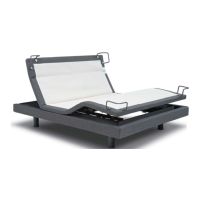
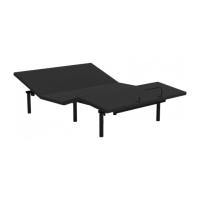
*Image may not represent the product you purchased
Follow the steps listed below to operate your Reverie power base using the remote provided and/or the Reverie
Nightstand™ app.
Step 1: Download the Reverie Nightstand
TM
app from the App store for any of your Apple devices, or from the Google Play
store for any Android devices.
Step 2: Install batteries in your remote before use.
Step 3: Contact Reverie customer service at 1-800-973-8374 or customerservice@reverie.com for additional assistance.
Your base comes with a 20 Year Limited Warranty. For a Full Owners Manual, Warranty, and Troubleshooting information,
please visit our website at: https://reverie.com/support
Adjustable Power Base
4M
TM
Owners Manual

Questions and Answers

  • A
    Alicia BrownAug 15, 2025
    What to do if no features of my Reverie Indoor Furnishing Power Base activate?
    • J
      James MorrisAug 15, 2025
      If no features of your Reverie Power Base are working, there are several things you can check: * Ensure your remote is paired or plugged into the bed. * Check your electrical circuit breaker, as it may be tripped. * Verify the power cord is plugged into a working, grounded electrical outlet. It's recommended to use a grounded, electrical surge protection device. Test the outlet with another working appliance. * It may be due to an overload condition. Remove the load, put the bed in the flat position, and then move it to the maximum position to test if the functions are operational.
  • J
    Jane HamiltonAug 18, 2025
    Why is my Reverie Indoor Furnishing bed making noise when operating?
    • M
      Michael VargasAug 18, 2025
      If your Reverie bed is making noise during operation, consider the following: * Check for any obstructions under the bed. * Note that the actuators make a light noise during operation, which is normal. * A loose bolt could cause a squeaking noise. Identify and tighten any loose bolts.
  • Z
    Zachary MurrayAug 21, 2025
    How to reduce excessive massage motor noise in my Reverie 4M Indoor Furnishing?
    • W
      wellsmatthewAug 22, 2025
      To address excessive massage motor noise in your Reverie product: * Make sure the massage motor cable is not loose and hitting the base structures. * Verify that the bed is not positioned against a wall, nightstand, or other object that may cause vibration or noise. * If the base is installed over a bed frame, verify the massage motors are not causing the bed frame (or its components) to vibrate. * Verify that the headboard attachment hardware is firmly tightened.
  • A
    Abigail MorenoAug 25, 2025
    What to do if the head or foot section of my Reverie 4M elevates but won't return to flat?
    • J
      Johnny GardnerAug 25, 2025
      If the head or foot section of your Reverie Power Base elevates but doesn't return to the flat position: * The power base mechanism may be obstructed. Elevate the power base and check for any obstructions. Remove any obstructions found. * The head section may be too close to the wall, or the headboard may be too close to the edge of the mattress. Adjust as needed.
  • R
    Richard AdamsAug 27, 2025
    Why isn't the Remote Lockout Feature working on my Reverie Indoor Furnishing?
    • W
      William ParkerAug 28, 2025
      If the Remote Lockout Feature on your Reverie product isn't working: * Ensure you are correctly pressing both specified buttons simultaneously. * Verify that the remote has sufficient battery power. * Make sure there are no other devices causing RF interference with the remote.
  • N
    nbutlerAug 30, 2025
    How to fix a Reverie Indoor Furnishing remote readout that doesn’t match the actual bed position?
    • L
      Lauren GarzaAug 31, 2025
      To fix a remote readout that doesn’t match the actual bed position on your Reverie product, recalibrate by pressing the FLAT button on the remote. Then, lift all sections to the maximum position until the remote screen shows 100.
  • T
    Tammy MitchellSep 2, 2025
    What causes minor interference during the lift function of my Reverie 4M?
    • R
      Robert WilliamsSep 3, 2025
      Minor interference during the lift function of your Reverie bed can be due to: * An overload of weight on the bed. * Ensure you press the lift buttons squarely and accurately. * The power base mechanism may be obstructed. Elevate the power base and check for an obstruction, and then remove it.
  • K
    Karen CraigSep 5, 2025
    What to do if my Reverie 4M Indoor Furnishing remote states “No Bed Paired”?
    • E
      Erin MurphySep 5, 2025
      If your Reverie remote displays “No Bed Paired”: * Allow the remote to go back to sleep by setting it down, then check if it connects after 3 minutes. * If the issue persists, go through the pairing process again.
  • M
    Michael FergusonSep 8, 2025
    Why does my Reverie 4M remote state 'other remote connected'?
    • M
      Melinda GibsonSep 8, 2025
      If your Reverie remote states 'other remote connected', it means either your phone is connected to the bed via the Reverie Nightstand app or another remote is connected. Disconnect from Bluetooth in the app and ensure the other remote is asleep.
  • D
    David PattersonSep 12, 2025
    How to fix a distorted image on my Reverie Indoor Furnishing remote screen?
    • O
      Omar HillSep 12, 2025
      To fix a distorted image on your Reverie remote screen, let the remote go back to sleep and wake it up again. Repeat this process multiple times.

Summary

Important Safety and Precautions

General Safety Warnings and Dangers

Crucial safety instructions, warnings, and potential dangers to be aware of.

Child, Pet, and Electrical Safety

Guidelines for child/pet safety, grounding, and electrical precautions.

Frame Assembly Instructions

Unpacking and Preparing the Power Base

Steps for safely unpacking and preparing the base unit for assembly.

Remote Control Operations

Remote Pairing and Unpairing Procedures

Instructions for pairing a new remote and unpairing existing ones.

Remote Control Function Guide

Adjusting Head, Foot, and Zero Gravity Positions

Controlling bed elevation and comfort positions using the remote.

iOS App User Guide

Android App User Guide

Headboard Bracket Assembly

Step-by-Step Headboard Bracket Installation

Detailed instructions for assembling and attaching headboard brackets.

Troubleshooting Power Base Issues

Power Base Activation and Obstruction Issues

Solutions for power base not activating or mechanical obstructions.

Troubleshooting Remote and Connectivity

Remote Lockout, Pairing, and Display Issues

Solutions for remote lockout, pairing errors, and distorted display.

20 Year Limited Warranty Information

Warranty Coverage Periods and Limitations

Details on warranty coverage for parts, labor, and frame over 20 years.

Reverie 4M Specifications

General IconGeneral
BrandReverie
Model4M
CategoryIndoor Furnishing
LanguageEnglish

Related product manuals