13
STEP 2:
SETTING UP REVITIVE FOR USE
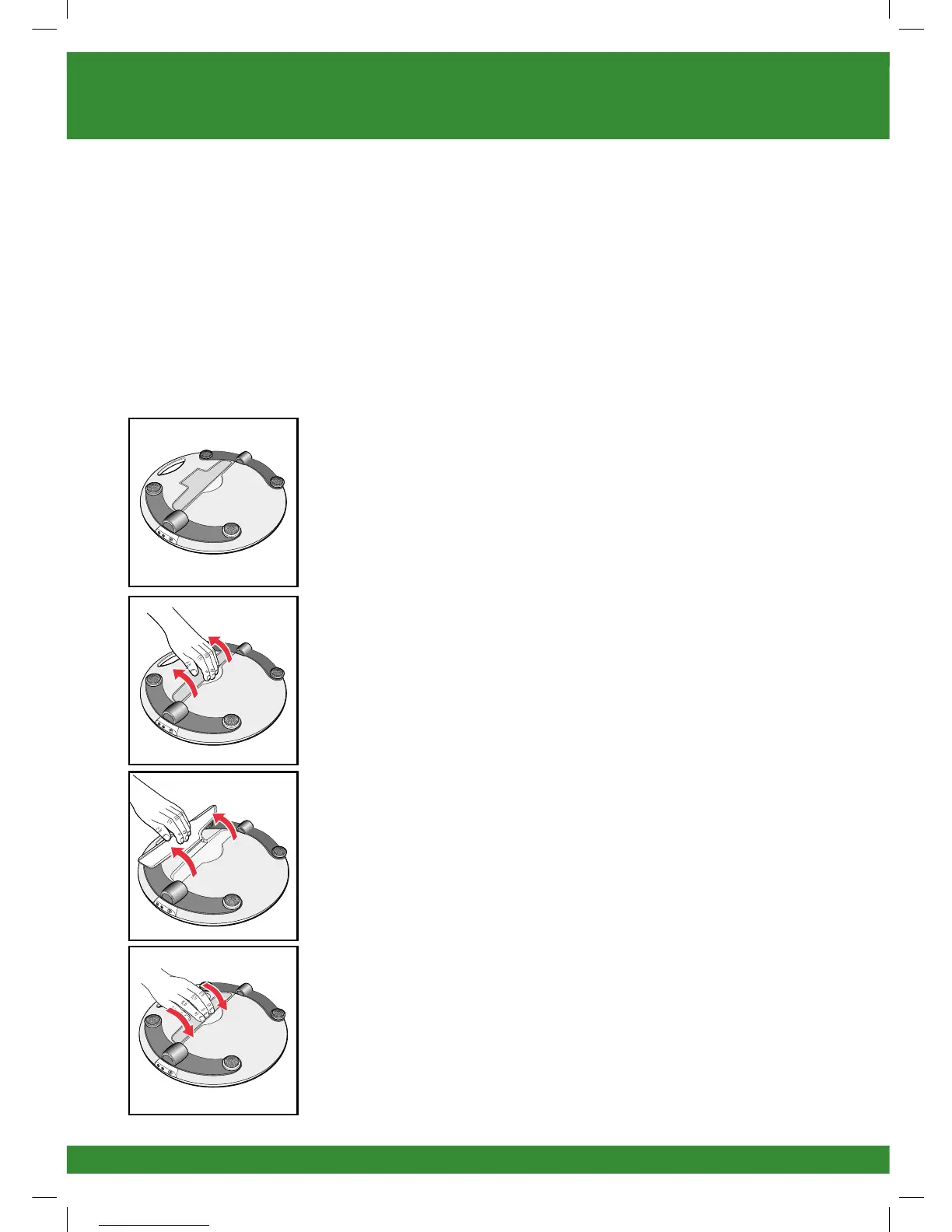
a Turn the device over so that you can see the
IsoRocker and the IsoRocker Disabler.
• The IsoRocker allows REVITIVE Advanced to rock
while stimulating your legs and feet.
• REVITIVE Advanced will begin rocking on the
IsoRocker once muscle contractions are strong
enough.
• The Isorocker feature can be disabled, by opening
the IsoRocker Disabler. REVITIVE Advanced will
then be static and it will not rock during use.
b If you want to use the IsoRocker, leave the IsoRocker
Disabler in place (ie flat) on the bottom of the device,
as shown.
c If you do not want to use the IsoRocker
• Open the IsoRocker Disabler on the bottom of
REVITIVE Advanced. You may have to pull hard.
• Pull the IsoRocker Disabler back until it clicks open,
as shown.
• To re-enable the IsoRocker, pull the IsoRocker
Disabler and press into place on the bottom of
the device (ie flat).
2296_IFU01_9608705.indd 13 17/07/2015 12:28


 To Next Page