28 Chapter 3 Software
(Data Format Tab--Cont.)
FAC Extended Precision Math On: Interprets the FAC data from a card to allow for the proper
amount of bits to provide appropriate info.
ID Extended Precision Math On: Interprets the ID data from a card to allow for the proper amount
of bits to provide appropriate info.
Reverse Wiegand Bytes: Reverses data in byte chunks (8 bits = 1 byte)
Reverse Wiegand Bits: Reverses each bit
Invert Wiegand Bits: Inverts each bit
Emulate ProxPro-Append Serial Checksum: This option is only for serial devices. It adds a digit to
the end of serial data. It emulates the serial data format to match HID Corp. Prox Pro reader by
sending a 2 byte checksum after the card data.
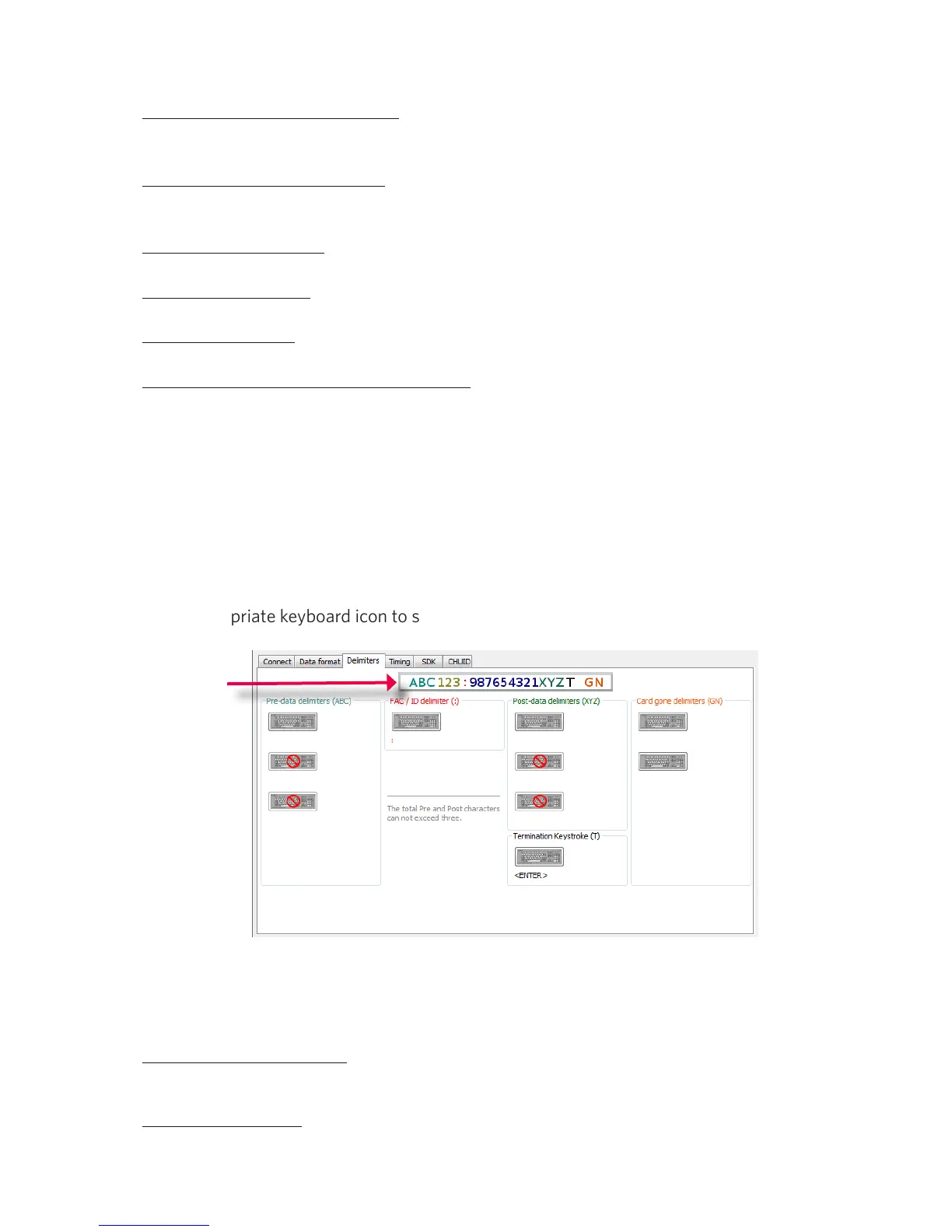
Delimiters Tab
Use this tab to configure pre and post data delimiters. A delimiter can also be set between the ID and
FAC card data.
Click the appropriate keyboard icon to select the appropriate corresponding delimiters.
Note: Only 3 pre and post delimiters total can be configured. If 3 pre-delimiters are set, no post
delimiters can be set.
Pre Data Delimiters (ABC): Select from 0 to 3 characters to display at the beginning of the card
data. These characters are shared with the post string of characters.
FAC/ID Delimiter (:): Select a character to display between and separate the FAC and ID data.
ABC = Pre-Data
: = FAC/ID



 To Next Page