RF-43UP
www.szrfstar.com V1.3 - Jan., 2020
Shenzhen RF-star Technology Co., Ltd. Page 23 of 34
7.2 Parameters of Command Setting
7.2.1 Format
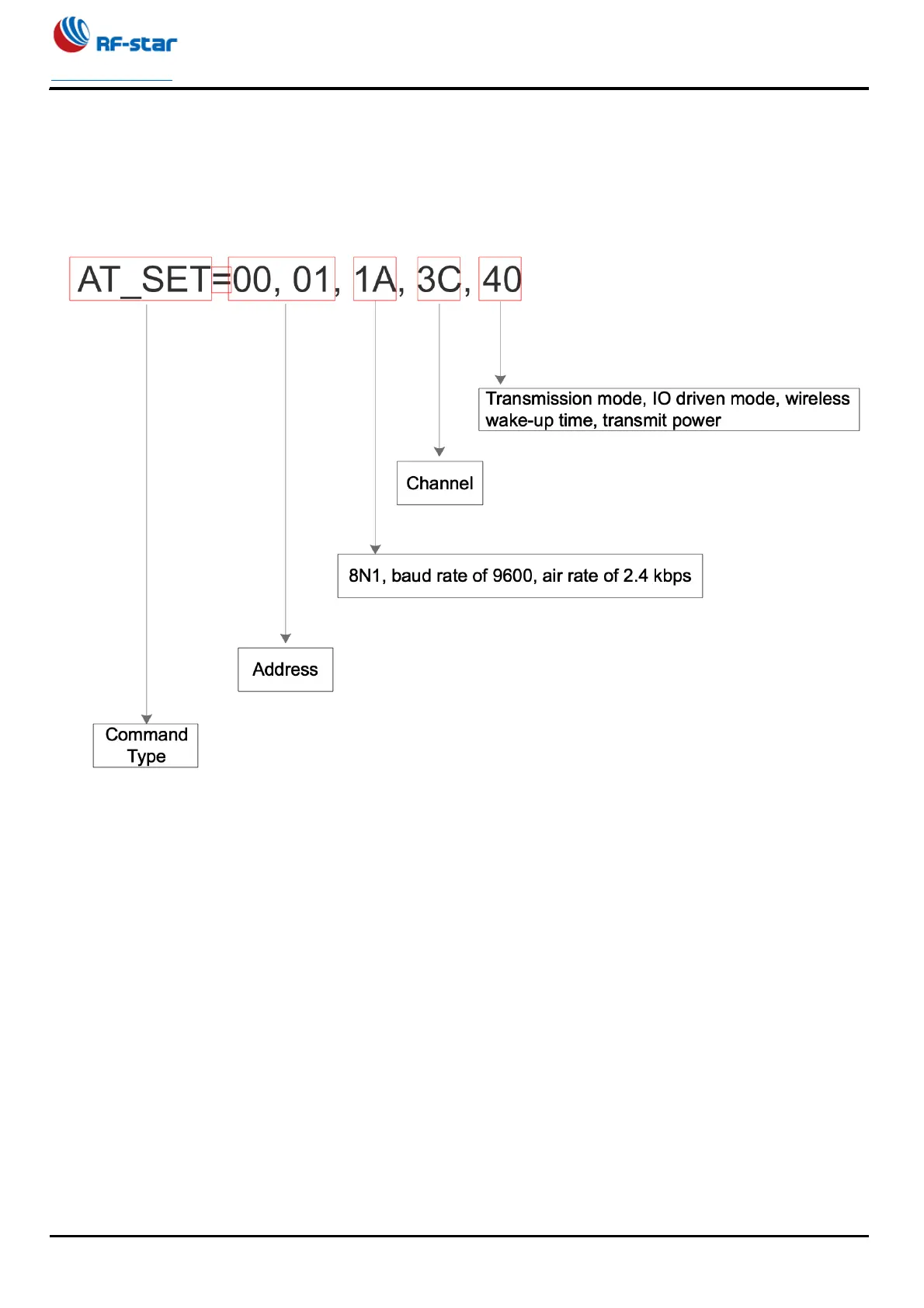
There are five groups in total, two bytes in each group, and 8 bits in each group.
For example: AT_SET=00,01,1A,3C,40
In normal mode, wake-up mode or sleep mode, you can directly input " AT_SET=00,01,1A,3C,40" in the serial port
assistant command box in ASCII, and press send button to get the module response. If the input is correct, the data just
entered will be returned.
7.2.2 Detailed Parameters
1. The first group of data represents the type of control command.
AT_SET represents the control command type, which is fixed to AT_SET and AT_USET.
AT_SET represents that the set parameters are saved after power off.
AT_USET represents that the set parameters are not saved after power failure.
2. The second group of data represents the module address.
By default [00 00], the module address range is 0 ~ 65535, and in Hex [00 00] ~ [FF FF]
3. The third group of data represents: serial parity bit, serial baud rate, and air rate of wireless signal.


 To Next Page