
 Need help?
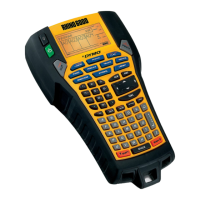
Do you have a question about the RHINO 6000 and is the answer not in the manual?
Instructions on how to insert the battery pack into the printer compartment.
Steps to connect the AC power adapter to the printer and a power outlet.
Guide on how to open the compartment and insert a label cassette correctly.
Procedures for removing an installed label cassette from the printer.
Steps for connecting the printer to a computer using a USB cable.
A walkthrough on operating the printer to create and print a sample label.
 General
| Model | Rhino 6000 |
|---|---|
| Print Resolution | 300 dpi |
| Keyboard Type | QWERTY |
| Print Technology | Thermal Transfer |
| Power Source | AC Adapter / Battery |
| Connectivity | USB |
| Label Type | Industrial Labels |
| Display | LCD |
| Supported Label Materials | Vinyl |
| Power Supply | AC Adapter |
| Label Compatibility | Industrial Labels |

 To Next Page
