4
4. Connecting the printer to your computer
Your printer connects to your computer using the USB connection located on the
top of the printer.
NOTE Do not connect the printer to your computer until prompted to do so during
the software installation.
To connect the printer to your computer
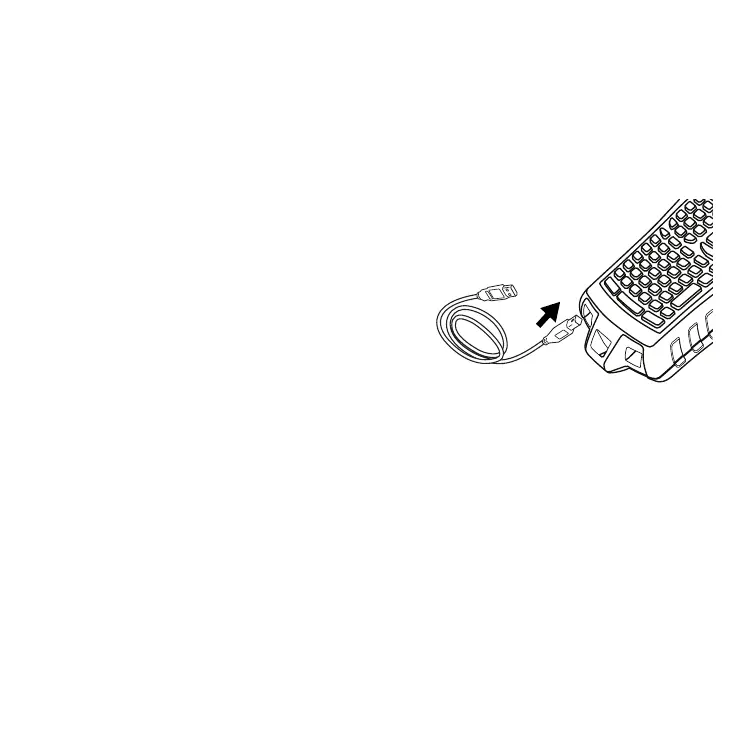
1. Plug the USB cable into the USB port on
the bottom of the printer. See Figure 5.
2. Plug the USB cable into a USB port
ONLY when prompted during the
software installation.
5. Installing the Software
To install the software
1. Insert the RHINO Connect Software CD into your CD-ROM drive. After a
few seconds, the installation screen appears. If the installation screen does
not appear:
a. Click Start and then Run on the Windows taskbar. The Run dialog
box appears.
b. Enter D:\setup.exe (where D is the CD-ROM drive letter) and click OK.
2. Follow the on-screen instructions.
3. When prompted by the installer, plug the USB cable into a USB port.


 To Next Page