70
R
i
c
o
h
C
o
.
L
t
d
.
h
t
t
p
:
/
/
w
w
w
.
r
i
c
o
h
.
c
o
m
/
M047 Series Training - Kriss-P2 /Model Kr-P2
Slide 70
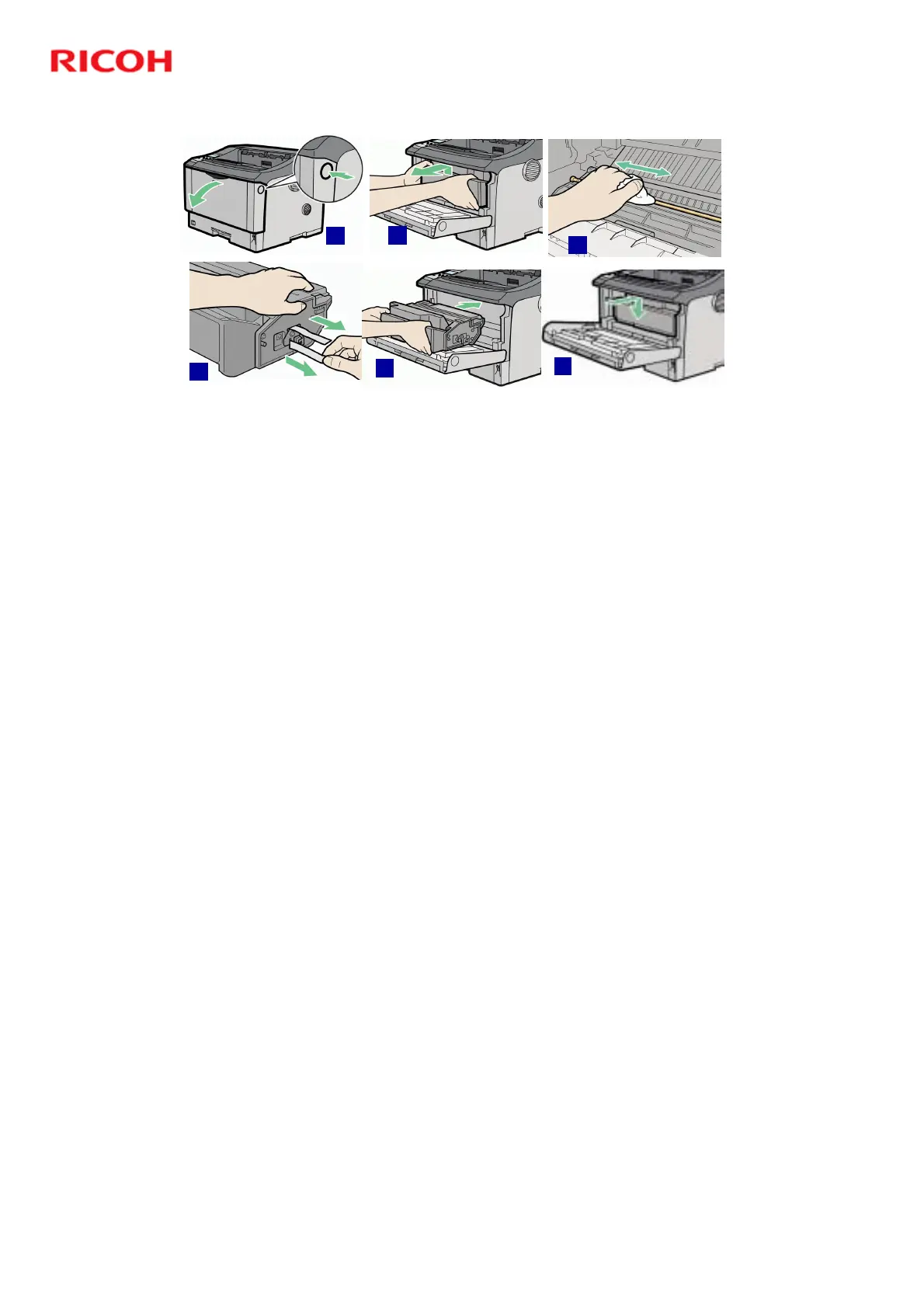
Replacing Print Cartridge
! Open front cover. [A]
! Lift & pull out Print Cartridge. [B]
! Wipe around metallic registration roller
with soft damp cloth. [C]
! Carefully pull out tape. [D]
! Insert cartridge into printer until it
stops. [E]
! Push down on tonner cartridge to
insure it's in correct position. [F]
! Close cover.
A
B
C
D
E
F
Note: Do not shake or shock print cartridge after pulling out toner seal in order to
avoid unwanted toner on paper surfaces, toner spillage, or printer failure.


 To Next Page
 Loading...