3.Troubleshooting
29
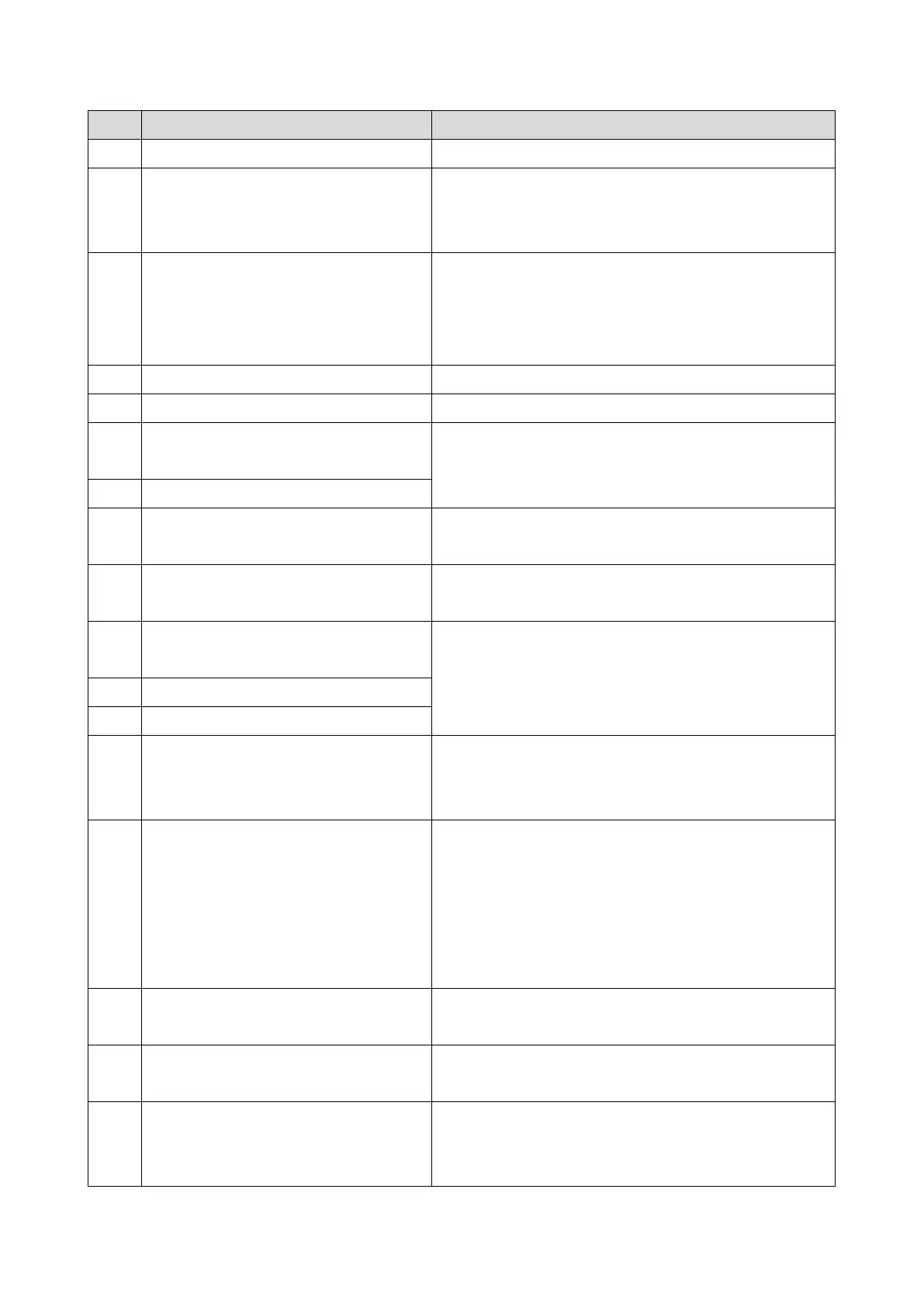
Code Meaning Suggested Cause/Action
task is full.
4-01 Line current was cut
• Check the line connector.
• Check for line problems.
• Replace the FCU.
4-10 Communication failed because of an ID
Code mismatch (Closed Network) or Tel.
No./CSI mismatch (Protection against
Wrong Connections)
• Get the ID Codes the same and/or the CSIs
programmed correctly, then resend.
• The machine at the other end may be defective.
5-00 Data reconstruction not possible
• Replace the FCU
5-10 DCR timer expired
• Replace the FCU.
5-20 Storage impossible because of a lack of
memory
• Temporary memory shortage.
• Test the SAF memory.
5-21 Memory overflow
5-23 Print data error when printing a substitute
rx or confidential rx message
• Test the SAF memory.
• Ask the other end to resend the message.
5-25 SAF file access error
• Replace an SD card or HDD.
• Replace the FCU.
6-00 G3 ECM - T1 time out during reception
of facsimile data
• Try adjusting the rx cable equalizer.
• Replace the FCU.
6-01 G3 ECM - no V.21 signal was received
6-02 G3 ECM - EOR was received
6-04 G3 ECM - RTC not detected
• Check the line connection.
• Check for a bad line or defective remote terminal.
• Replace the FCU.
6-05 G3 ECM - facsimile data frame not
received within 18 s of CFR, but there
was no line fail
• Check the line connection.
• Check for a bad line or defective remote terminal.
• Replace the FCU.
• Try adjusting the rx cable equalizer
Cross reference
• Rx cable equalizer - G3 Switch 07 (PSTN)
6-06 G3 ECM - coding/decoding error
• Defective FCU.
• The other terminal may be defective.
6-08 G3 ECM - PIP/PIN received in reply to
PPS.NULL
• The other end pressed Stop during communication.
• The other terminal may be defective.
6-09 G3 ECM - ERR received
• Check for a noisy line.
• Adjust the tx levels of the communicating machines.
• See code 6-05.



 To Next Page