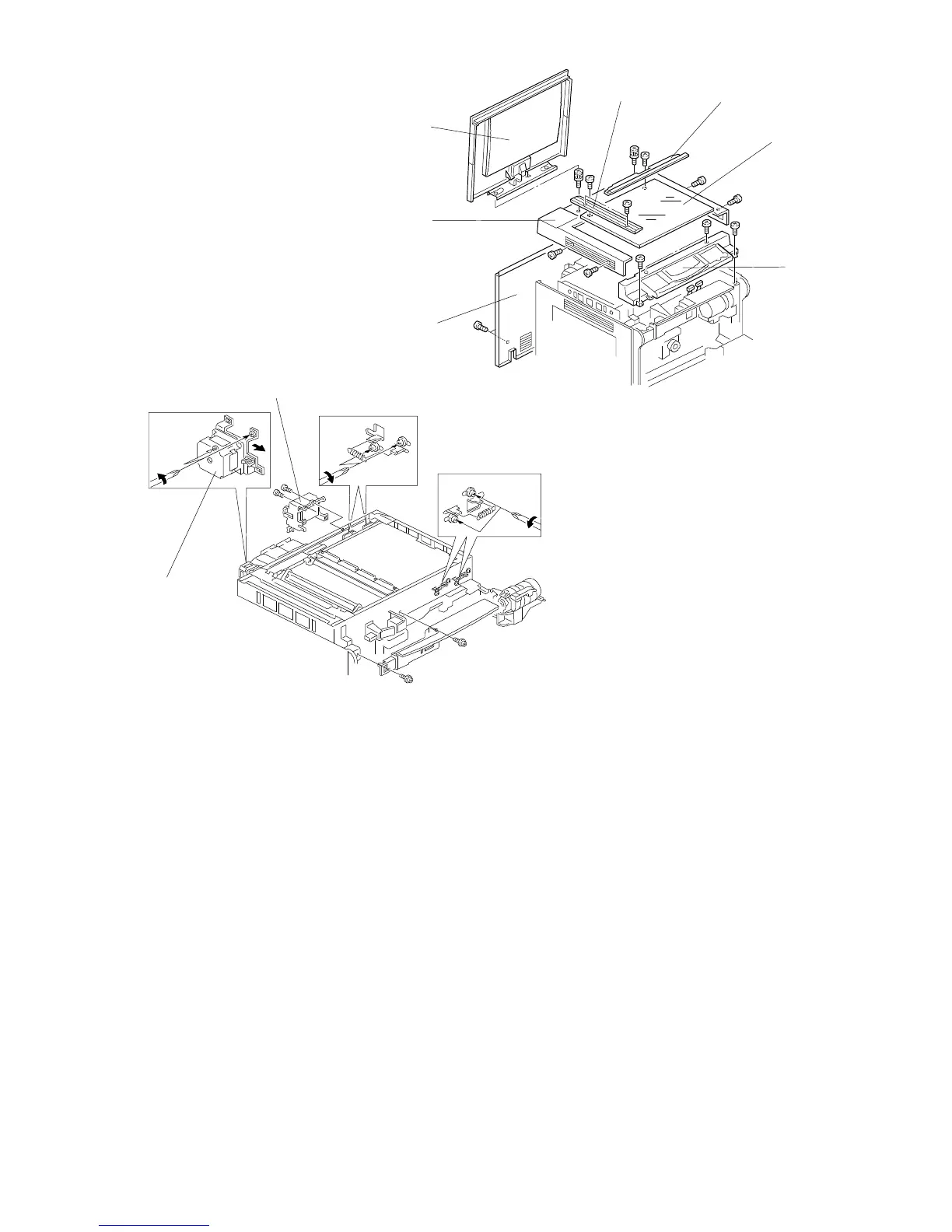
2.3 SCANNER DRIVE BELT REPLACEMENT
1. Remove the following parts:
2. Loosen the 4 screws securing the scanner drive motor assembly [H].
3. Remove the main control board bracket (4 screws), and remove the C/B
high voltage supply board assembly [I] (2 screws, 3 connectors and
1 clamp).
4. Loosen the screws securing the belt tension brackets [J] and remove all four
belt tension springs as shown.
[A]
[E]
[B]
[F]
[C]
[D]
[G]
[I]
[H]
[J]
[J]
• Platen cover [A] or DF
• Left scale [B] (2 shoulder
screws)
• Exposure glass [C]
• Operation panel [D]
• Top cover [E]
• Rear scale [F]
• Rear cover [G]
• Upper inner cover
FT5535/4527/4522 5-6 FSM













 To Next Page