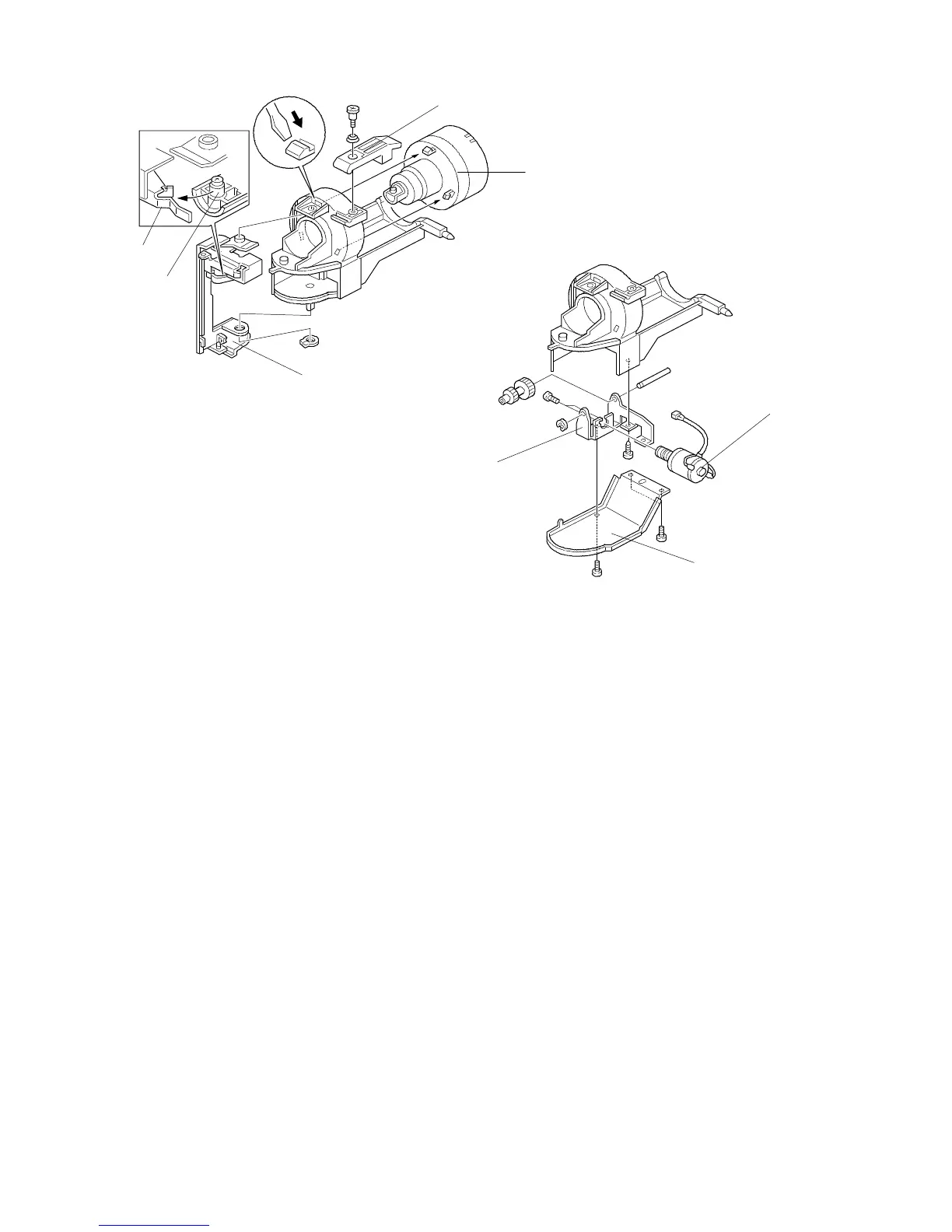
3.3 TONER SUPPLY MOTOR REPLACEMENT
1. Turn off the main switch and open the front cover.
2. Swing out the bottle holder and remove the toner bottle.
3. Remove the bottle holder from the copier (1 screw, 1 knob screw, and
1 connector).
4. Remove the bottle locking lever [A] (1 shoulder screw and 1 spring).
5. Remove the bottle rotating cover [B] by releasing the three hooks.
6. Remove the hinge bracket [C] from the bottle holder (1 C-ring).
7. Remove the bottom cover [D] (3 screws).
8. Remove the toner supply motor bracket [E] (1 screw) and replace the toner
supply motor [F] (1 E-ring and 1 gear shaft).
NOTE: When reinstalling the hinge bracket on the bottle holder, make sure
that the roller [G] slides into the notch [H] between the two guide rails
as shown.
[A]
[B]
[H]
[C]
[E]
[F]
[D]
FSM 5-15 FT5535/4527/4522













 To Next Page