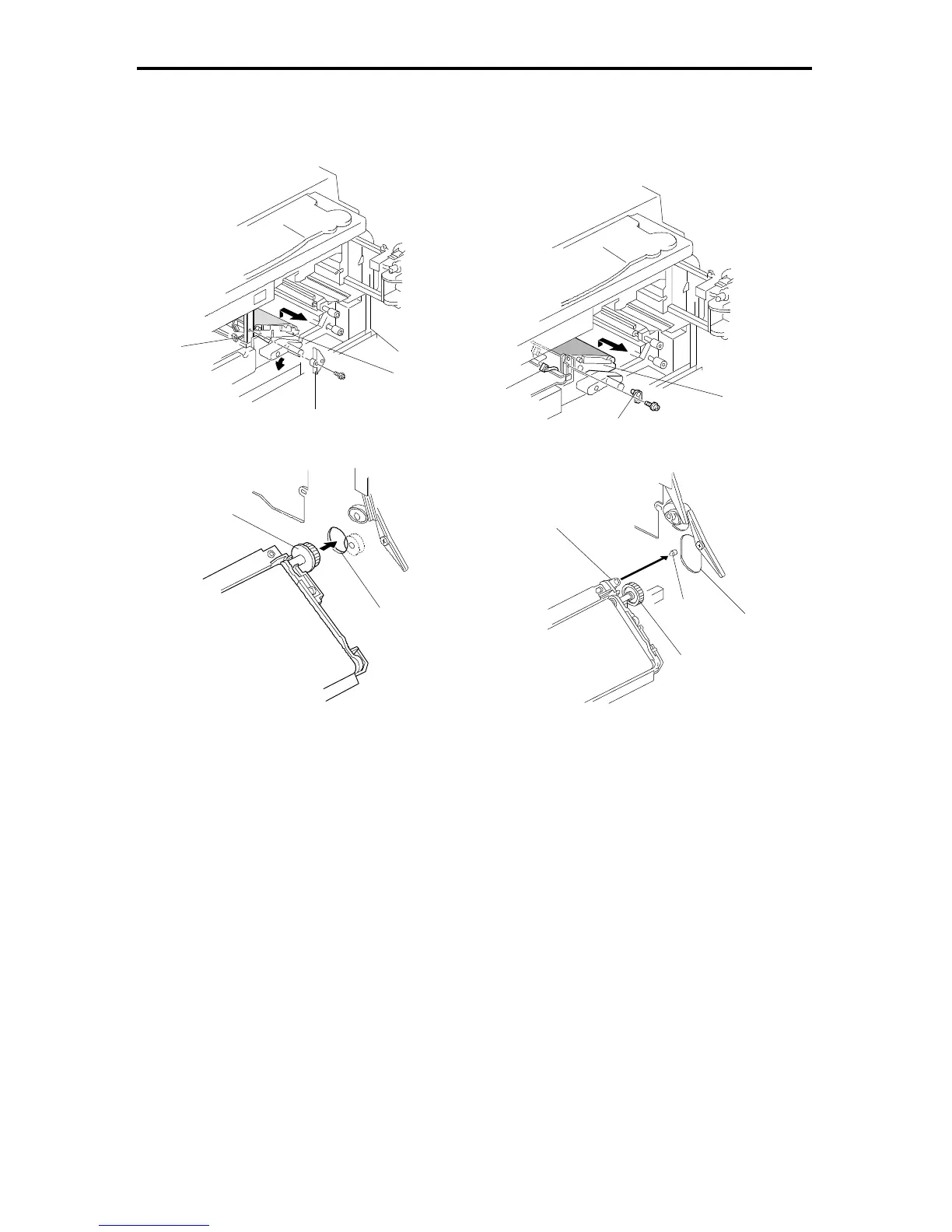
5. TRANSFER BELT UNIT
5.1 TRANSFER BELT UNIT REPLACEMENT
1. Remove the development unit, drum unit, and fusing unit
2. Disconnect the connector [A].
3. Remove the transfer belt positioning plate [B] (one screw).
4. Remove the transfer belt unit [C].
NOTE: Never touch the surface of the transfer belt.
5. A153, A155, and A156 copiers:
When reinstalling the transfer belt unit, align gear [D] and opening [E].
A157, A159, and A160 copiers:
When reinstalling the transfer belt unit, align opening [F] and positioning pin
[G] first. Then align gear [H] and opening [I].
– A157, A159, and A160 copiers
[A]
[C]
[B]
– A153, A155, and A156 copiers –
[E]
[D]
[A]
[B]
[C]
– A153, A155, and A156 copiers –
[G]
[F]
– A157, A159, and A160 copiers
[I]
FSM 5-29 FT5535/4527/4522













 To Next Page