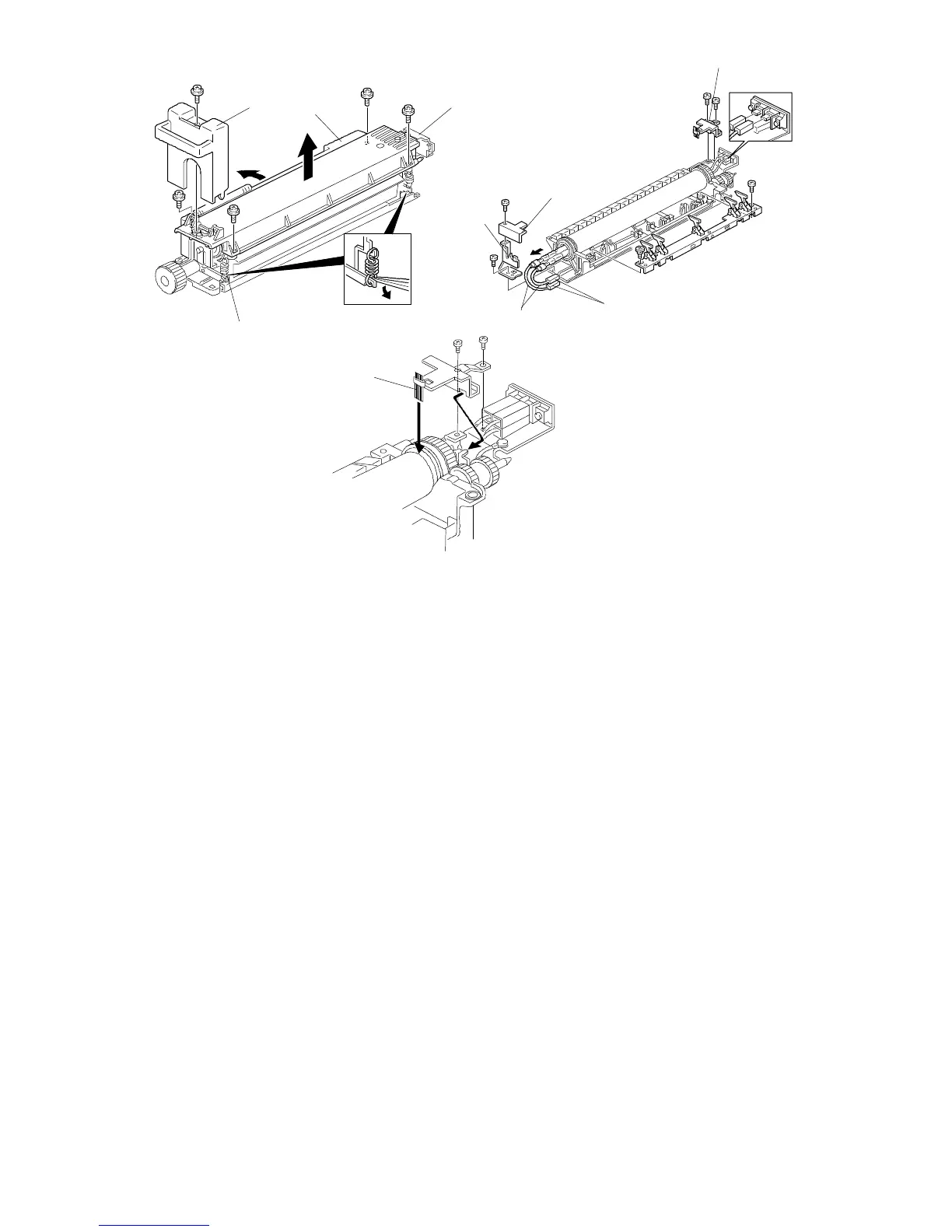
8.2 FUSING LAMP REPLACEMENT
1. Remove the fusing unit (see "Fusing Unit Removal").
2. Remove the fusing front cover [A] (1 screw).
3. Remove the pressure springs [B].
4. Open the fusing exit cover [C] and remove the fusing upper unit [D] (4
screws).
5. Remove the upper front lamp holder [E] (1 screw).
6. Remove the rear lamp holder [F] (2 screws).
7. Disconnect the lamp connectors [G].
8. Remove the lower front lamp holder [H] (1 screw) and remove the two lamps
[I].
NOTE: 1) Do not touch the fusing lamps with bare hands.
2) When reinstalling the rear lamp holder, make sure that the antistatic
brush [J] contacts the hot roller and pressure roller shown.
3) The standard pressure spring position is at the upper position.
[A]
[C]
[D]
[B]
[J]
[E]
[I]
[H]
[F]
[G]
FSM 5-43 FT5535/4527/4522













 To Next Page