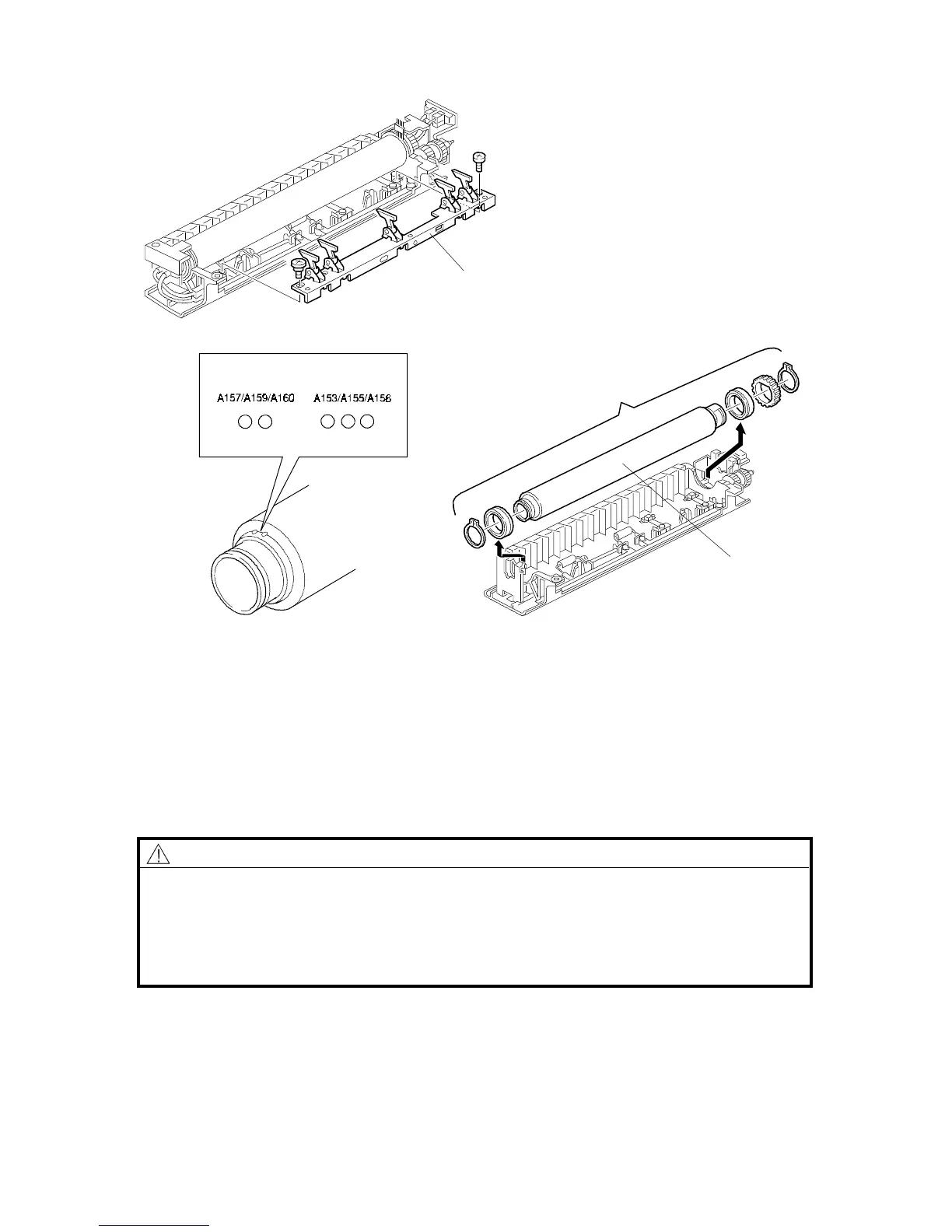
8.3 HOT ROLLER REPLACEMENT
1. Remove the fusing lamps (see "Fusing Lamp Replacement").
2. Remove the hot roller stripper bracket [A] (2 screws).
3. Remove the hot roller assembly [B].
4. Replace the hot roller [C] (2 C-rings, 1 gear, 2 bearings).
NOTE: 1) Before installing the hot roller, peel off 3 cm (1 inch) from both ends of
the protective sheet on the new one.
2) The standard pressure spring position is at the upper position.
CAUTION
The hot rollers for the A153/155/156 are different from the hot rollers for
the A157/159/160. To distinguish between the two types of hot roller, look
at the end of the roller. The A153/155/156 roller has three small dot-like
indentations at one end, and the A157/159/160 has two. Do not confuse
the two, or the machine may be damaged.
Rev. 7/95
[A]
[C]
FT5535/4527/4522 5-44 FSM













 To Next Page