4.2 INSTALLATION PROCEDURE
CAUTION
Unplug the copier power cord before starting the following procedure.
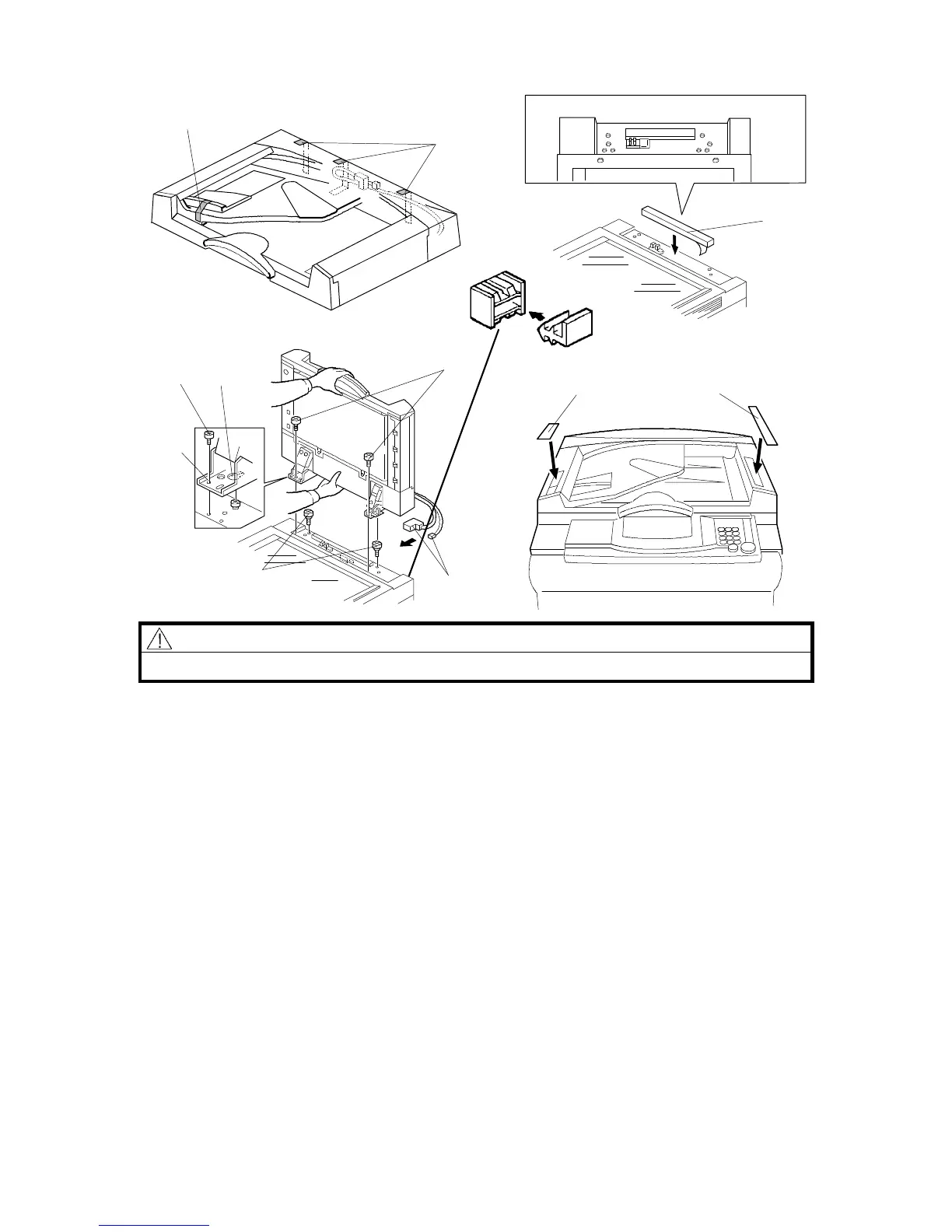
1. Remove the strips of tape [A].
2. Attach the sponge retainer [B] to the top cover of the copier as shown.
3. Tighten the two stud screws [C].
4. Mount the ARDF by aligning the holes [D] in the ARDF and the stud screws
[C], then slide the ARDF to the front as shown.
NOTE: When mounting the ARDF, hold it by hand as shown in the
illustration. Holding it in another way may damage the ARDF.
5. Screw the two M4 x 10 screws [E] into the holes [F] and tighten them.
6. Remove the Plug [P] from the rear of the copier.
7. Connect the connectors [G] into the socket on the rear of the copier.
8. All models except for the A156: Attach the symbol explanation decal [H]
and the combine originals explanation decal [I] to the ARDF as shown.
Rev. 10\11\95
⇒
[A]
[A]
[B]
[E]
[D]
[E]
[G]
[C]
[F]
[I] [H]
Fiber Connector Plug [P]
⇒
FT5535/4527/4522 7-6 FSM













 To Next Page