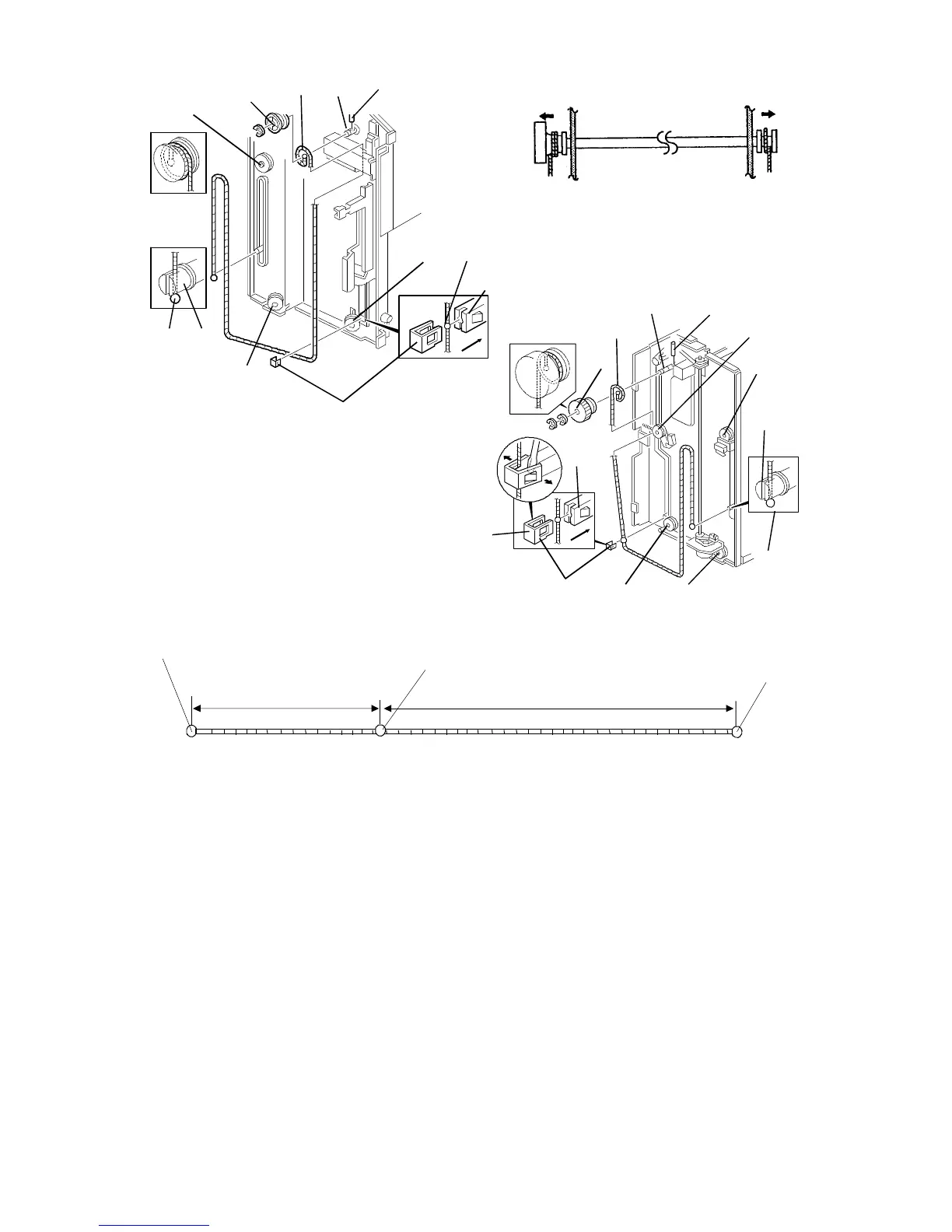
6.4.2 Wire Installation
1. Put the bead [A] at the end of the wire in the slot in the wire pulleys [B, C],
2. Insert the pin [D] into the bin drive shaft [E] and then push in the wire pulleys.
3. Wind the wire one and a half turns as shown and put the bead [F] in the slot
in the bin support block [G].
4. Put the bin support block stopper [H] on the bin support block.
5. Run the wires over the pulleys [Front wire: I/J/K, Rear wire: L/M/N/O] and put
the bead [P] in the slot in the bin lift shaft [Q].
6. Reassemble the sorter stapler.
NOTE: When installing the bin drive bracket, make sure that the bin lift wires
are wound from the inner side to the outer side of the pulleys as
shown.
599mm (23.58")
877.6 mm (34.55")
[A]
[F]
[P]
Rear
Front
- Front -
[G]
[F]
[H]
[J]
[Q]
[P]
[I]
[D]
[K]
[B]
[A]
[E]
[G]
[C]
[A]
[O]
[Q]
[M]
[H]
[P]
[L]
[F]
FT5535/4527/4522 10-24 FSM













 To Next Page