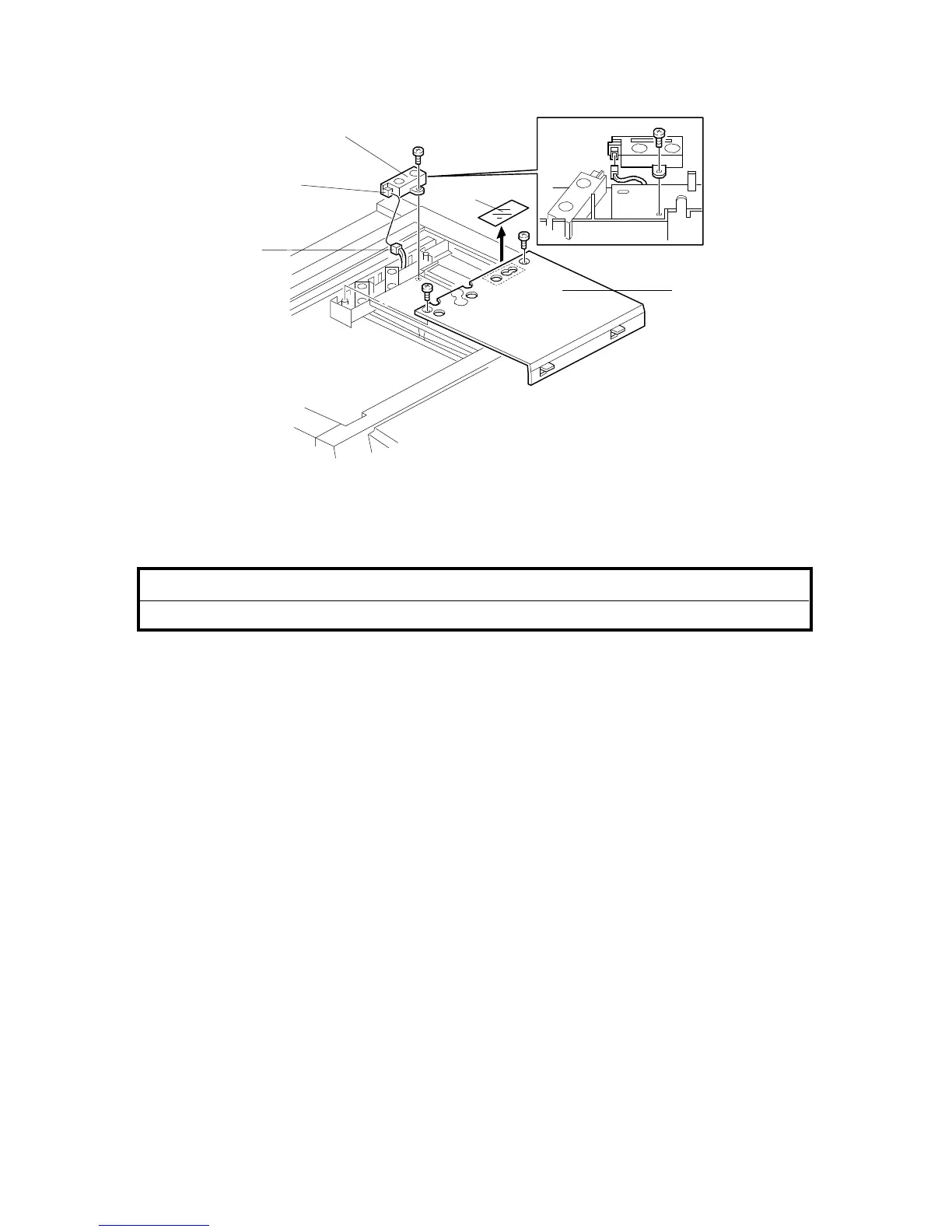
2.7 ORIGINAL LENGTH SENSOR FOR APS (OPTION ONLY FOR
THE LT/DLT VERSION)
NOTE: To detect 11" x 15" size paper by APS in platen mode, an optional
original length sensor is required. The sensor is available as a service
part. (See the parts catalog.)
!
CAUTION
Unplug the copier power cord before starting the following procedure.
1. Remove the exposure glass. (See "Replacement and Adjustment - Exposure
Glass Removal".)
2. Remove the lens housing cover. (See "Replacement and Adjustment -
Scanner Drive Belt Replacement".)
3. Pull out the light yellow connector [A] from under the optical rail.
4. Connect the light yellow connector [A] to the connector [B] of the optional
sensor [C].
5. Mount the optional sensor [C] as shown (1 tapping screw).
6. Remount the lens housing cover [D] (2 tapping screws), and remove the light
shielding mylar [E].
7. Enter SP mode, and input "1" as the SP4-302 setting. (See "Service Tables -
Service Program Mode".)
[A]
[E]
[C]
[D]
[B]
FSM 3-23 FT5535/4527/4522













 To Next Page