User Tools
58
3
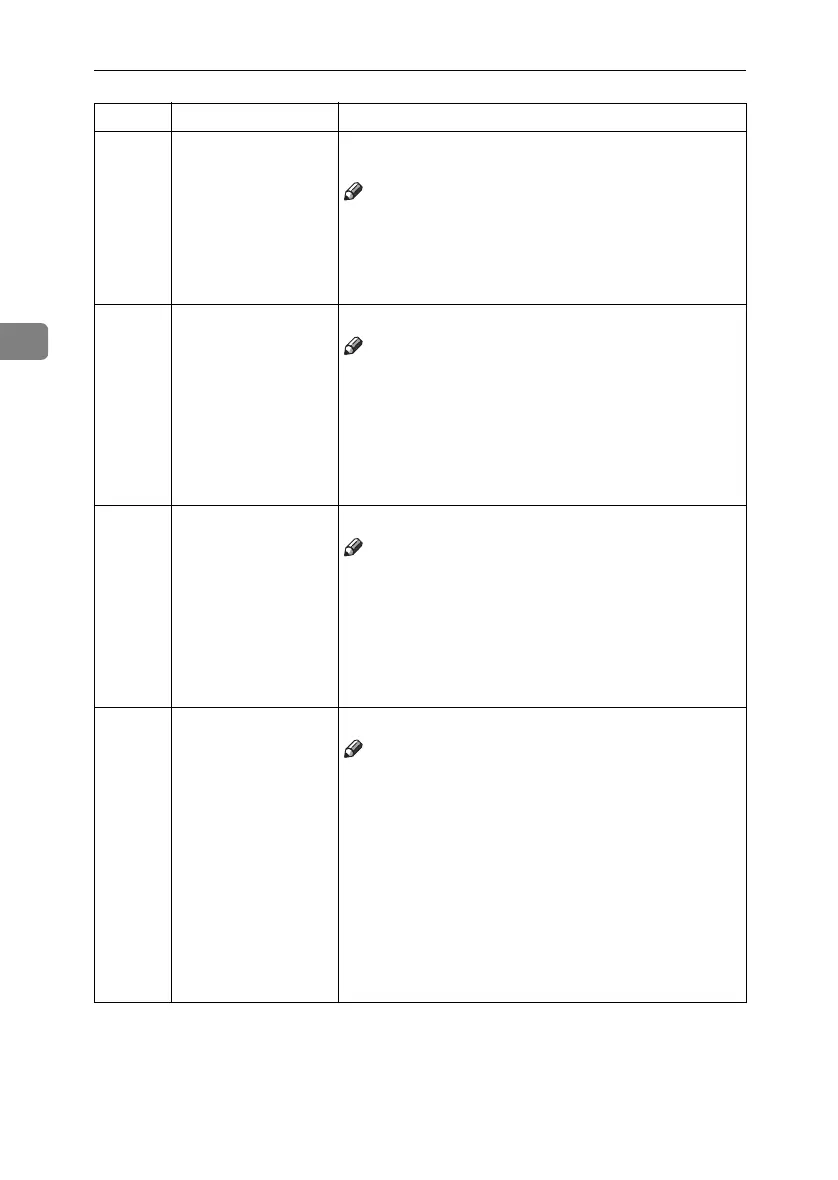
8 Buzzer On You can select whether the buzzer sounds when you press
a key.
Note
❒ Default: oFF
❒ Adjustment value:
• 0: oFF
• 1: on
9 Image Density You can select the image density at power on.
Note
❒ Default: Standard
❒ Adjustment value:
• 1: Standard
• 2: Dark
• 3: Darker
• 4: Light
10 Original Type You can select the original image mode at power on.
Note
❒ Default: Letter mode
❒ Adjustment value:
• 1: Letter mode
• 2: Letter/Photo mode
• 3: Photo mode
• 4: Tint mode
11 Ratio Priority You can select the primary reproduction ratio at power on.
Note
❒ Default: 100%
❒ Adjustment value:
• 1: 65%
• 2: 74%
• 3: 77%
• 4: 93%
• 5: 100%
• 6: 121%
• 7: 129%
• 8: 155%
No. Mode Function
PinkGold-F_V4_FM.book Page 58 Tuesday, May 27, 2003 3:33 PM



 To Next Page