Copier Functions
35
2
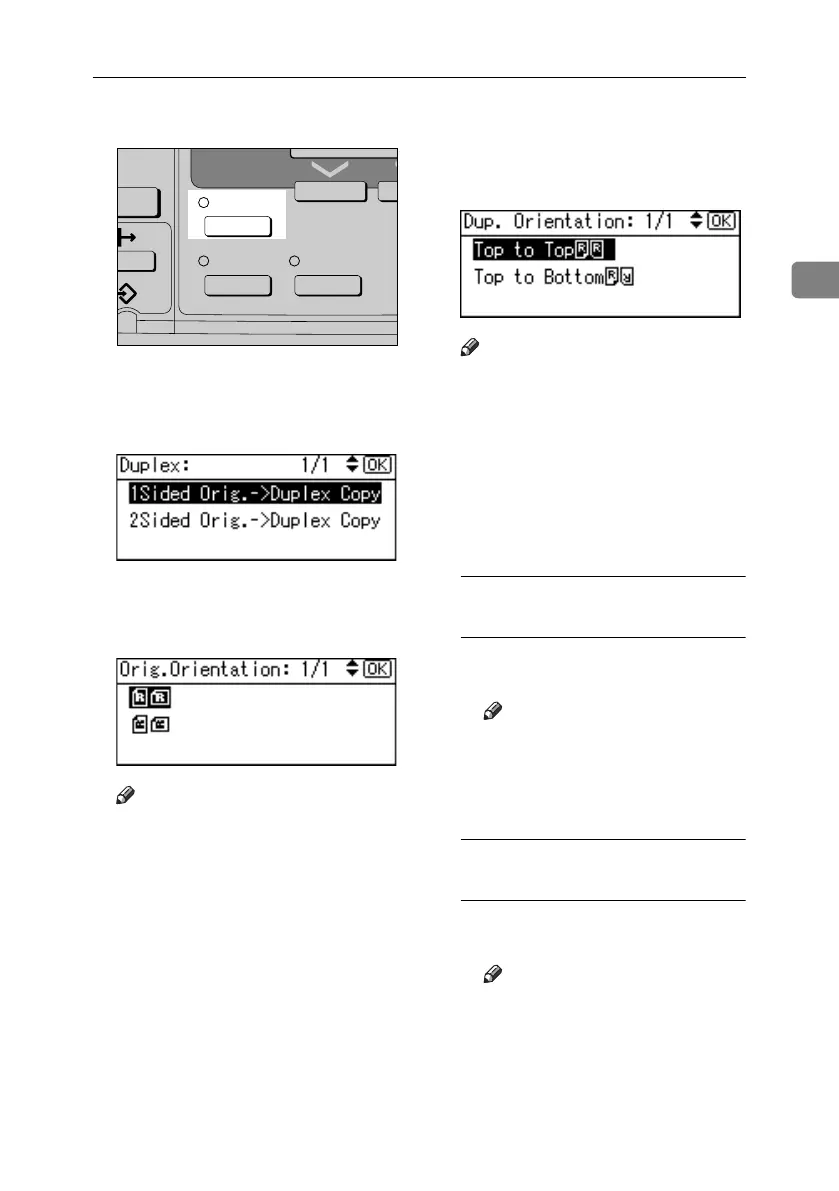
A Press the {Duplex} key.
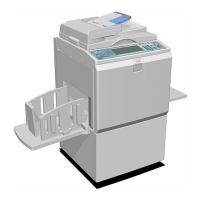
B Select the setting of original and
copy type using {U} or {T}, and
then press the {OK} key.
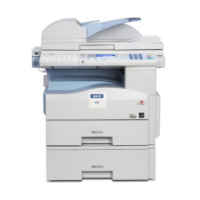
C Select the orientation using {U}
or {T}, and then press the {OK}
key.
Note
❒ You can select the orientation of
originals and copying paper
when [Always Specify] is speci-
fied for [Orientation] under [Copi-
er Features] (User Tools). See
p.54 “Orientation”. If it was not
specified for, proceed to step
E
.
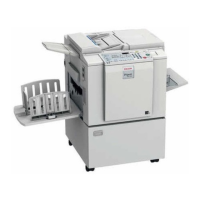
D When selecting two-sided copy-
ing, select the orientation [Top to
Top] or [Top to Bottom] using {U} or
{T}, and then press the {OK} key.
Note
❒ To change the copy orientation,
select the original icon whose
orientation is that required. See
p.34 “Original orientation and
completed copies”.
The “
Programmed” message ap-
pears.
E Place your originals.
When placing originals on the
exposure glass
A Place the original, and then
press the {Start} key.
Note
❒ Start from the first page to be
copied.
B Place the next original, and
then press the {Start} key.
When placing a stack of originals
in the ADF or ARDF
A Place your originals, and then
press the {Start} key.
Note
❒ Place the first page on top.
inter
Combine/
Series
Sort
APE034S
Duplex
KirC3L_copy_F-EN_FM.book Page 35 Tuesday, November 1, 2005 12:12 PM



 To Next Page