2003484_A
For more information visit www.rimage.com/support
9
Operate the Catalyst System
This section provides you with the information needed to ready the
Catalyst system to produce discs.
Power On the Catalyst System
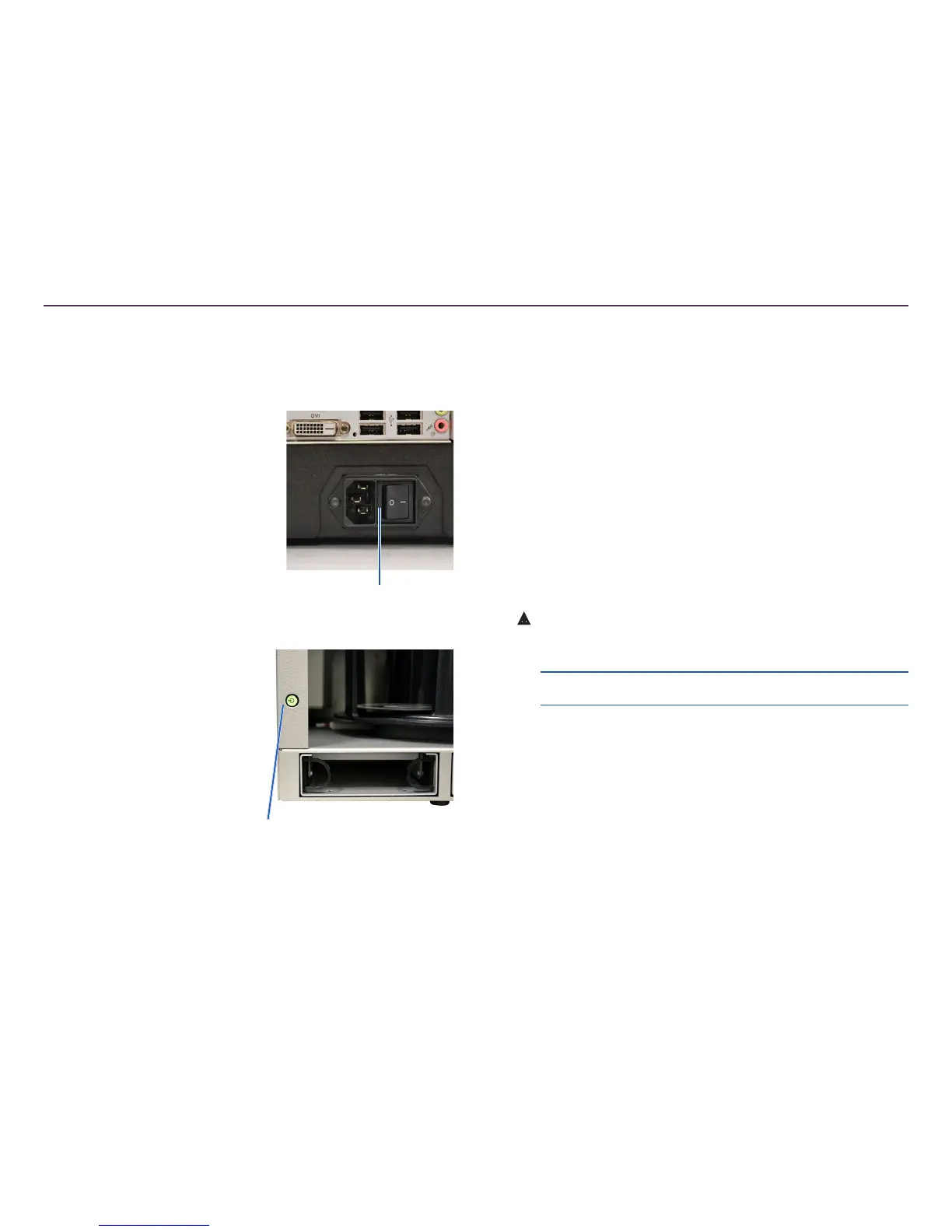
1. Press the power switch on the
rear of the autoloader.
• If you have a Catalyst 6000,
the system is powered on.
• If you have a Catalyst
6000N, continue with
step 2.
2. On the front of the autoloader,
press the PC power button to
power on the embedded PC. The
autoloader and embedded PC
power on.
Power Off the Catalyst System
• If you have a Catalyst 6000
• Close all open applications
• Press the main power switch on the rear of the autoloader to
power off the Catalyst system
• If you have a Catalyst 6000N
• Close all open applications
• Shutdown from Windows Start Menu
-or-
• Briey press and release the PC power button on the front of
the Catalyst system. This shuts down the software, Windows,
and the embedded PC.
ȸ
Caution: Do not press and hold the PC power button. If you
press and hold the PC power button, the embedded PC will not
shut down properly. This may cause data loss or corruption.
Note: It takes approximately 30 seconds for the system to
power off.
Pause the Catalyst System
1. Open the front door to pause operation.
2. Close the front door to resume operation.
Power Switch
PC Power Button


 To Next Page