EasyManua.ls Logo

ring Transformer - User Manual

ring Transformer
11 pages
Print Icon
To Next Page IconTo Next Page
Loading...
Transformer
Smart Lighting
Question and Answer IconNeed help?

Do you have a question about the ring Transformer and is the answer not in the manual?

Summary

Safety Information and Warnings

Electrical Hazard and Installation Precautions

Details risks of electric shock, proximity to water, GFCI protection, weatherproof receptacles, and mounting height.

Usage Guidelines and Restrictions

Covers wattage limits, compatible lights, cable types, and power supply connection restrictions.

Initial Setup and Configuration

Download and Install the Ring App

Guide to downloading the Ring app for setup and management of the Transformer.

Set Up the Ring Bridge

Instructions for connecting the Ring Transformer to the Ring app via the Bridge.

Physical Installation of the Transformer

Choose a Mounting Location

Guidance on selecting a suitable location near a GFCI outlet and marking screw holes.

Install Mounting Screws

Instructions for driving top screws with specific spacing and drilling pilot holes for anchors.

Mount the Transformer Unit

Steps to align and secure the Transformer to the mounting surface using screws.

Wiring and Connecting Landscape Lights

Select Appropriate Low Voltage Cable

Advice on choosing and purchasing low voltage cable for landscape lighting.

Cable Gauge and Wattage Calculation

Chart for selecting cable gauge based on wire length and total wattage, and calculating total fixture wattage.

Connect Cable to Transformer Terminals

Procedure for splitting, stripping, and connecting the cable wires to the transformer's common and voltage terminals.

Run and Connect Fixture Cables

Guide on routing cable to fixtures and connecting the light fixtures to the cable.

Final Setup and Operation

Plug in the Transformer

Requirement to connect the Transformer to a covered, weatherproof GFCI protected receptacle.

Pair Transformer with Ring App

Steps for the Transformer's light to flash blue, indicating readiness for pairing with the Ring app.

Complete App-Based Setup

Instructions to select Smart Lighting in the app and follow prompts until the Transformer light turns solid blue.

Conceal Wiring and Troubleshoot

Methods for hiding the cable and guidance on resetting the Transformer if needed.

Overview

The Ring Transformer Smart Lighting device is designed to integrate landscape lighting systems with the Ring smart home ecosystem, allowing users to control their outdoor lights via the Ring app.

Function Description:

The Ring Transformer acts as a smart controller for low-voltage landscape lighting. It connects to existing 12V or 15V landscape lights (including LED and halogen types) and enables smart features such as scheduling, remote control, and integration with other Ring devices through the Ring Bridge. The device itself does not come with low-voltage cable or light fixtures, which must be purchased separately.

Important Technical Specifications:

  • Maximum Wattage Load: 200 watts. Users must ensure that the combined total wattage of all connected fixtures does not exceed this limit.
  • Voltage Compatibility: Designed for use with 12V or 15V landscape lights.
  • Cable Compatibility: Uses common gauge sizes of CSA or UL approved low voltage cable (12-16 AWG). The manual provides a chart to help determine the appropriate wire gauge based on wire length and total light wattage. For wire lengths over 100 feet and total wattage over 100 watts, a 15V Tap is recommended with 12 AWG cable. For all other cases, a 12V Tap is recommended.
  • Power Source: Must be connected to a covered, weatherproof Class A GFCI protected receptacle.
  • Installation Height: Must be installed greater than 1 foot (18 inches recommended for top screws) above ground level.
  • Proximity to Water: Cannot be mounted within 10 feet (3.0 meters) of a pool, spa, or fountain.
  • Connectivity: Requires a Ring Bridge for integration with the Ring app and other Ring devices.
  • Power Supply: The device is a transformer, converting standard household voltage to low voltage for landscape lighting.

Usage Features:

  • Smart Control: Once set up with the Ring app and Ring Bridge, users can control their landscape lights remotely, set schedules, and integrate them into existing Ring routines.
  • Easy Setup: The setup process involves downloading the Ring app, setting up the Ring Bridge, mounting the Transformer, connecting the low-voltage cable to fixtures, and then plugging in the Transformer.
  • Mounting: The Transformer is mounted to a surface using screws. For masonry or drywall, pilot holes and anchors are required.
  • Cable Connection: The low-voltage cable is split and stripped, with one wire fed into the Common terminal and the other into either the 12V (center) or 15V (right) terminal, depending on the system's total wattage.
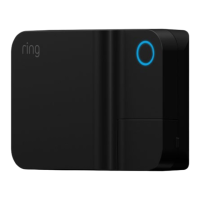
  • Indicator Light: A light around the button on the front of the Transformer indicates its status: flashing blue for pairing mode, solid blue for complete setup. If the light is white after plugging in, pressing and releasing the button will initiate pairing mode (flashing blue).
  • Manual Test: Users can press the round button on the Transformer once to test the lights; the circle will turn white, and the light fixtures will illuminate.
  • Cable Concealment: After installation, the low-voltage cable can be buried in a shallow trench (up to 6 inches deep) or covered with mulch in areas like flower beds.

Maintenance Features:

  • Reset Button: The Transformer includes a reset button located behind its access door. If the light around the front button is not illuminated when plugged in, pressing this button may reset the device. If the reset button pops up again, users should double-check the total wattage of their fixtures to ensure it is below the 200W maximum.
  • GFCI Protection: The requirement for a Class A GFCI protected receptacle ensures electrical safety, providing protection against ground faults.
  • Professional Installation Recommendation: For users uncomfortable or inexperienced with electrical work, the manual recommends hiring a licensed electrician for proper installation, especially if a suitable GFCI protected receptacle is not available.
  • Cable Management: Users are advised to leave a little extra cable at each fixture for future adjustments and to ensure the power unit and cord do not interfere with completely closing the receptacle cover.
  • Warranty and Support: Ring provides customer support via phone and online resources (ring.com/help, ring.com/callus) and offers warranty information (ring.com/warranty) and patent details (ring.com/patents).

ring Transformer Specifications

General IconGeneral
Brandring
ModelTransformer
CategoryController
LanguageEnglish