Rinnai Tankless Water Heater Installaon and Operaon Manual 43
SETTING
#
SETTING
DESCRIPTION
SELECTION
A
c
E F
08
Cascade Secondary (1-23) Primary
09
Units in Standby
(Cascade)
1 2 3 4 5 6
Parameter Sengs (Cascade Communicaon)
Refer to the parameter seng secon of this manual for instrucons on how to access and change parameter sengs.
08 Cascade:
Primary: Select the water heater intended to be the Primary water heater for cascade communicaon. Set the
parameter seng for this water heater to “Primary” (08 ).
NOTE: Controller will display the set temperature for the system.
Secondary: Factory Default seng for each water heater is set to “Secondary”. Parameter adjustment is only
needed on the water heater idened as “Primary”.
NOTE: Controller will display “- - -”.
09 Units in Standby:
Adjust the parameter seng of the primary unit to set the number of water heaters in standby. Standby units
will maintain operaon with the water ow control valve in the open posion. The remaining water heaters will
maintain the water ow control valve in the closed posion.
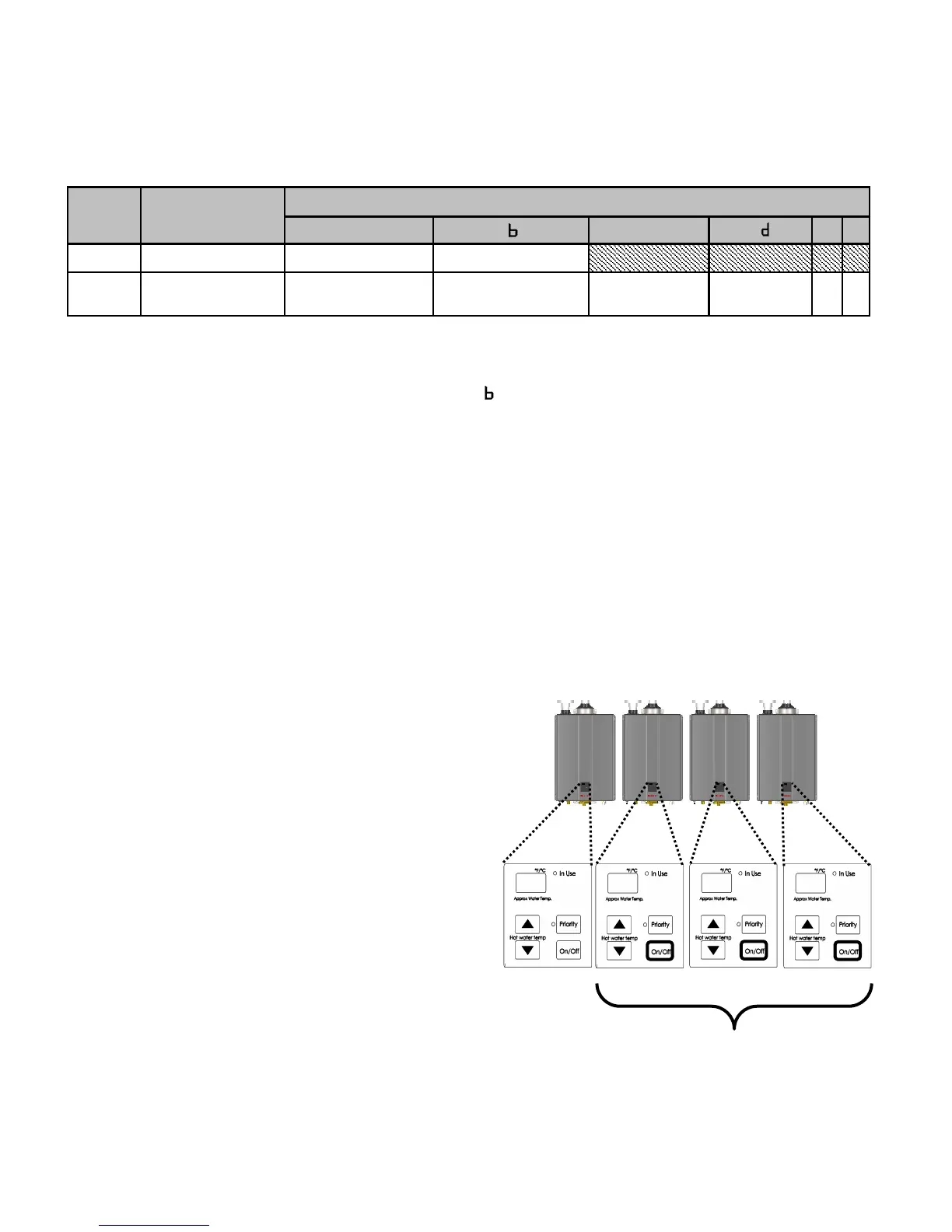
Seng Secondary ID
Aer idenfying the “Primary” water heater in the
parameter sengs, set the Secondary ID for all re-
maining water heater in the system by pressing the
“On/O” buon on the controller.
When ID seng is successful, the controller display
will change from “- - -” to the newly set ID number.
140 -01
-02
-03
Secondary 01
Primary Water
Heater
Secondary 02 Secondary 03
Idenfy Secondary ID by pressing
“On/O”
Programming Cascade Communicaon





 To Next Page