54 Rinnai Tankless Water Heater Installaon and Operaon Manual
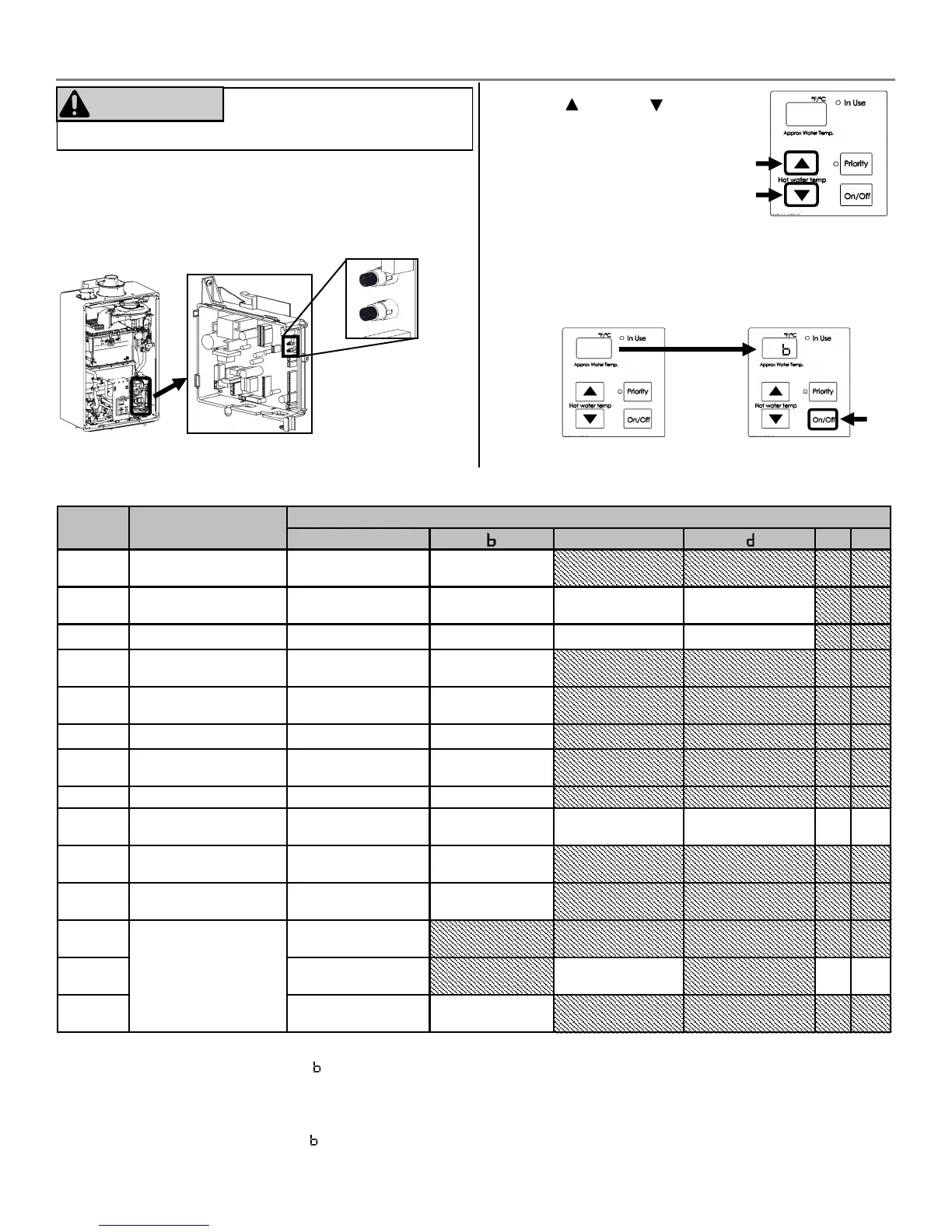
Parameter Sengs Table
SETTING
#
SETTING
DESCRIPTION
SELECTION
A
c
E F
01
Maximum Set
Temperature
140° F 185° F
02
High Altude
(Installaon Locaon)
0 - 2,000
(0 - 610 m)
2,001 - 5,400
(610 - 1,646 m)
5,401 - 7,700
(1,646 - 2,347 m)
7,701 - 10,200
(2,347 - 3,109 m)
03
Service Soon
1
Disabled 0.5 Year 1 Year 2 Years
04
Recirculaon Sengs
No
Recirculaon
Recirculaon
(Dedicated)
05
Recirculaon Mode
2
Comfort Economy
06
Control Switch
BMS
3
Air Handler (AH)
07
Units in Standby
(EZ Connect)
2 1
08
Cascade Secondary Primary
09
Units in Standby
(Cascade)
4
1 2 3 4 5 6
10
Gas Type
(Factory Set)
NG LPG
11
Maximum Flow Rate
5
Standard High
12
Commercial
without Pump (CU)
Water Heater Model
(Factory set values
and not adjustable)
13
CU199
(REU-N3237)
CU160
(REU-N2530)
14
Internal
(Indoor)
External
(Outdoor)
Default is A for all sengs below except 10, 12, 13, and 14 which are factory set.
1
See secon “3.13 Service Indicator (Service Soon, 55)” for more informaon.
2
Seng 05 is available only if seng 04 is selected.
Comfort mode cycles the pump more frequently, ensuring the loop temperature remains higher (but also uses more energy).
Economy mode cycles the pump less oen, using less energy to maintain the circulaon loop temperature.
3
BMS = Building Management System
4
Seng 09 is available only if seng 08 is selected.
5
Selecng “High” will increase the water ow rate to the maximum capacity.
4. Use the (Up) and (Down)
buons on the controller to
select a seng number (see
Parameter Sengs Table
below).
Certain elements of the installaon may require adjusng
the parameters of the tankless water heater.
To adjust the parameters:
1. Locate the PC Board (lower right side of unit).
2. Locate the two push buons (A and B) on the PC Board.
3. Press the “A” buon for 1 second.
5. Once the desired seng number is selected, use the
“On/O” buon on the controller to change the
selecon for the seng number.
Example: Display will change from 01A to 01b for
Maximum Temperature seng (as shown below).
6. To exit the parameters, press the “A” buon for 1 second.
DO NOT adjust parameter sengs
unless specically instructed to do so.
WARNING
3.12 Parameter Sengs
A
B
0 1 A
0 1 B





 To Next Page