LuMIN8 Installation Instructions
Stand Alone Mode (SW5 OFF):
Select the triggering command that will activate the sounder.
ON: Positive trigger
OFF: Negative trigger
BUS (Serial) Mode (SW5 ON):
Defines the BUS protocol when SW5 is set to BUS.
ON (PRO): Connection to ProSYS Freecom.
OFF (ACT): Connection to GT (NovaActive) control panels.
Used to connect an internal 4K7 resistor to TRIG terminal (only used for Stand Alone
mode).
ON (MON): (Monitored) An internal 4K7 resistor is connected between the TRIG terminal
and the HOLD – (0V) terminal.
OFF (NM): Not monitored. No 4K7 resistor disconnected from TRIG and HOLD – (0V)
terminals.
Note:
See Wiring detail for two bell boxes wired in Standard mode.
Use this switch to ease installation of tamper in stand alone mode
ON (TMF): Connects the TMPF terminal to HOLD – (0V)
OFF (EXT): TMPF terminal is open.
Note:
See Wiring detail for two bell boxes wired in standard mode.
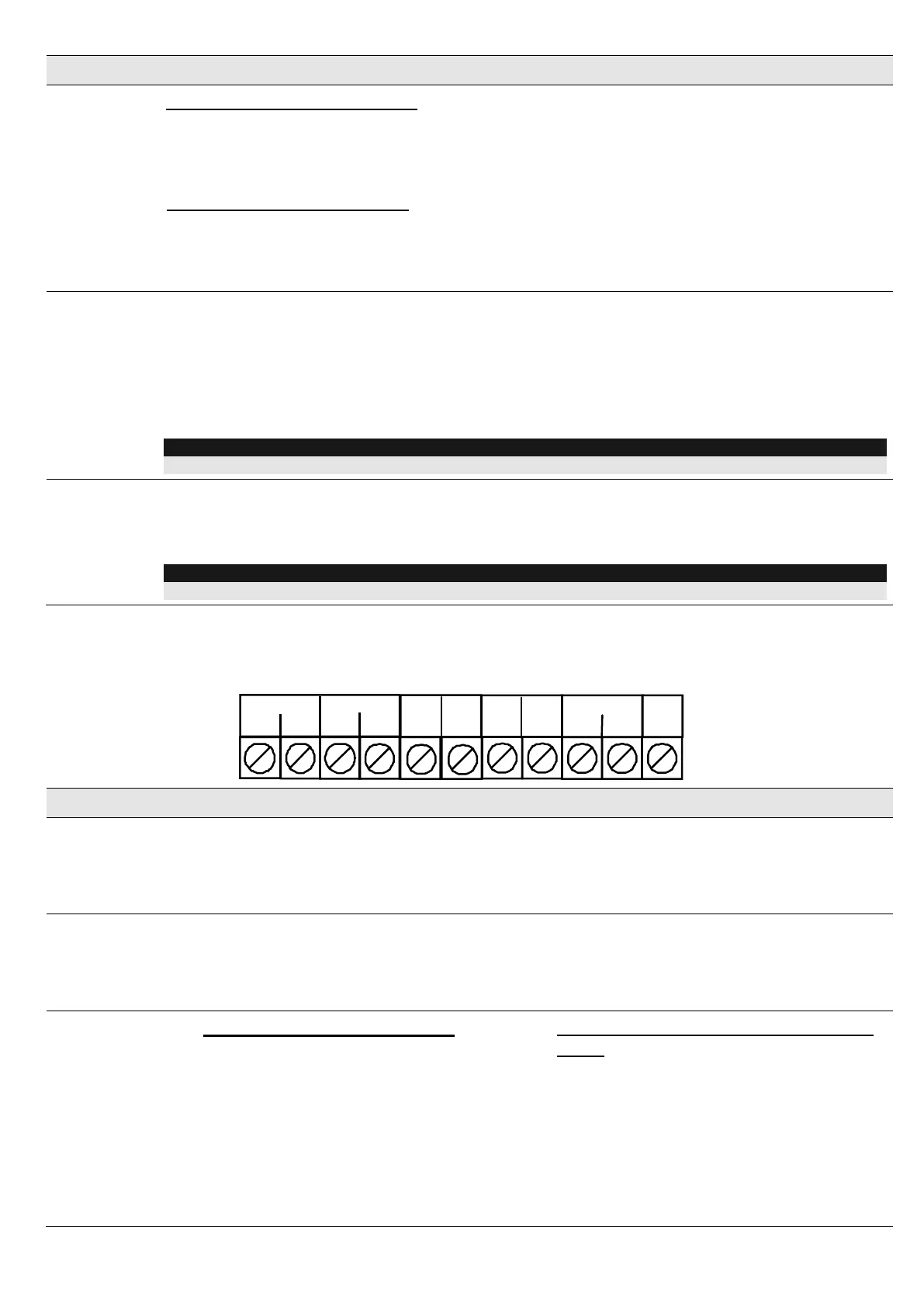
Terminal Block Wiring
The following explains the various wiring and connection procedures that must be performed when
wiring the sounder.
+
-
HOLD
TMPR
TRIG
ACT BUS
STB-
TMPF
FAULT
SET+
YEL
GRN
PRO BUS
LAMP
The supply to this terminal is normally taken from the Bell+ of the control panel
(depending on manufacturer) and provides the + hold off for the SAB/SCB function.
When connected to the ProSYS BUS configuration, connect this terminal to the Bell+
terminal.
The negative supply to this terminal should be permanent as it is the - hold off for the
SAB/SCB function.
When connected to the ProSYS BUS configuration, connect this terminal to the COM
BLK terminal.
Stand Alone Mode (SW5 OFF):
Sounder Trigger terminal. Trigger options
are, Unmonitored Negative Trigger,
Unmonitored Positive Trigger, Monitored
Negative Trigger and Monitored Positive
Trigger (see section - Sounder Trigger
Connection). If switch SW1 is set for SAB,
power for the sounder provided by the
12V & 0V terminals. If switch SW1 is set
for SCB, power for the sounder is
BUS (Serial) Mode (SW5 ON and SW6
OFF):
When used in Serial Mode this terminal
will be used as a data input from the GT
panel.




 To Next Page