85
How to Use Useful Functions >> Copy Function Operations
3
7
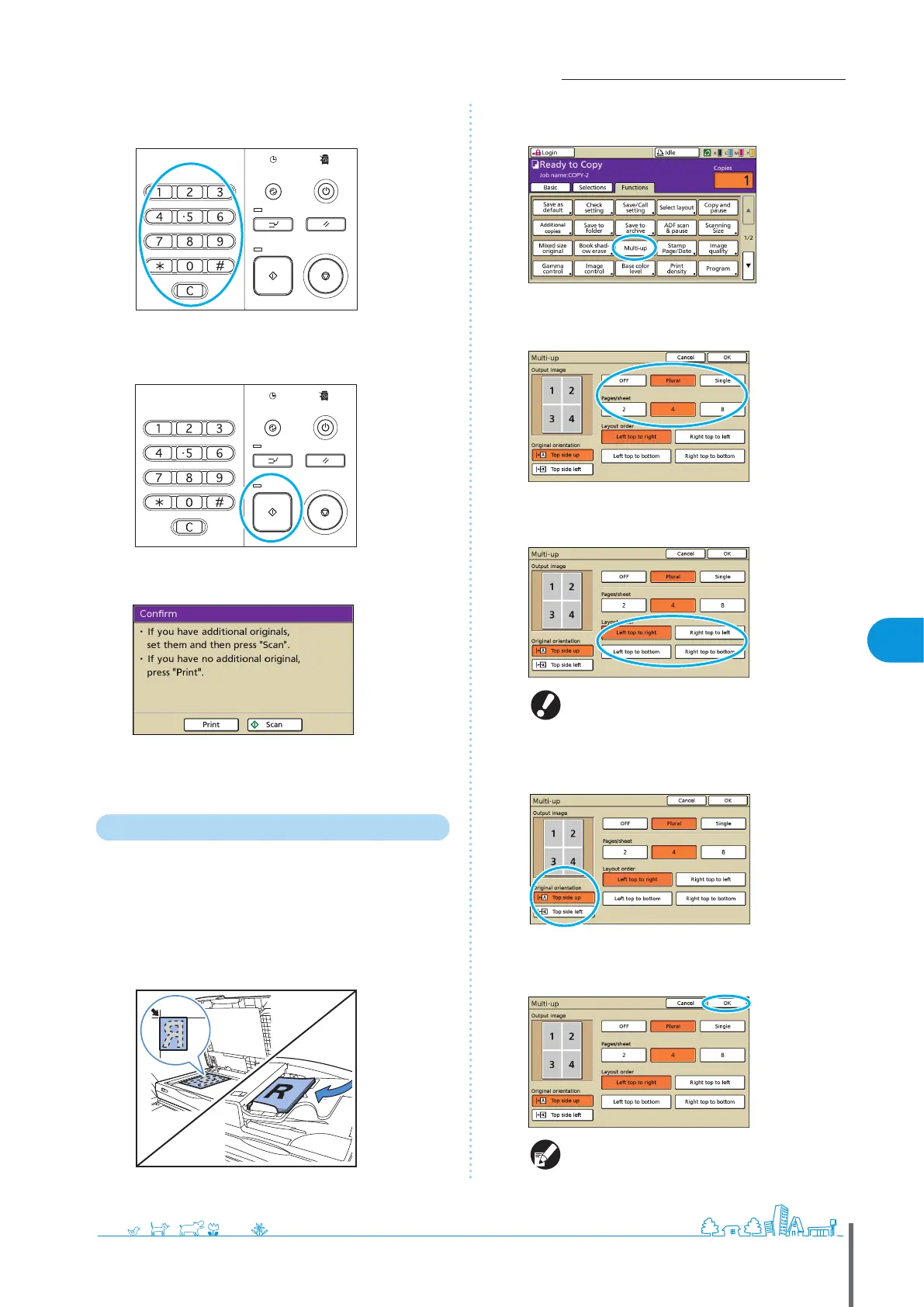
Enter the number of copies.
Use the numeric keys for input.
8
Press the [START] key.
When you are using the platen glass, a conrmation message
may be displayed regarding scanning the next original.
Load the next original and press [Scan]. After all originals are
scanned, press [Print].
Copying Multiple Originals Per Sheet
Multi-page originals or multiple images of the same
original can be copied onto a single sheet. You can save
even more paper by combining this feature with others,
such as duplex copying.
1
Load the original.
Load the original on the platen glass or in the ADF.
2
On the [Functions] screen, press [Multi-up].
3
Specify the type of layout and the [Pages/sheet]
setting.
4
Complete the [Layout order] setting.
The [Layout order] button is not displayed when
you have selected [Single] in step 3.
5
Complete the [Original orientation] setting.
6
Press [OK].
Complete other copy settings as needed.
ComColor Series Basic Guide 06



 To Next Page