87
How to Use Useful Functions >> Copy Function Operations
3
6
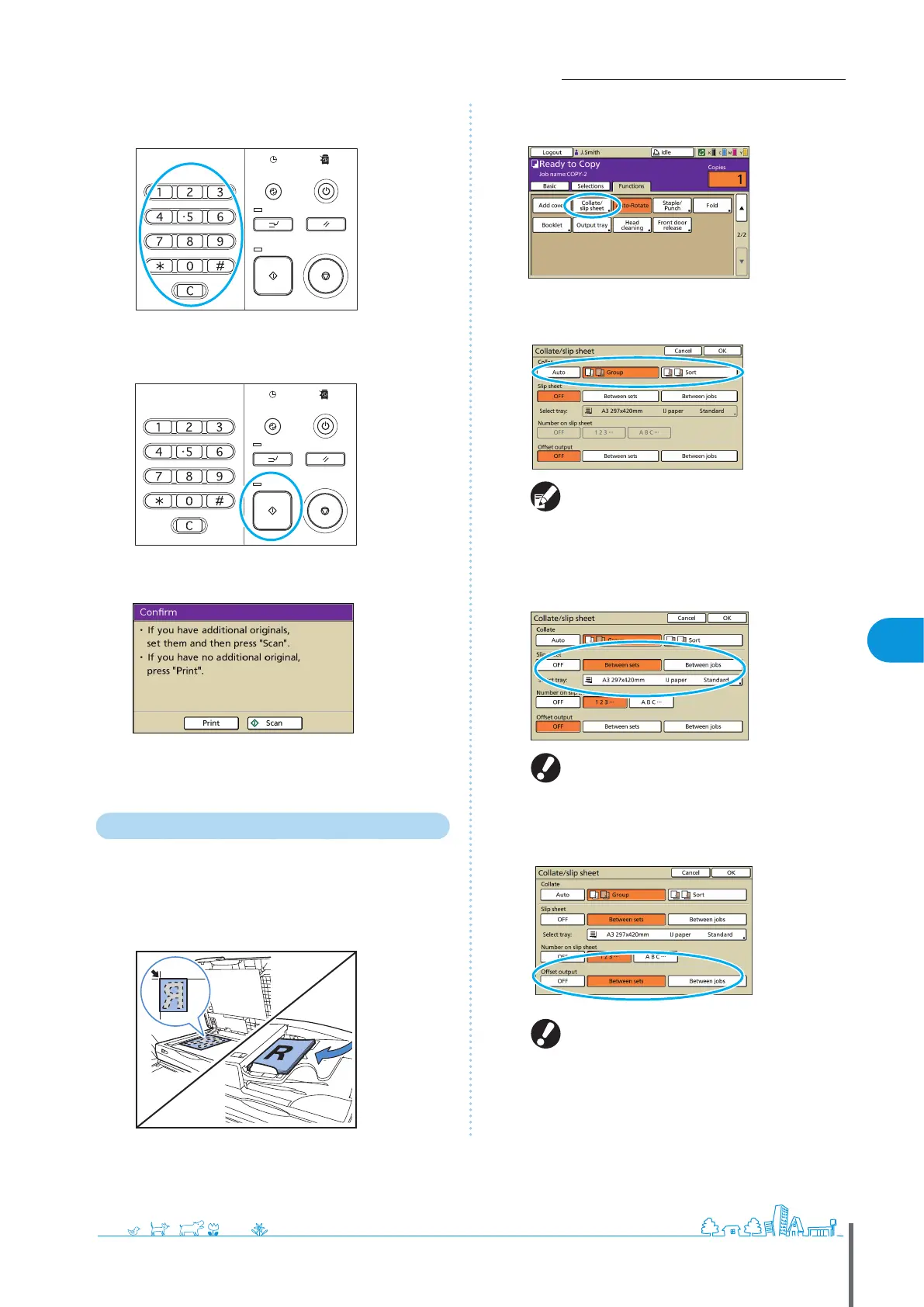
Enter the number of copies.
Use the numeric keys for input.
7
Press the [START] key.
When you are using the platen glass, a conrmation message
may be displayed regarding scanning the next original.
Load the next original and press [Scan]. After all originals are
scanned, press [Print].
Collated Copying
Collating can quickly sort your copies into sets. You can
also insert slip sheets between copies.
1
Load the original.
Load the original on the platen glass or in the ADF.
2
On the [Functions] screen, press [Collate/slip sheet].
3
Complete the [Collate] setting.
When you have specied [Auto], [Sort] is
automatically set when using the automatic
document feeder and [Group] is set when using the
platen glass.
4
Complete the [Slip sheet] setting.
To insert slip sheets, load the paper to use as slip
sheets in advance, into the tray selected in [Feed
tray].
5
Complete the [Oset output] setting if needed.
These buttons are not displayed unless you have
connected an optional multifunction nisher, face
down oset stapler, high capacity stacker.
ComColor Series Basic Guide 06









 To Next Page