63
Basic use >> Scanner Mode Screens
2
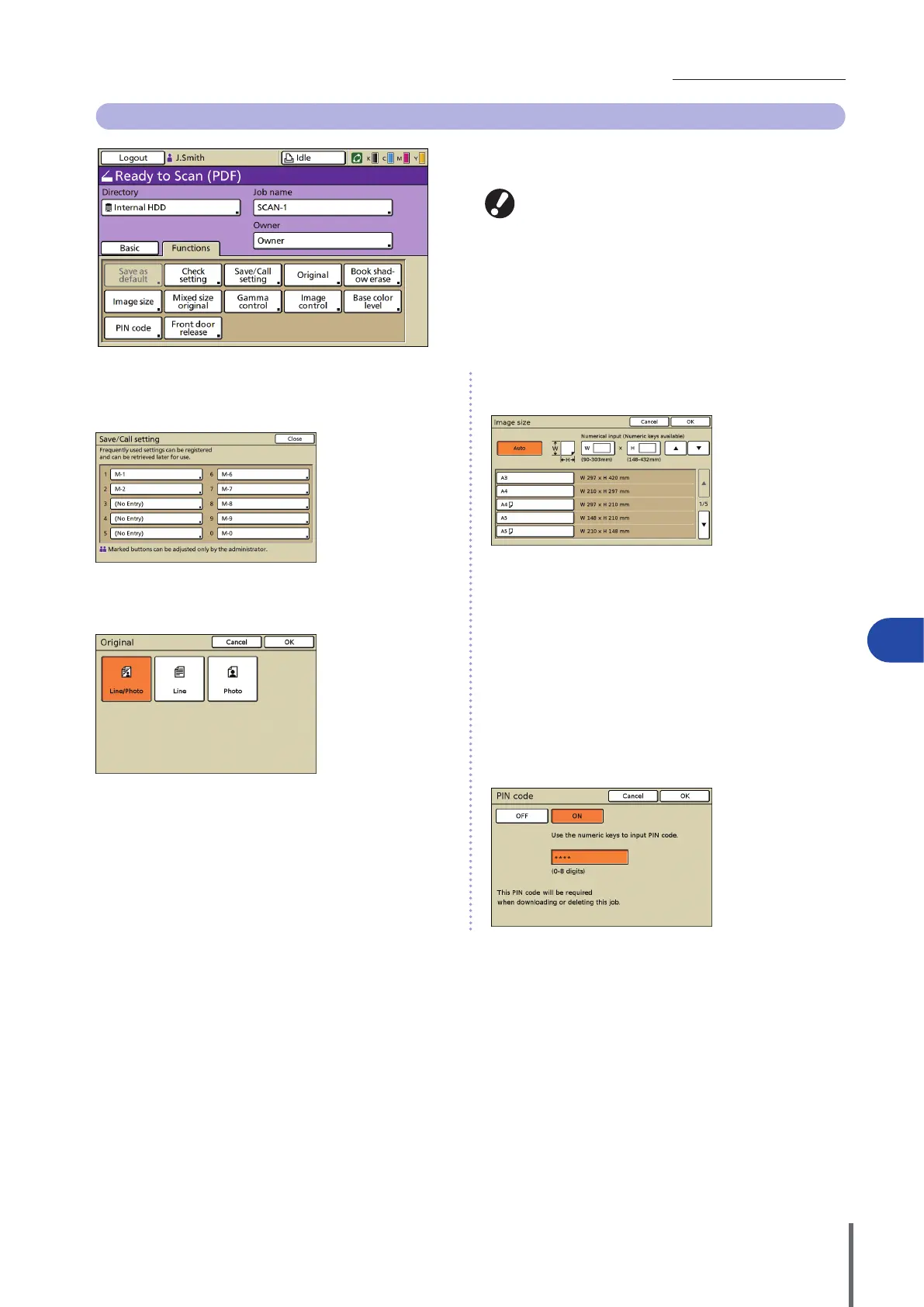
Functions Screen
Shows user-adjustable settings. Complete advanced scanning
functions on this screen.
The following functions are also used in other modes
besides scanner mode. They are described in ”Functions
Screen”(p.52) in “Copy Mode Screens”.
• Save as default
• Check setting
• Book shadow erase
• Mixed size original
• Gamma control
• Image control
• Base color level
• Front door release
[Save/Call setting]
Register and call the settings you frequently use. For details,
see “Saving Frequently Used Settings”(p.89).
[Original]
Specify settings matching the type of original.
[Line/Photo]
Settings optimized for originals with both text and photos or
graphics.
[Line]
Settings optimized for originals with text only.
[Photo]
Settings optimized for originals with photos or graphics only.
[Image size]
Specify the scanning size of an original.
[Auto]
The scanning size is automatically calculated and set from the
original size and reproduction size.
[Numerical input]
Use [] and [] or the numeric keys to enter the desired value.
Image size list
Select sizes from the list displayed.
[PIN code]
Specify a password when saving a scan job to the machine’s
internal hard disk.
For details, see”Assigning PIN Codes to Scanning Jobs”(p.91).
ComColor Series Basic Guide 06









 To Next Page