EasyManua.ls Logo

RKI Instruments 72-2102-07 - User Manual

RKI Instruments 72-2102-07
57 pages
Print Icon
To Next Page IconTo Next Page
Loading...
www.rkiinstruments.com
72-2102-07
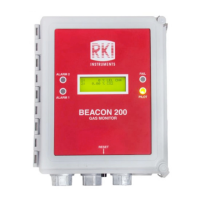
Beacon 200
Operator’s Manual
Part Number: 71-0364
Revision: A
Released: 12/11/17

Questions and Answers

  • T
    tyler94Aug 10, 2025
    How to troubleshoot no power issue on RKI Instruments Monitor?
    • K
      kendraleachAug 11, 2025
      If your RKI Instruments Monitor has no power, here are a few things to check: * First, verify that the wiring to the power source is correct and secure. * Check the continuity of the AC or DC fuse, as one or both AC fuses or the DC fuse may be blown. * Also, verify that the display cable is properly connected.
  • S
    Steven BrownAug 17, 2025
    What to do if RKI Instruments 72-2102-07 has frequent alarms?
    • C
      coxkristinAug 17, 2025
      If your RKI Instruments Monitor is experiencing frequent or suspect alarms: * Verify that the detector head wiring is properly shielded, as the device might be experiencing false readings due to RFI or EMI. * Ensure that the detector head wiring is correctly connected and secure, as a disconnection, misconnection, or intermittent connection could be the cause.
  • D
    douglas05Aug 22, 2025
    Why is the display flickering on my RKI Instruments Monitor?
    • S
      Sally AcevedoAug 22, 2025
      A flickering display on your RKI Instruments Monitor could be due to several reasons: * The Beacon 200 might be experiencing false readings due to RFI or EMI. Verify that the detector head wiring is properly shielded. * The noise filter setting may be too low. Increase the noise filter setting in the Channel Control & Setup Program. * The zero suppression setting may be too low. Increase the zero suppression setting in the Channel Control & Setup Program.
  • J
    jacksonrebeccaAug 29, 2025
    What to do if the buzzer is not working on RKI Instruments Monitor?
    • M
      Madison BryantAug 29, 2025
      If the buzzer on your RKI Instruments Monitor isn't working, verify that the wiring to the BUZ- and BUZ+ terminals of the controller terminal strip is correct and secure. If the issue persists, further assistance is needed.
  • B
    Brian ChavezSep 3, 2025
    How to fix a reset switch that is not working on RKI Instruments 72-2102-07?
    • A
      Alejandro ThomasSep 3, 2025
      If the reset switch on your RKI Instruments Monitor is not working, verify that the wiring to the RESET (2) terminals of the controller terminal strip is correct and secure. If the issue persists, further assistance is needed.

RKI Instruments 72-2102-07 Specifications

General IconGeneral
BrandRKI Instruments
Model72-2102-07
CategoryMonitor
LanguageEnglish

Related product manuals