18
Scan sensitivity setting - FM
Your radio will normally scan for FM broadcasts which are strong enough
to give good reception. However, you may wish the Auto-scan function
to also be able to fi nd weaker signals, possibly from more distant radio
transmitters. Your radio includes a local / distant option for the Auto-scan
function.
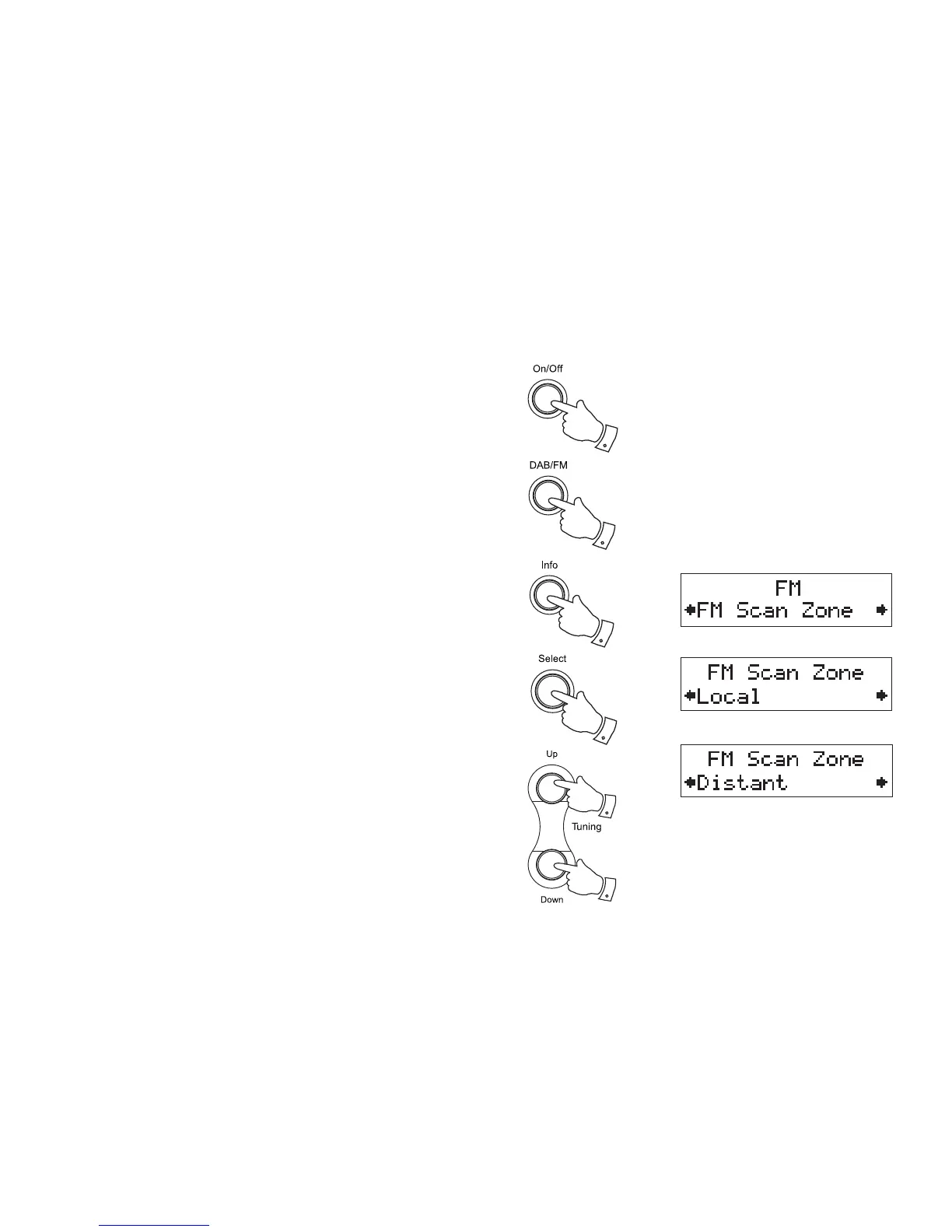
1. Press the On/Off button to switch on your radio.
2. If needed, press the DAB/FM button to select the FM band.
3. Press and hold the Info button until the display shows "FM Scan
Zone" then press the Select button to enter the scan zone selection
menu.
4. Press the Tuning Up or Down buttons to switch between Local and
Distant options on the lower line of the display. The Distant option will
allow the radio to fi nd weaker signals when scanning.
5. Press and release the Select button to confi rm your selection. The
current setting will be marked with an asterisk. The radio will then
revert to the normal information display. The Local or Distant setting
is stored in the radio and remains in force until changed or until a
System Reset.
Note: The initial setting (out of the box, or after a System Reset) causes
the radio to ignore weaker (or more distant) signals.
1
2
3
4
4
3,5


 To Next Page