EasyManua.ls Logo

Roberts R9921 - User Manual

Roberts R9921
28 pages
Print Icon
To Next Page IconTo Next Page
Loading...
ROBERTS
Sound for Generations
Please read this manual before use
R9921
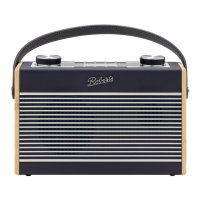
Multi-band RDS digital preset world radio
M
BANDS
Display
Time Set
StandBy
Power
FM ST./Mono
ATS
Meter
- FM/MW
-SW
Hour
Min
R 9921
Preset
+
+
FM/MW/SW
Memo
Tuning
AUTO TUNING SYSTEMAUTO TUNING SYSTEM
Question and Answer IconNeed help?

Do you have a question about the Roberts R9921 and is the answer not in the manual?

Summary

Radio Features and Controls

Product Features

Summary of key radio functions.

Control Locations

Identification of all radio buttons and switches.

Display Indicators

Explanation of screen symbols and information.

Initial Setup and Power

Installing Batteries

Guide to inserting the power source.

Battery Replacement

Procedure for changing batteries.

Clock Setting Methods

Automatic and manual clock adjustment procedures.

Using AC Adaptor and Headphones

Connecting external power and audio devices.

Radio Tuning and Station Management

Setting Alarms

Instructions for buzzer and radio alarms.

Station Tuning Techniques

Methods for searching and manual tuning.

Preset Station Management

Saving, recalling, and scanning favorite stations.

ATS and RDS Operation

Utilizing automatic tuning and RDS data.

Advanced Features and Settings

Display Modes and FM Settings

Customizing display and FM reception modes.

Sleep Timer and Backlight

Setting auto-off timers and activating screen illumination.

Lock Button Function

Securing controls to prevent accidental operation.

Troubleshooting, Specifications, and Guarantee

Troubleshooting and Reset

Steps for fixing problems and resetting the device.

Specifications

Technical data of the radio.

Guarantee Information

Details on product warranty and claims.

Summary

Radio Features and Controls

Product Features

Summary of key radio functions.

Control Locations

Identification of all radio buttons and switches.

Display Indicators

Explanation of screen symbols and information.

Initial Setup and Power

Installing Batteries

Guide to inserting the power source.

Battery Replacement

Procedure for changing batteries.

Clock Setting Methods

Automatic and manual clock adjustment procedures.

Using AC Adaptor and Headphones

Connecting external power and audio devices.

Radio Tuning and Station Management

Setting Alarms

Instructions for buzzer and radio alarms.

Station Tuning Techniques

Methods for searching and manual tuning.

Preset Station Management

Saving, recalling, and scanning favorite stations.

ATS and RDS Operation

Utilizing automatic tuning and RDS data.

Advanced Features and Settings

Display Modes and FM Settings

Customizing display and FM reception modes.

Sleep Timer and Backlight

Setting auto-off timers and activating screen illumination.

Lock Button Function

Securing controls to prevent accidental operation.

Troubleshooting, Specifications, and Guarantee

Troubleshooting and Reset

Steps for fixing problems and resetting the device.

Specifications

Technical data of the radio.

Guarantee Information

Details on product warranty and claims.

Roberts R9921 Specifications

General IconGeneral
BrandRoberts
ModelR9921
CategoryPortable Radio
WavebandsFM
Power SourceBattery
FeaturesHeadphone socket

Related product manuals