4
Battery operation
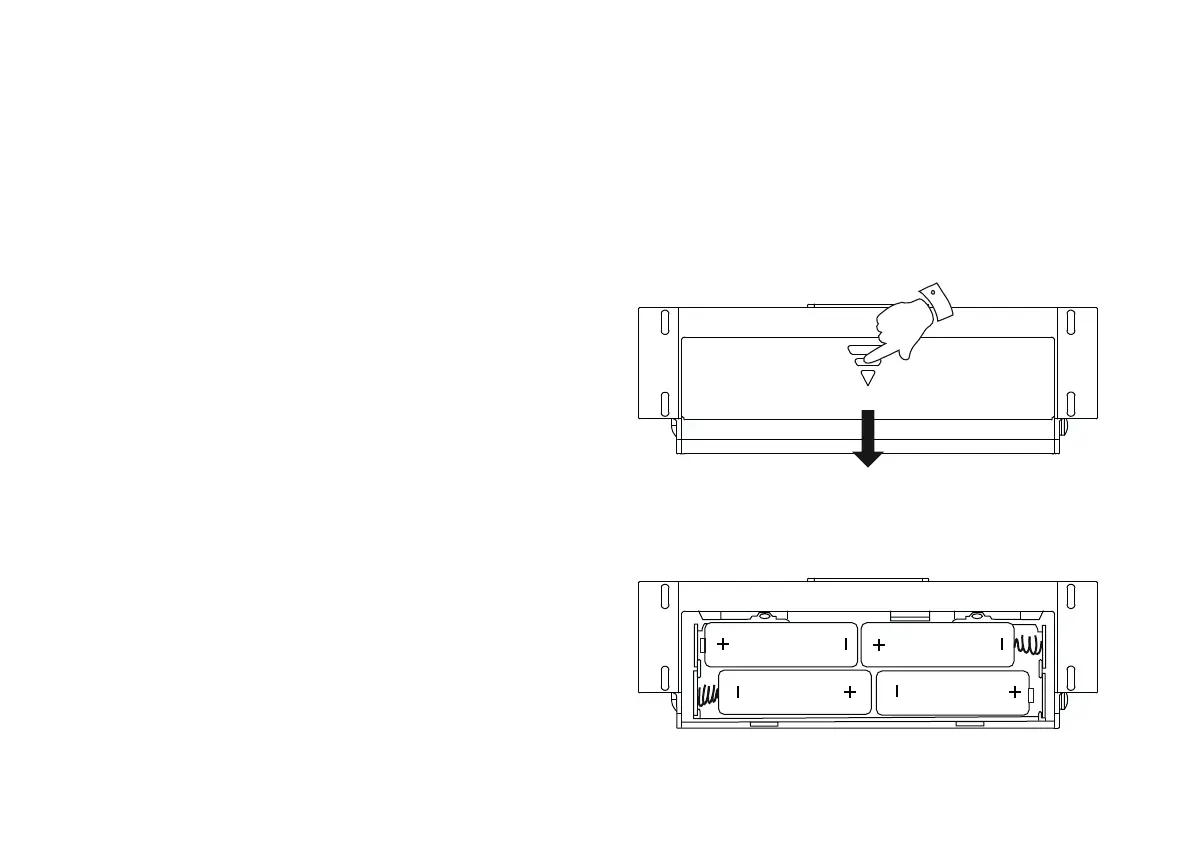
1. Remove the battery cover on the underside of the unit by sliding the
cover in the direction of the arrow shown.
2. Insert four LR6 (AA size) batteries into the spaces in the compartment.
Take care to ensure all batteries are inserted with the correct polarity
as shown inside the battery compartment. Replace the battery cover.
3. Reduced power, distortion and a ‘stuttering’ sound are all signs that
the batteries may need replacing.
4. If the radio is not to be used for any extended period of time it is
recommended that the batteries are removed from the radio.
We would recommend for economy that the radio is used via the AC
adaptor whenever possible with battery operation for occasional use
only.
IMPORTANT: The batteries should not be exposed to excessive heat
VXFKDVVXQVKLQH¿UHRUWKHOLNH$IWHUXVHGLVSRVDEOHEDWWHULHVVKRXOG
if possible be taken to a suitable recycling centre. On no account
should batteries be disposed of by incineration.
Using the buttons
Most operations on the radio are performed by a simple short press of a button.
A few operations require a longer press of a button. In this case the instructions will tell you to apply a long press, and the button should be held
down for 2 or 3 seconds, until the radio has responded. Examples are applying a long press to the Menu / Mode button to change the operating
mode of the radio, or applying a long press to one of the Preset buttons to store a radio station.













 To Next Page