68
Clock and Alarms
Setting the alarm clock
Your radio has two separate alarms which can be set to wake you to either
the radio or a buzzer alarm. In the event of a power interruption your radio
has a built in memory that will retain your alarm settings. Ensure that the
time is set correctly before setting the alarms. Alarms cannot be used when
running on batteries as the clock is reset from internet or DAB broadcast
and does not run in battery mode.
Alarms may only be set while the radio is switched on.
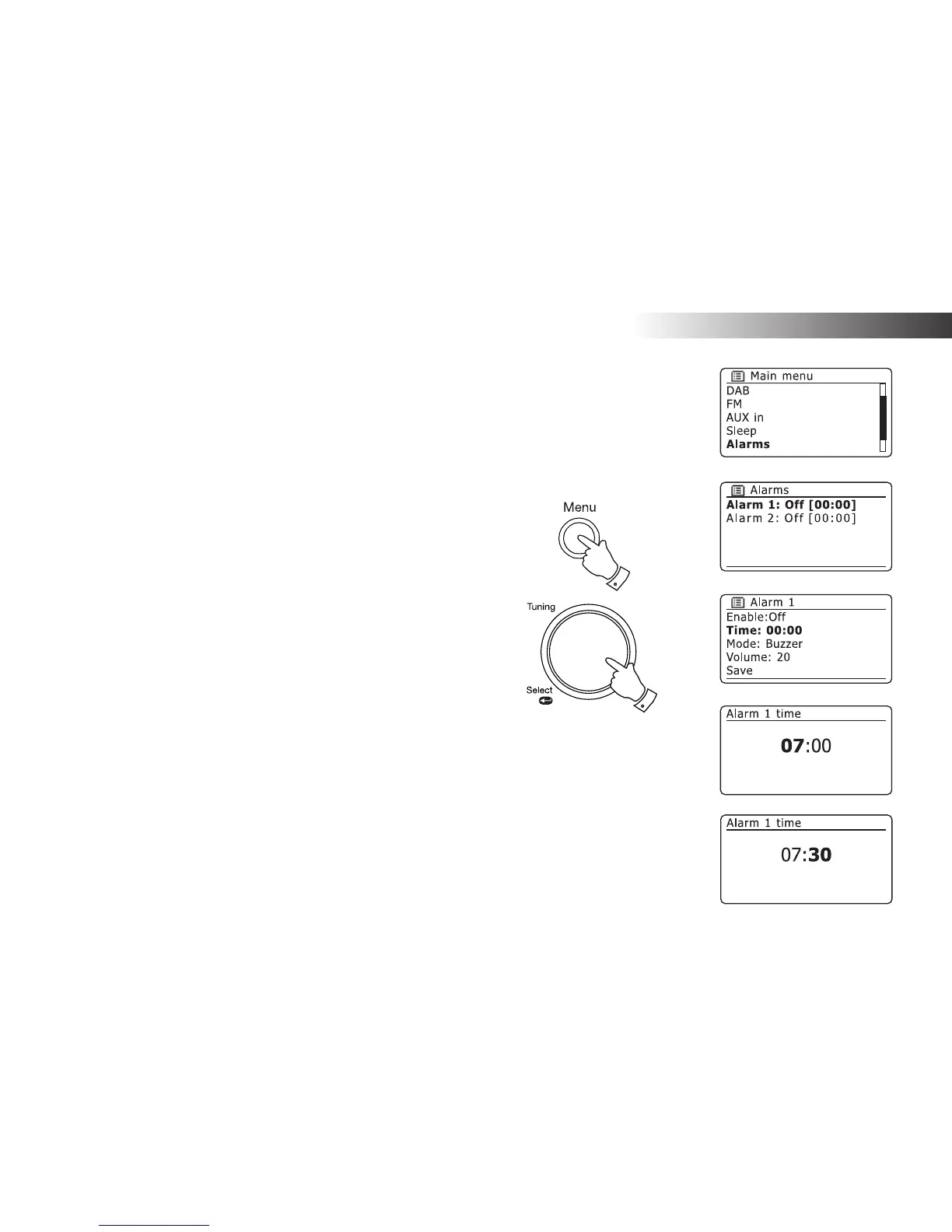
1. To change the alarm settings press the Menu button to access the
menu for the current mode
2. Rotate the Tuning/Select control until 'Main menu' is highlighted on
the display.
3. Press the Tuning/Select control to enter the 'Main menu'.
4. Rotate the Tuning/Select control until 'Alarms' is selected on the
display. Press the control to see the current alarm settings. If no
change is required, press the Menu or Back buttons to exit.
5. Rotate the Tuning/Select control until the desired alarm (1 or 2) is
highlighted on the display. Press the control to enter alarm setup.
6. Rotate the Tuning/Select control until 'Time' is highlighted on the
display. Press the control to adjust the alarm time.
7. Rotate the Tuning/Select control to choose the alarm hour. Press the
control to confi rm the setting.
8. Rotate the Tuning/Select control to choose the alarm minute. Press
the control to confi rm the setting. The display will then return to the
alarm setting menu.
If the radio has been set to use a 12 hour clock format, there will also
be an option here for setting AM or PM for the alarm time.
2-8
1



 To Next Page