Page 6 of 8
Rev 02 01/11/13
While in the reset position, press “B” to select the countdown mode. The mode will be indicated in the left
side of the upper row of the display: “CdS” for STOP, “Cdr” for REPEAT, or “CdC” for COUNT UP.
After selecting the mode, press and hold “D” for 2-3 seconds. The “SET” indicator appears and the hour
digits begin to flash. Advance the hours by pressing or holding “B”. After setting hours, press “C” tens of
minutes begin flashing. Press or hold “B” to advance tens of minutes.
Repeat this procedure for setting minutes and seconds. Upon completion of setting the preset time, press
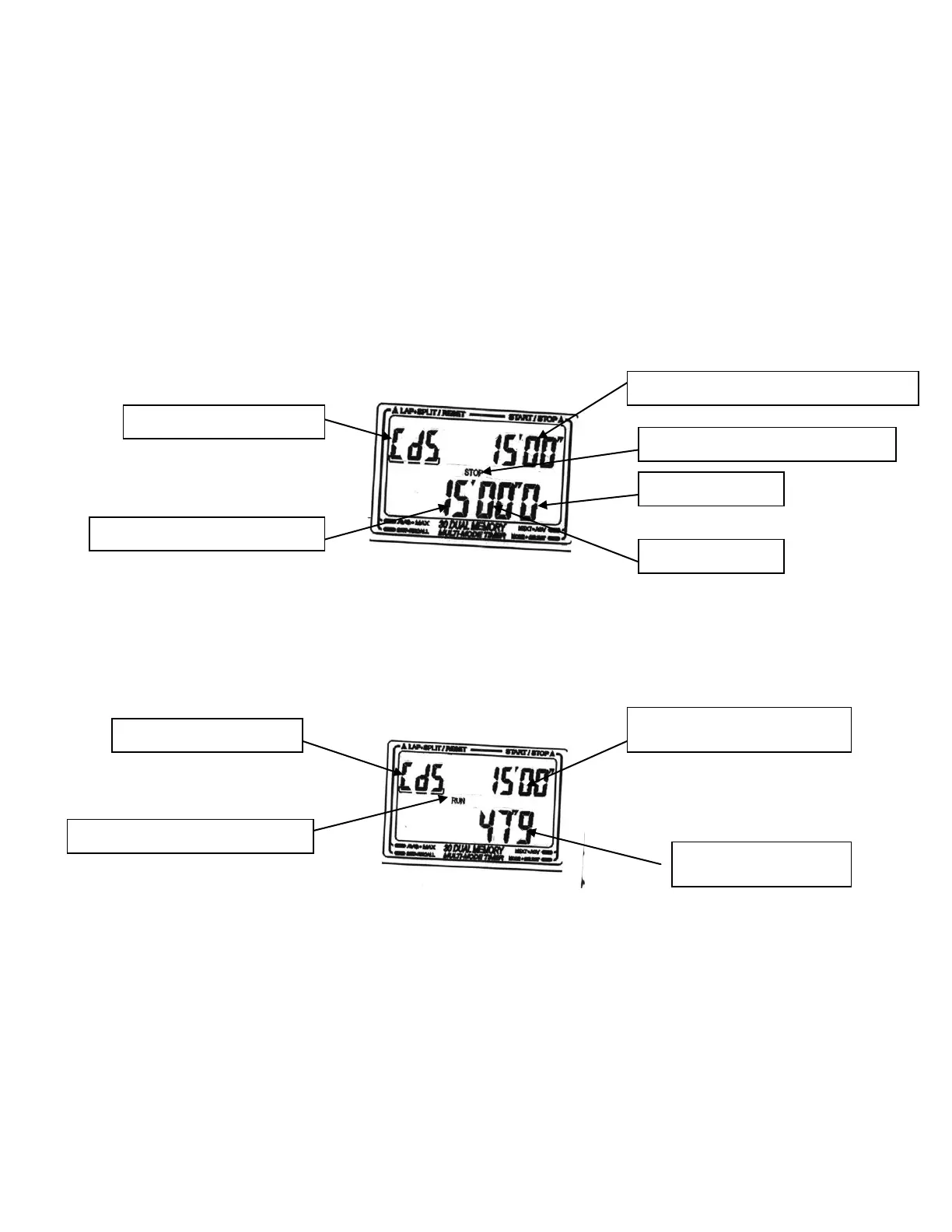
“D” to exit the setting procedure. The preset time will appear in both the upper and lower rows of the
display as shown below.
Please note the SC-606W will automatically exit the setting procedure if no pushbuttons are pressed within
two (2) minutes of entering the “SET” mode.
OPERATING THE COUNTDOWN TIMER
After the mode is selected and the preset time value has been entered:
Press “A” to start the Countdown Timer. “RUN” indicator appears.
“Time Out”. You may stop and restart the CDT by pressing “A”. While stopped, the “STOP” indicator
will appear. You may restart the timer by pressing “A” or reset to the original preset time by pressing “B”.
Upon completion of the Countdown time, a beep tone will sound to indicate the end of the time. The beep
tone will sound for 20 seconds if the preset time value is greater that one (1) minute. If the preset time is
less than one (1) minute, then four (4) beeps will signal the completion of the time.
NOTES:
(1) You may mode into other timer functions at any time by pressing “C”.
Pre-Set time of 15 minutes 00 seconds
“STOP” Indicator. Timer is stopped
Tens and Units of Minutes digits
“RUN” Indicator. Timer is active
Pre-Set Time of 15 minutes 00
seconds
Time remaining is 47.9
seconds


 To Next Page