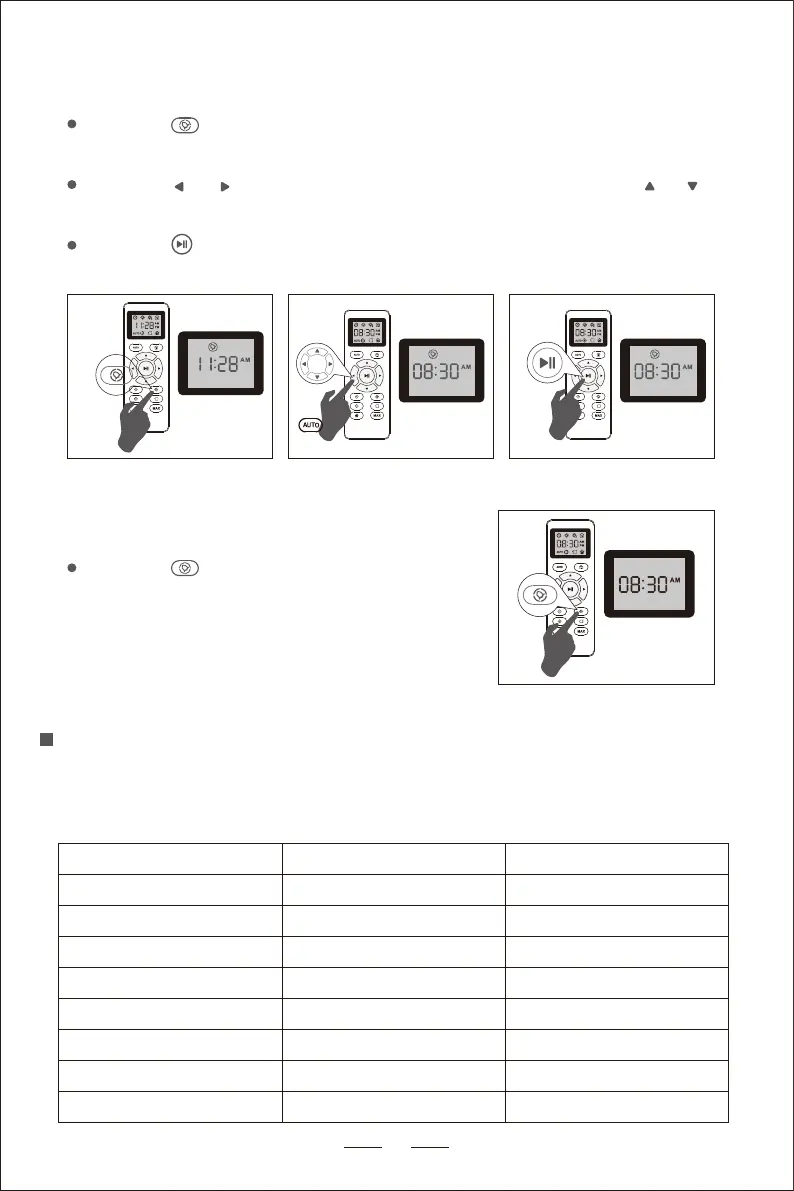
Scheduled Cleaning Setting
Press the on the remote control, and then start showing one hour in the
display to set the cleaning schedule.
Press the or to select the minute or hour setting. Press the or to
set the desired time.
Press the again, when the cleaning plan setting is completed, the
machine will emit a beep.
15
Cleaning and Maintenance
In order to ensure the service life and the best cleaning performance of the
robot vacuum, please refer to the following instructions to clean and maintain
the robot vacuum parts.
Robot Part
Dust Collector
Care Frequency Replacement Frequency
After each use
-
Filter Once per week Every 2 months
Roller Brush Once per week Every 6-12 months
Side Brushes Once per month Every 3-6 months
Once per month Every 3-6 months
Once per month
-
Once per month
Once per month
-
-
Roller Brush Protector
Electrode Contact Pins
Universal Wheel
Sensor
Cancel Scheduled Cleaning
Press the on the remote control for about 4
seconds. When the scheduled cleaning plan
is canceled, the machine will make a beep.


 To Next Page