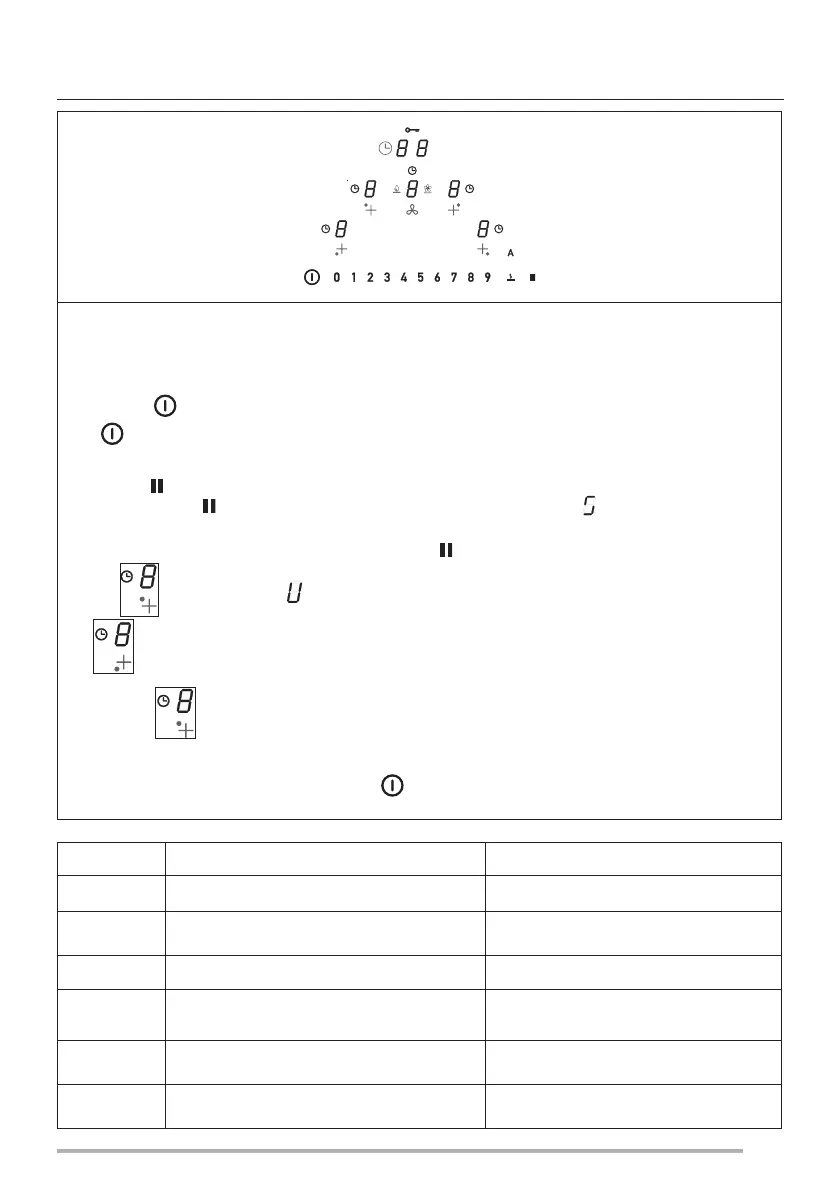
The User menu enables the user to customise at will both the audio (tone and volume) and visual signals
sent by the hob.
Press the key .
Press
again within 3 seconds.
- The symbol will appear.
- Keeping the button pressed, press the 4 Digit buttons of the cooking areas ( ) one at a time in a clockwise
direction starting from the left.
Each press is signalled by a beep and releasing the button we will see:
The Digit alternately displays and a number from 2 to 7 indicating the Menu Code (see table below).
Digit shows a number that depends on the values indicated in the selection (see table below).
Press the Digit and a number from 2 to 7 on the power bar to enter the settings menu. See table below.
Once the correct value has been set, confirm by holding the button down until confirmed. Once the correct value
has been entered, confirm by pressing and holding until confirmation is received.
Menu Code Description Value
U2
Menu to manage the button sounds volume. 0 - 1 - 2 - 3
U3
Menu to manage the alarm signal sounds volume. 0 - 1 - 2 - 3
U4
Menu to manage the display lighting level. Max. 0 - 1 - 2 - 3 - 4 - 5 - 6 - 7 - 8 - 9 Min.
U5
Menu to manage the countdown animation. 0 - 1
U6
Pan recognition function always active menu. 0 - 1
U7
Menu to manage the end of countdown buzzer. 0 - 1 - 2
USER MENU (CUSTOMISATIONS)
43


 To Next Page