When first connecting to the domestic power supply, the installer must set the power of the hob cooking
areas based on the actual abilities and capacity of the power supply itself.
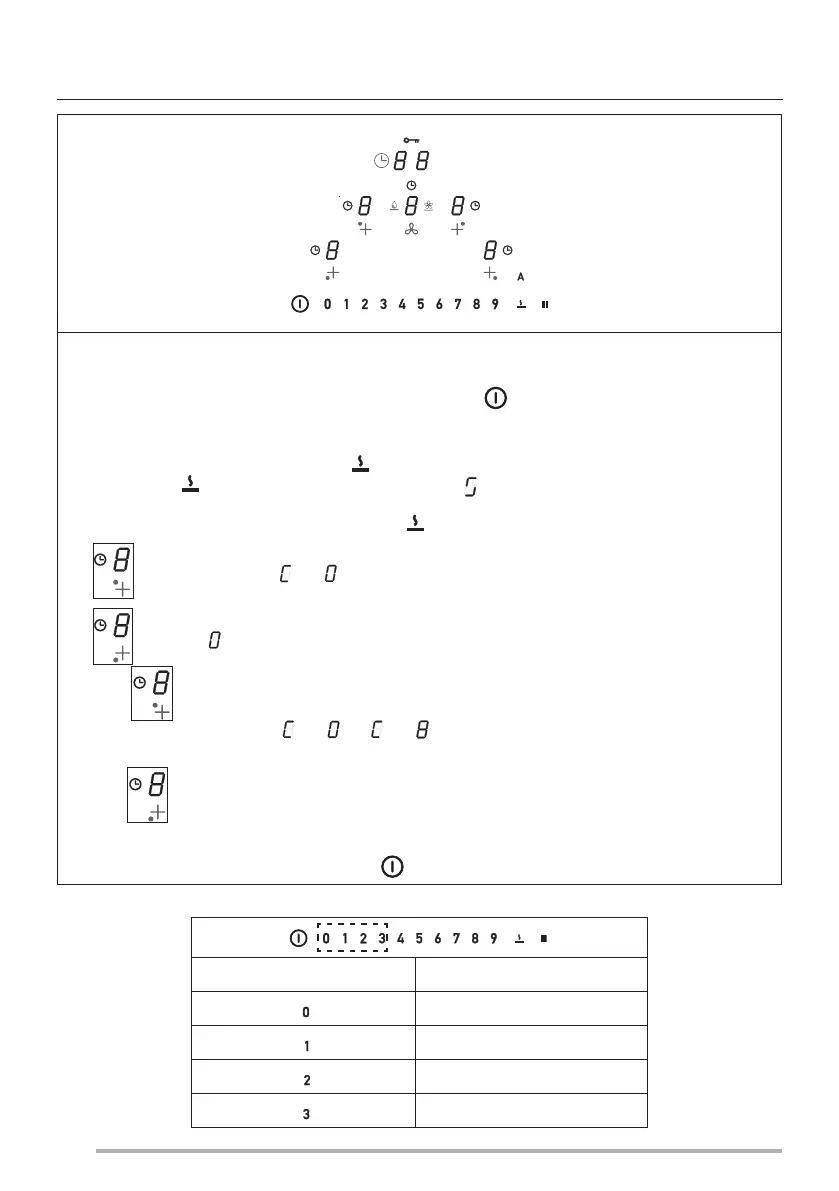
If this is not necessary, the hob can be turned on directly using , otherwise, follow the operations below
to access the menu.
When the power is first turned on, the symbol flashes.
Continuing to hold , press the 4 Digits for the cooking areas ( ) one at a time in an anticlockwise direction,
starting from the one on the right.
A beep sounds each time you press, and when button is released it shows:
Digit will alternately display and .
Digit will display .
Press Digit and number 8 on the power bar to access the settings menu. The operation is confirmed by the
fact that the display changes from ( and ) to ( and ).
We are now in the hob power settings menu.
Press Digit and select one of the values displayed in the power bar (0-1-2-3) following the table provided below.
Once the correct value has been set, confirm by holding the button down until confirmed. Once the correct value
has been entered, confirm by pressing and holding until confirmation is received.
INSTALLER MENU (HOB POWER SETTING)
Kw
7.4 Kw
4.5 Kw
3.5 Kw
2.8 Kw
44


 To Next Page