Roboguard 41
Note:
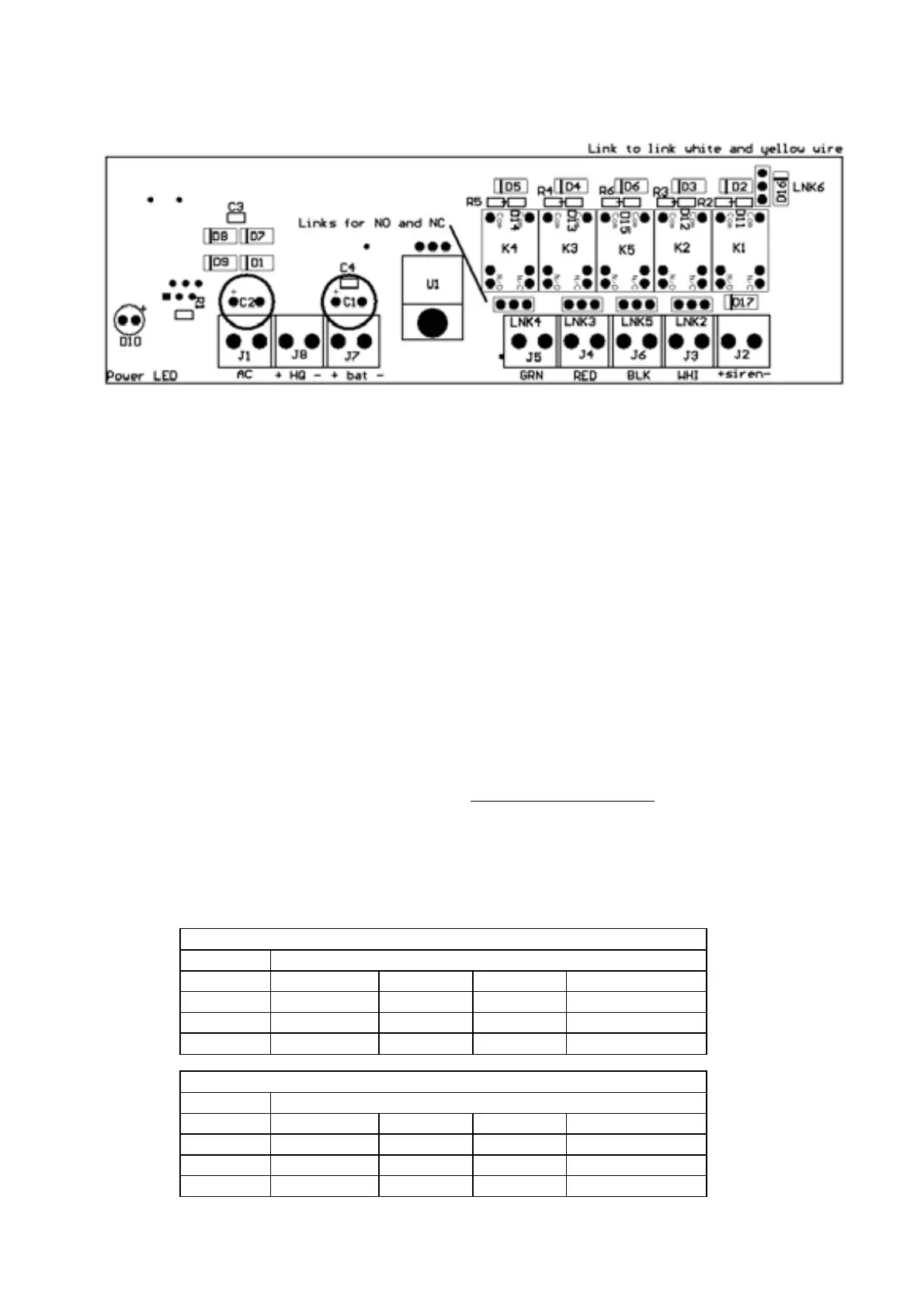
Set the HQ to have NO outputs.
The LED’s on the power supply board should be OFF in the
non triggered state. The Output of the power supply board
has jumpers to make the outputs NO or NC. (This method
greatly reduces the current consumption).
To enter the programming mode on the HQ:
5. Disconnect 12Volt power and the battery after opening the HQ.
6. Hold down both the Tamper and Status buttons and connect the
12Volt power supply until you hear a beep. Release the buttons.
Both red lights will flash and the default Setting 3, ON.
7. Select a Setting 1,2,3,4 from the two tables.
8. Press and release the Tamper button to accept. HQ will beep 10
times and all the lights will flash. Reconnect the battery and replace
the cover.
OUTPUT FORMAT 1
Setting 1= N/O Setting 3 = N/C (Default)
White Zone 1
Black Zone 2
Red Zone 3
Green Zone 4
OUTPUT FORMAT 2
Setting 2= N/O Setting 4 = N/C
White Zone1234
Black Tamper
Red Status
Green Panic/Silent


 To Next Page